Data Domain - 5342: ASSOC failed: Encrypted replication incompatible between source and destination
Summary: KB to show the symptoms and errors associated with File Replication Encryption mismatch and how to resolve on CLI and GUI
Ez a cikk a következő(k)re vonatkozik:
Ez a cikk nem vonatkozik a következő(k)re:
Ez a cikk nem kapcsolódik egyetlen konkrét termékhez sem.
Ez a cikk nem azonosítja az összes termékverziót.
Symptoms
Scenario
- SR opened due to Netbackup Auto Image Replication (NBU AIR) replication failing bidirectionally
- New configuration
- NBU bpdm logs showing lost of nfs errors;
- Err: 5004-nfs lookup failed (nfs: No such file or directory)
- Err: 5009-nfs remote file op failed (nfs: I/O error)
- Err: 5008-nfs imageset op failed (nfs: Invalid argument)
Cause
The replication was failing bidirectionally because of DDBoost file replication encryption incompatibility.
Basically there is a mismatch between the DD systems.
ddfs.info
12/20 16:31:55.554 (tid 0x7f4496732760): filecopy: ASSOC failed: Encrypted replication incompatible between source and destination
To verify using Autosupports;
On one DD, we see enabled
------------
DDBOOST File-Replication Option Show
------------------------------------
Option Value
------------ --------
Low-bw-optim disabled
Encryption enabled
Ipversion ipv4
------------ --------
----------------------------------------------------------------------------------------------------------------------------------------
On other DD we see disabled
-----------------
DDBOOST File-Replication Option Show
------------------------------------
Option Value
------------ --------
Low-bw-optim enabled
Encryption disabled
Ipversion ipv4
------------ --------
Basically there is a mismatch between the DD systems.
- One DD has file replication encryption enabled.
- The other DD has file replication encryption disabled
- On Support Bundle if you check messages.engineering and ddfs.info on the Source DD (or both is bidirectional) and you will see lots of the following error;
messages.engineering
Jan 2 15:35:08 xxxxxx ddfs[1879]: ERROR: MSG-NFS-00005: Failed to do a filecopy, err = [5342: ASSOC failed: Encrypted replication incompatible between source and destination (5342), ddr/repl/lrepl_originator.c, filecopy_do_associate, 1586]
Jan 2 15:35:08 xxxxxx ddfs[1879]: ERROR: MSG-NFS-00005: Failed to do a filecopy, err = [5342: ASSOC failed: Encrypted replication incompatible between source and destination (5342), ddr/repl/lrepl_originator.c, filecopy_do_associate, 1586]
ddfs.info
12/20 16:31:55.554 (tid 0x7f4496732760): filecopy: ASSOC failed: Encrypted replication incompatible between source and destination
12/20 16:31:55.554 (tid 0x7f4496732760): filecopy: ASSOCIATE failed ASSOC failed: Encrypted replication incompatible between source and destination (5342)
To verify using Autosupports;
- Go to both DD Autosupports
- Search for "DDBOOST File-Replication Option Show"
- The below is what you will see;
On one DD, we see enabled
------------
DDBOOST File-Replication Option Show
------------------------------------
Option Value
------------ --------
Low-bw-optim disabled
Encryption enabled
Ipversion ipv4
------------ --------
----------------------------------------------------------------------------------------------------------------------------------------
On other DD we see disabled
-----------------
DDBOOST File-Replication Option Show
------------------------------------
Option Value
------------ --------
Low-bw-optim enabled
Encryption disabled
Ipversion ipv4
------------ --------
Resolution
Both DD systems must have the same option. Either both have file replication encryption enabled or disabled
Command Line Example
If you wanted to enable encryption on one DD to match the other, you can run following command;
# ddboost file-replication option set encryption enabled
# ddboost file-replication option show
DD System Manager GUI Example
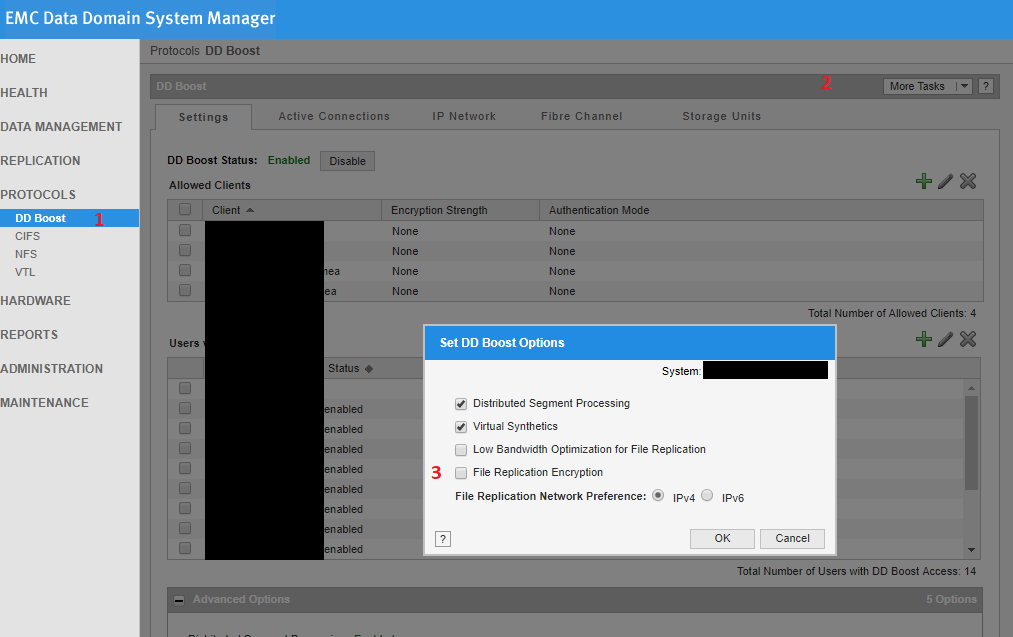
1. Click DD Boost
2. Click More Tasks (top right) and click "Set Options"
3. Click radio button on/off to enable/disable "File Replication Encryption"
4. Click OK
- Ask customer if they want both sides with file replication encryption enabled or disabled
- Then they can change the file replication encryption option as desired
Command Line Example
If you wanted to enable encryption on one DD to match the other, you can run following command;
# ddboost file-replication option set encryption enabled
# ddboost file-replication option show
DD System Manager GUI Example
1. Click DD Boost
2. Click More Tasks (top right) and click "Set Options"
3. Click radio button on/off to enable/disable "File Replication Encryption"
4. Click OK
Érintett termékek
Data DomainTermékek
Data Domain, Data Domain Boost, Data Domain EncryptionTermék tulajdonságai
Article Number: 000050345
Article Type: Solution
Utoljára módosítva: 08 szept. 2025
Version: 3
Választ kaphat kérdéseire más Dell-felhasználóktól
Támogatási szolgáltatások
Ellenőrizze, hogy a készüléke rendelkezik-e támogatási szolgáltatással.