Some or All Services Fail to Automatically Start on Boot (Linux or Windows)
Summary: During a boot/reboot of any SRM server some or all services do not start.
Ez a cikk a következő(k)re vonatkozik:
Ez a cikk nem vonatkozik a következő(k)re:
Ez a cikk nem kapcsolódik egyetlen konkrét termékhez sem.
Ez a cikk nem azonosítja az összes termékverziót.
Symptoms
During a boot|reboot of a SRM server some or all services do not start. Services can be successfully started with
On a Linux SRM server additional testing with the startup script, /etc/init.d/apg-service will show that the status command also does not work correctly: 'service agp-services status' will not return the services that failed to started.
'manage-modules.sh|manage-modules.cmd service start <module>'.
On a Linux SRM server additional testing with the startup script, /etc/init.d/apg-service will show that the status command also does not work correctly: 'service agp-services status' will not return the services that failed to started.
Cause
The service startup mode has been set to Manual or Disabled.
Resolution
In Centralized Management->Physical Overview-><SRM server>-><Collector-Manager Modules> check the 'Configure Service' Button. Make sure the Service startup mode is set to Auto.
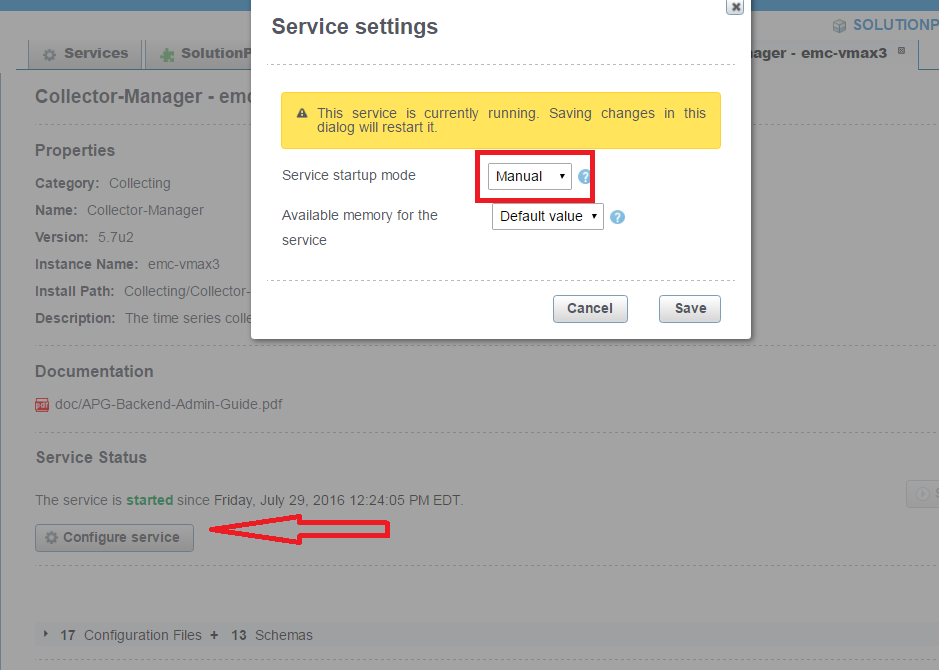
There will also be an /opt/APG/Collecting/Collector-Manager/<collector-manager>/conf/service-user.properties file which shows the the startup mode setting:
cat service-user.properties
#This file has been automatically (re)generated.
#Fri Jul 29 12:24:02 EDT 2016
startup=manual
Additional Information
See KB 000469626, Watch4net | EMC M&R | ViPR SRM - Services do not start up automatically after server reboot (Linux) for additional checks to make on Linux SRM servers.
Érintett termékek
SRMTermék tulajdonságai
Article Number: 000065756
Article Type: Solution
Utoljára módosítva: 29 júl. 2025
Version: 4
Választ kaphat kérdéseire más Dell-felhasználóktól
Támogatási szolgáltatások
Ellenőrizze, hogy a készüléke rendelkezik-e támogatási szolgáltatással.