Local LCD Displayer Shows a Black Screen When Opening Lid or Hot Plugging an External Monitor
Summary: This article is about getting a black screen on a local LCD displayer for a second when opening the lid or hot-plugging an external monitor.
Ez a cikk a következő(k)re vonatkozik:
Ez a cikk nem vonatkozik a következő(k)re:
Ez a cikk nem kapcsolódik egyetlen konkrét termékhez sem.
Ez a cikk nem azonosítja az összes termékverziót.
Symptoms
The local LCD displayer shows a black screen for one second when opening the lid or hot-plugging to an external monitor.
Affected Platforms:
- Latitude 5410
- Latitude 5510
- Latitude 5411
- Latitude 5511
- Latitude 7210 2-in-1
- Latitude 7310
- Latitude 7410
- Latitude 9410
- Latitude 9510
- Precision 3550
- Precision 3551
- Precision 7550
- Precision 7750
Cause
Getting the black screen for a sec is an expected behavior of the Microsoft Multiplane Overlay
Note: MPO feature is a power conservation feature to enhance battery life. Intel recommends end user to enable this feature.
Resolution
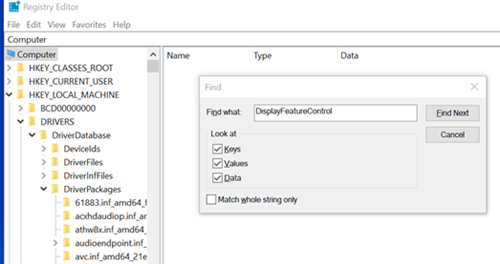
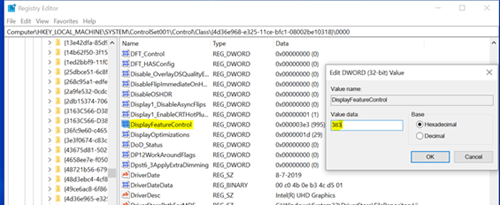
MPO feature can be disabled by editing the registry table as follow steps:
- Search DisplayFeatureControl in the Registry Editor.
- Modify the value from 3e3 to 383.
- Restart the computer.
Érintett termékek
Latitude 7210 2-in-1, Latitude 7310, Latitude 5410, Latitude 5411, Latitude 7410, Latitude 9410, Latitude 5510, Latitude 5511, Latitude 9510, Precision 3550, Precision 3551, Precision 7550, Precision 7750Termék tulajdonságai
Article Number: 000130724
Article Type: Solution
Utoljára módosítva: 19 ápr. 2026
Version: 6
Választ kaphat kérdéseire más Dell-felhasználóktól
Támogatási szolgáltatások
Ellenőrizze, hogy a készüléke rendelkezik-e támogatási szolgáltatással.