Dell Parts and Repairs Selector
Summary: The Dell Parts and Repairs selector show what Dell-certified memory, storage, drives, media, batteries, parts, and upgrades are available for purchase.
Ez a cikk a következő(k)re vonatkozik:
Ez a cikk nem vonatkozik a következő(k)re:
Ez a cikk nem kapcsolódik egyetlen konkrét termékhez sem.
Ez a cikk nem azonosítja az összes termékverziót.
Instructions
To determine what parts and repairs are available for your Dell devices, perform the following steps.
- Browse to the Dell Support Homepage.
- Identify your Dell device.
- Select the listing for your computer under View This PC.
Note: When there is no listing for your computer under View This PC, select Download & Install SupportAssist, which automatically identifies your computer for you. Follow the prompts to download and install SupportAssist. For more information, go to the Dell SupportAssist page.
- Enter the Service Tag, Dell Product ID, or Model, select the Search button, and then select your computer from the list.
- Select Browse all products: You must select the type of device you have, the brand name, and then the product model.
Note: For more information, see How to find the product model number of your Dell computer.
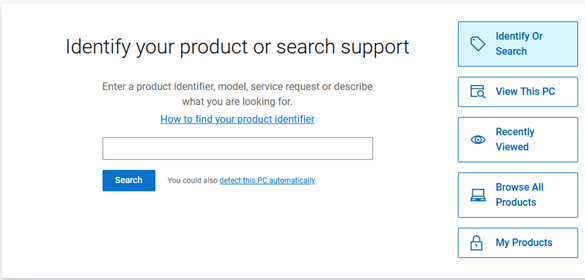
- Select the listing for your computer under View This PC.
- When you get to the product support page for your computer, select the Parts & Repairs tab on the left.
 Note: Depending on your country or region, you get different options on what parts are available for your computer. When there is not a Parts & Repairs tab, then no parts are available in your country or region.
 - Select which kind of parts that you are interested in to see which ones are available.
Érintett termékek
Alienware, Inspiron, OptiPlex, Vostro, XPS, G Series, G Series, Alienware, Dell Pro, Dell Pro Max, Dell Pro Premium, Inspiron, Latitude, Vostro, XPS, Fixed Workstations, Mobile WorkstationsTermék tulajdonságai
Article Number: 000130752
Article Type: How To
Utoljára módosítva: 31 júl. 2025
Version: 14
Választ kaphat kérdéseire más Dell-felhasználóktól
Támogatási szolgáltatások
Ellenőrizze, hogy a készüléke rendelkezik-e támogatási szolgáltatással.