PowerEdge: How to Update the CMC Firmware on M1000e, FX2, and VRTX Chassis
Summary: This article explains how to perform Chassis Management Controller (CMC) updates using the Web Management Interface of the Management Card on the M1000E, FX2, VRTX Chassis.
Ez a cikk a következő(k)re vonatkozik:
Ez a cikk nem vonatkozik a következő(k)re:
Ez a cikk nem kapcsolódik egyetlen konkrét termékhez sem.
Ez a cikk nem azonosítja az összes termékverziót.
Instructions
Caution: It is recommended to update the CMC firmware before updating the server component firmware.
To download the CMC update, follow the steps below:
- Browse to https://www.dell.com/support/home?app=drivers enter your Chassis server model or enter Chassis service tag.
- Click Drivers & Downloads Tab
- Keyword Chassis Management Controller
- Expand the Chassis Management Controller Firmware option and select View full driver details
- Scroll down to the Available formats section and Download the Update Package for Chassis Management Controller (CMC):
- M1000E: firmimg.cmc | FX2: fx2_cmc_X.XX.cmc | VRTX: vrtx_cmc.bin
Note: If you must download a previous version of the firmware, scroll down and expand the section for Other Available Versions, then select the version you want to download.
Follow these steps to update the CMC:
The recommended order to update redundant CMC:
- Start with updating the Standby.
- Fail over the primary CMC.
- Update the other Standby.
- Fail the CMC over again so the original CMC is Primary.
- Chassis Overview > Update or Chassis Controller > Update
- Select the CMC to update and click Apply CMC Update
- Next to Firmware Image click Choose File
- Browse to the downloaded CMC firmware image and then click Begin firmware Update
- If updating a standby CMC, wait for the update to complete then failover the CMC and repeat steps 1-4 afterwards to update the second CMC
- Chassis Overview > Power > Control > Reset CMC (warm boot) > Apply
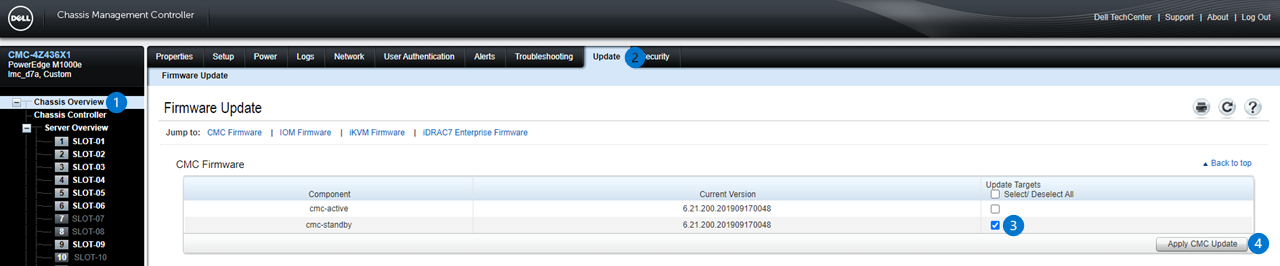
Figure 1: Image of CMC Firmware Update Page with two Redundant CMC. (With a single CMC configuration, only one active CMC is displayed.)
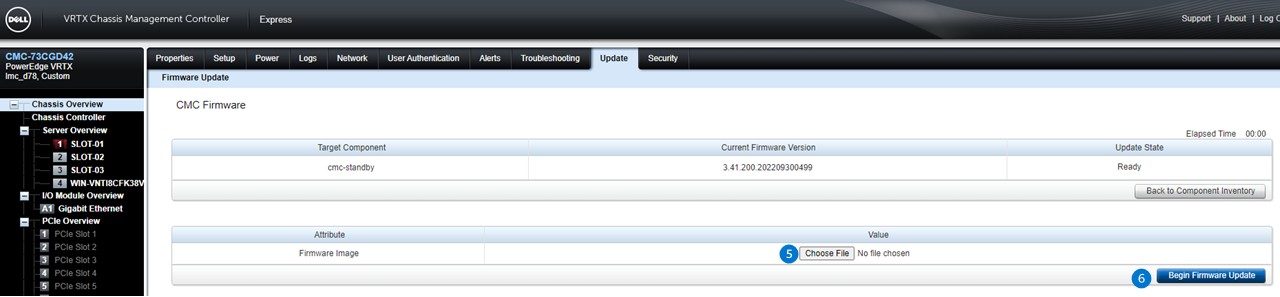
Figure 2: Image of CMC Firmware Image Page where you can select the image file and begin the update.

Figure 3: Image of Chassis Power Control Page, only needed if updating a standby CMC in redundant configuration
How to Update Firmware for M1000E
This video demonstrates the updating procedure of a Firmware for the M1000e.This video demonstrates the updating procedure of a Firmware for the M1000e.
Érintett termékek
PowerEdge FX2/FX2s, PowerEdge M1000E, POWEREDGE VRTXTermék tulajdonságai
Article Number: 000134801
Article Type: How To
Utoljára módosítva: 17 dec. 2024
Version: 9
Választ kaphat kérdéseire más Dell-felhasználóktól
Támogatási szolgáltatások
Ellenőrizze, hogy a készüléke rendelkezik-e támogatási szolgáltatással.