Chromebook Missing Keys on the Keyboard
Summary: This article provides information about the missing caps lock and delete keys on a Chromebook.
Ez a cikk a következő(k)re vonatkozik:
Ez a cikk nem vonatkozik a következő(k)re:
Ez a cikk nem kapcsolódik egyetlen konkrét termékhez sem.
Ez a cikk nem azonosítja az összes termékverziót.
Symptoms
Missing Keys on the Keyboard
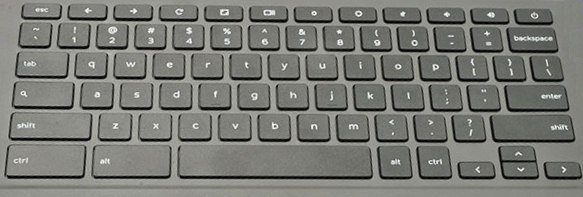
Your Chromebook laptop may look like its missing keys on its keyboard (Caps Lock and Delete Keys).
Cause
No cause information is available.
Resolution
The Chromebook keyboard does not include a CAPS LOCK or DELETE key by design.
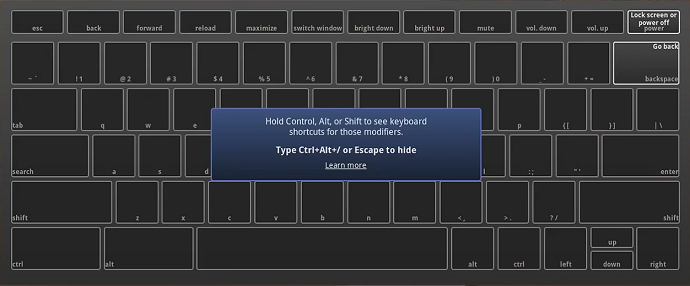
By pressing the hotkey combination of CTRL+ALT+?, you can bring up the hotkey map.
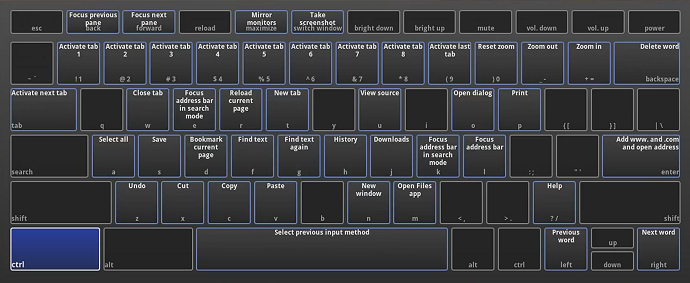
With the map up, hold the CTRL key to see that page of hotkeys (Blue Hotkeys).
With the map up, hold the ALT key to see that page of hotkeys (Red Hotkeys).
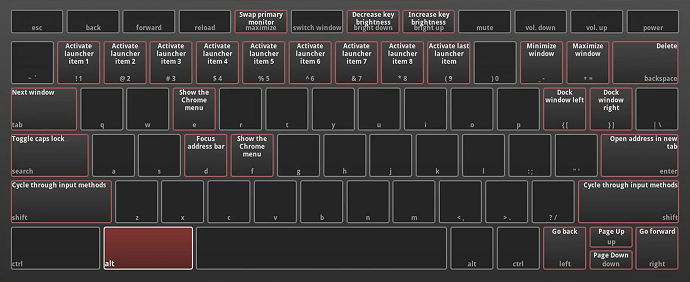
ALT+Search turns on the CAPLOCK. Pressing ALT+Search or SHIFT turns it back off (a notification in the bottom right of your screen is given).
ALT+Backspace switches Delete
You can learn more about the Chromebook keyboard from the Chromebook article about: Use Your Chromebook Keyboard

Érintett termékek
Chromebook 11, Chromebook 3100 2-in-1., ChromeBook 3100, Chromebook 3110 2-in-1, Chromebook 3110, Chromebook 3120, Chromebook 11 3180, Chromebook 11 3189, Chromebook 5190 2-in-1, Chromebook 5190, Chromebook 13 3380, Chromebook 7310, ChromeBook 3400
, Inspiron Chromebook 11 3181, Inspiron Chromebook 11 3181 2-in-1, Inspiron Chromebook 7486, Latitude 5300 2-in-1 Chromebook, Latitude 3445 Chromebook, Latitude 5400 Chromebook, Latitude 5430 Chromebook, Latitude 7410 Chromebook
...
Termék tulajdonságai
Article Number: 000137465
Article Type: Solution
Utoljára módosítva: 12 nov. 2025
Version: 7
Választ kaphat kérdéseire más Dell-felhasználóktól
Támogatási szolgáltatások
Ellenőrizze, hogy a készüléke rendelkezik-e támogatási szolgáltatással.