PowerEdge: How to Enable Nested Virtualization with AMD EPYC Processors Running Windows Server 2022
Summary: How to guide to enable nested virtualization on Dell Technologies PowerEdge platforms with AMD EPYC processors running the Windows Server 2022 operating system.
Ez a cikk a következő(k)re vonatkozik:
Ez a cikk nem vonatkozik a következő(k)re:
Ez a cikk nem kapcsolódik egyetlen konkrét termékhez sem.
Ez a cikk nem azonosítja az összes termékverziót.
Instructions
Nested virtualization is a feature that allows running a Hyper-V inside a Hyper-V virtual machine (VM).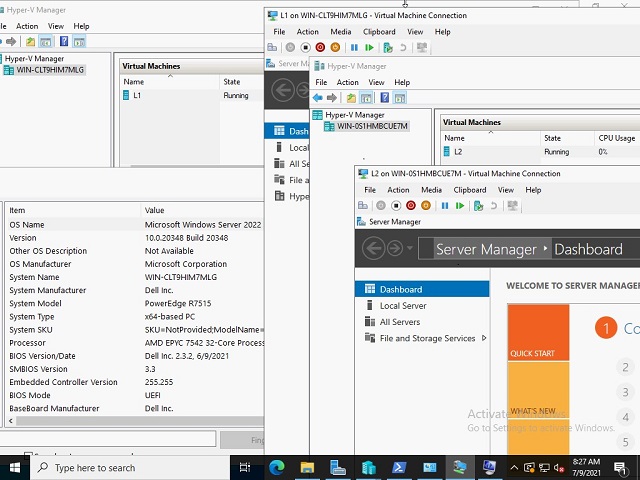
Guidelines and limitations:
- AMD first-generation EPYC or newer processor
- Microsoft guest OS version that is greater or equal to the host OS version (19636) or newer
- Currently third-party virtualization support is not available
- VM configuration version 9.3 or greater
To Configure Nested Virtualization:
- Create a VM on the Host OS
- With the VM in the OFF state, enable nested virtualization for the virtual machine with the following PowerShell command:
Set-VMProcessor -VMName <VMName> -ExposeVirtualizationExtensions $true
- Start the Virtual Machine
- Install Hyper-V on the VM, see Install Hyper-V
- Create a VM on the first (L1) level virtual machine created above
- In order for network packets to be routed through two virtual switches, MAC address spoofing must be enabled on the first (L1) level of the virtual switch. This is completed with the following PowerShell command:
Get-VMNetworkAdapter -VMName | Set-VMNetworkAdapter -MacAddressSpoofing On

References
Érintett termékek
Microsoft Windows Server 2022, Microsoft Windows Server 2025, PowerEdge R6415, PowerEdge R6515, PowerEdge R6525, PowerEdge R7415, PowerEdge R7425, PowerEdge R7515, PowerEdge R7525Termékek
PowerEdge R7615, PowerEdge R7625Termék tulajdonságai
Article Number: 000191321
Article Type: How To
Utoljára módosítva: 21 okt. 2025
Version: 4
Választ kaphat kérdéseire más Dell-felhasználóktól
Támogatási szolgáltatások
Ellenőrizze, hogy a készüléke rendelkezik-e támogatási szolgáltatással.