VMware: How to Migrate VMkernel Port vmk0 From a Distributed Switch to a Standard Switch
Summary: This article shows how to migrate vmk0 from a vDS to Standard switch through command line.
Ez a cikk a következő(k)re vonatkozik:
Ez a cikk nem vonatkozik a következő(k)re:
Ez a cikk nem kapcsolódik egyetlen konkrét termékhez sem.
Ez a cikk nem azonosítja az összes termékverziót.
Instructions
Procedure:
Steps to migrate VMkernel port vmk0 from a distributed switch to a standard switch:
- Gather IP information for current VMkernel port vmk0 (IP address, netmask, default gateway, and VLAN).
- Remove a
vmnicfrom a current distributed switch (vDS).- Get Port ID of
vmnicand vDS Name using the following command:
- Get Port ID of
esxcli network vswitch dvs vmware list
Below is an example of the output, name is
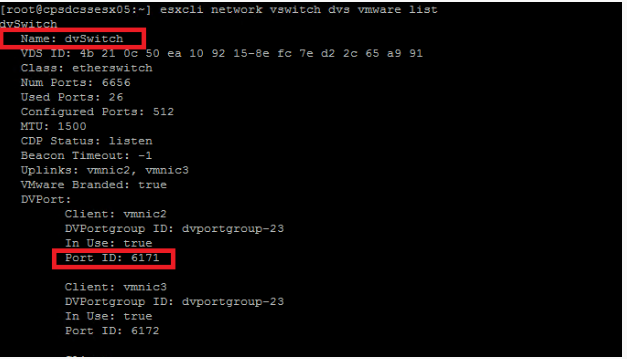
dvSwitch, and Port ID for vmnic2 is 6171.
Figure 1: Port ID and vDS Name of vmnic
- Run the following command to remove a vmnic from the vDS:
esxcfg-vswitch -Q vmnic -V dvPort_ID_of_vmnic dvSwitch
Example:
esxcfg-vswitch -Q vmnic2 -V 6171 dvSwitch
- Delete current vmk0 with the command:
esxcli network ip interface remove --interface-name=vmk0
If network coredump is set on vmk0, disable it with the following command:
esxcli system coredump network set --enable false
- Create a Standard Switch with the command:
esxcli network vswitch standard add -v vSwitchName
Example:
esxcli network vswitch standard add -v vSwitch0(Creates a vSwitch with the name vSwitch0.)
- Create a port group to assign vmk0 to with command:
esxcli network vswitch standard portgroup add -p portgroup_name -v vSwitch
Example:
esxcli network vswitch standard port group add -p management -v vSwitch0
(Creates a port group that is named management on vSwitch0.)
- Assign vmk0 to the port group with the command:
esxcli network ip interface add -i vmk0 -p portgroup_name
Example:
esxcli network ip interface add -i vmk0 -p management(Adds
vmk0 to management port group.)
- Set the IP address of vmk0 with the command:
esxcli network ip interface ipv4 set -i vmk0 -I ipaddress -N netmask -t static
Example:
esxcli network ip interface ipv4 set -i vmk0 -I 10.1.1.10 -N 255.255.255.0 -t static(Set
vmk0 to 10.1.1.10 with netmask 255.255.255.0 as static IP.)
- Set the VLAN for the port group where vmk0 resides with the command:
esxcli network vswitch standard portgroup set -p portgroup -v VLAN
Example:
esxcli network vSwitch standard port group set -p management -v 10(Assigns VLAN
10 to port group management.)
- Set the default gateway for vmk0 with the command:
esxcfg-route -a default defaultGW
Example:
esxcfg-route -a default 10.1.1.1(Set default gateway to
10.1.1.1.)
- Set vmk0 as management with command:
esxcli network ip interface tag add -i vmk0 -t Management
- Enable network core dump if it was enabled on vmk0 with the command:
esxcli system coredump network set --enabled true
Érintett termékek
VxBlock and Vblock Systems, VMware ESXi 7.x, VMware ESXi 8.xTermék tulajdonságai
Article Number: 000206306
Article Type: How To
Utoljára módosítva: 22 júl. 2025
Version: 3
Választ kaphat kérdéseire más Dell-felhasználóktól
Támogatási szolgáltatások
Ellenőrizze, hogy a készüléke rendelkezik-e támogatási szolgáltatással.