Data Domain: Reboot loop at "NVRAM driver load and initialization"
Summary: PowerProtect Data Domain systems have reported being stuck in a reboot loop. The NVRAM driver fails to load or initialize successfully resulting in a system reboot.
Ez a cikk a következő(k)re vonatkozik:
Ez a cikk nem vonatkozik a következő(k)re:
Ez a cikk nem kapcsolódik egyetlen konkrét termékhez sem.
Ez a cikk nem azonosítja az összes termékverziót.
Instructions
Affected Systems:
- PowerProtect DD6400 | DD6900 | DD9400 | DD9900
- All DDOS versions
Symptoms:
- Unable to boot into DDOS
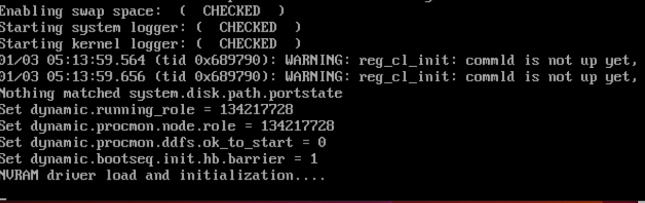
- Serial output (Virtual Console - iDRAC) shows Boot process restarts after "NVRAM driver load and initialization"
Cause:
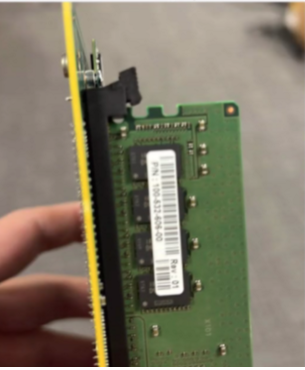
- The DIMM located on the NVRAM card is not seated or installed correctly.
- OR
- The NVRAM card is not installed correctly or is faulty.
Required Action:
With the system powered off:
- Check and reseat the DIMM on the NVRAM card.
- Here is a image showing the NVRAM DIMM not clipped in correctly
- Ensure the NVRAM card or PCI riser are seated securely.
- Power up and retry booting the system.
- If symptoms persist, replace the NVRAM (Part Number: DGK85).
Érintett termékek
Data Domain, DD6400 ApplianceTermékek
Data Domain, Data Domain Deduplication Storage Systems, DD6900 Appliance, DD9400 Appliance, DD9900 ApplianceTermék tulajdonságai
Article Number: 000208323
Article Type: How To
Utoljára módosítva: 29 szept. 2025
Version: 5
Választ kaphat kérdéseire más Dell-felhasználóktól
Támogatási szolgáltatások
Ellenőrizze, hogy a készüléke rendelkezik-e támogatási szolgáltatással.