PowerEdge: VM image-level snapshot creation failure for VMs migrated from Hyper-V environment
Summary: This article provides a workaround for virtual machines migrated from Hyper-V environment to VMware
Symptoms
VMware image-level backups may fail intermittently with snapshot creation errors similar to the following:
2023-09-28 19:18:39 avvcbimage Error <44034>: vSphere Task failed (snapshot error=45): 'An error occurred while saving the snapshot: One of the parameters supplied is invalid.'.
2023-09-28 19:18:39 avvcbimage Error <44020>: Snapshot 'Avamar-1695928695ba0dce79647e23fcd987d6c9faec3592aded6f1f' creation for VM '[U3524_DELLAVM] naa.6006016089404b00d729e8f7531342d0/DELLAVM.vmx' task creation encountered a problem
2023-09-28 19:18:39 avvcbimage Info <19680>: vmAction runBackupScript: ()
2023-09-28 19:18:39 avvcbimage Info <19681>: vmAction runBackupScript: script is skipped because it is null
2023-09-28 19:18:39 avvcbimage Info <0000>: [IMG0009] Post-snapshot script:  completed successfully
2023-09-28 19:18:39 avvcbimage FATAL <0000>: [IMG0003] The VMX '[U3524_EMCESXCLUS00] naa.6006016089404b00d729e8f7531342d0/DELLAVM.vmx' could not be snapshot.
2023-09-28 19:18:39 avvcbimage Info <9772>: Starting graceful (staged) termination, Create Snapshot failure. (wrap-up stage)
2023-09-28 19:18:39 avvcbimage Error <0000>: [IMG0009] Create Snapshot: snapshot creation or pre/post snapshot script failed.
2023-09-28 19:18:39 avvcbimage Error <0000>: [IMG0009] Create Snapshot: snapshot creation/pre-script/post-script failed
In Event Viewer, the Application log may show the following Volume ShadowCopy Service (VSS) errors: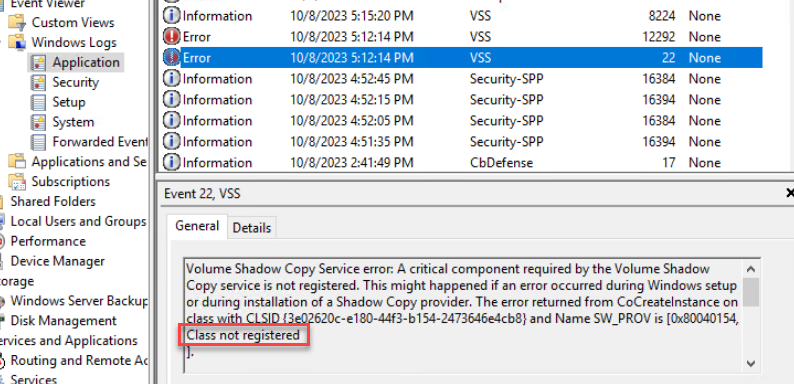
Cause
Windows VMs migrated from Hyper-V to VMware leaves the Hyper-V VSS provider in the Windows operating system of the virtual machine:
When the VMware plug-in attempts to quiesce the Windows virtual machine (VM) for an application-consistent snapshot, it may use the Hyper-V provider. The Microsoft Software Shadow Copy provider should be the default provider.
Resolution
To check if the Hyper-V VSS provider still exists on the Windows VM, open PowerShell prompt and run the following command:
vssadmin list providers
If "Hyper-V IC Software Shadow Copy Provider" is present in the output, then it could be causing problems with VSS.
Open the registry by searching for the name "regedit" on the Windows VM. Delete the registry key that references the Hyper-V provider:
[HKEY_LOCAL_MACHINE\SYSTEM\CurrentControlSet\Services\VSS\Providers\{74600e39-7dc5-4567-a03b-f091d6c7b092}]
@="Hyper-V IC Software Shadow Copy Provider"
"Type"=dword:00000002
"Version"="1.0.0.0"
"VersionId"="{c797fff9-2c3e-453c-a3e9-cc7673a6c732}"
Once the registry key is deleted, reboot the Windows VM and rerun the PowerShell command. The resulting output should show that the Hyper-V VSS provider is now gone.