Avamar: How to find and download Avamar scripts and tools from the Dell Central Avamar page
Summary: This article provides instructions for locating and downloading Avamar scripts and tools to troubleshoot and manage the Avamar backup environment.
Ez a cikk a következő(k)re vonatkozik:
Ez a cikk nem vonatkozik a következő(k)re:
Ez a cikk nem kapcsolódik egyetlen konkrét termékhez sem.
Ez a cikk nem azonosítja az összes termékverziót.
Instructions
Open the Dell Central page to access customer-accessible scripts in the Avamar-Scripts solution.
Sign in to the Dell Central site with your Dell credentials, or create an account if necessary.

The following screen appears including the entire list of scripts and tools that able to be shared with customer level:
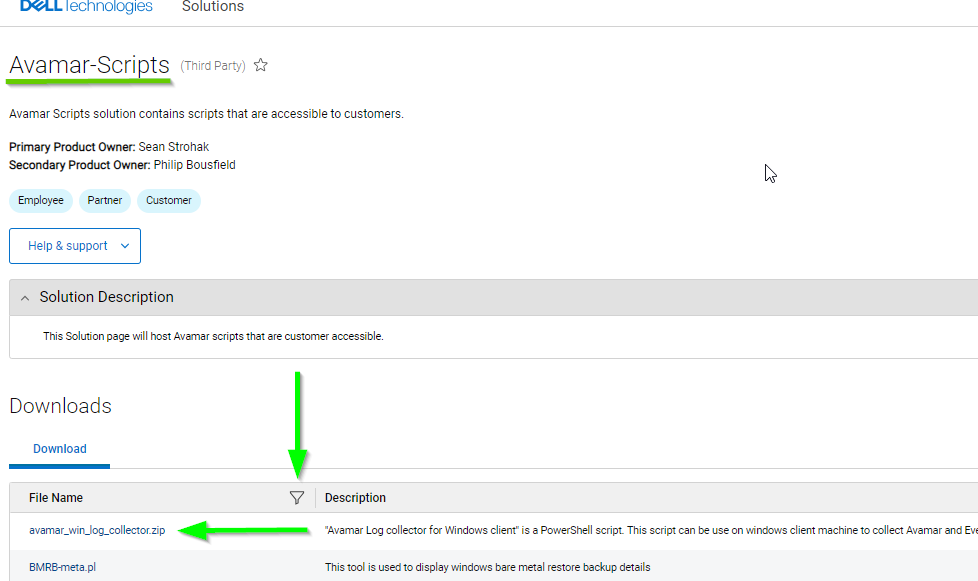
To search for an item, click the search icon and type the item name or part of it:

Another example:

To download an item click the script or tool’s name and, it downloads to the default download folder.
Notes:
Sign in to the Dell Central site with your Dell credentials, or create an account if necessary.
The following screen appears including the entire list of scripts and tools that able to be shared with customer level:
To search for an item, click the search icon and type the item name or part of it:
Another example:
To download an item click the script or tool’s name and, it downloads to the default download folder.
Notes:
- The Dell Central link requires "Sign In" with the Dell support credentials to search and download items.
- These steps are specific to the Avamar product.
- In case the item is not found, contact the Dell Avamar Support team.
Érintett termékek
AvamarTermék tulajdonságai
Article Number: 000225258
Article Type: How To
Utoljára módosítva: 07 jún. 2024
Version: 3
Választ kaphat kérdéseire más Dell-felhasználóktól
Támogatási szolgáltatások
Ellenőrizze, hogy a készüléke rendelkezik-e támogatási szolgáltatással.