Dell APEX Cloud Platform: Failed to upload Hardware Update package to staging node
Summary: Update failing with "Failed to upload Hardware Update package to staging node"
Ez a cikk a következő(k)re vonatkozik:
Ez a cikk nem vonatkozik a következő(k)re:
Ez a cikk nem kapcsolódik egyetlen konkrét termékhez sem.
Ez a cikk nem azonosítja az összes termékverziót.
Symptoms
Update failing with "Failed to upload Hardware Update package to staging node"
Dell APEX Cloud Platform (ACP) UI reports:
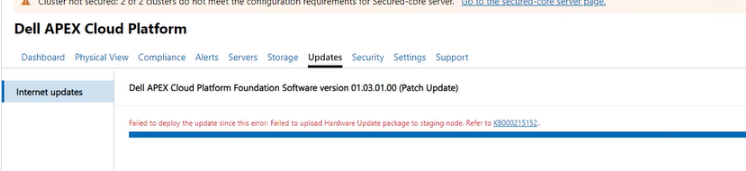
Life-Cycle Manager (LCM) logs can report different errors like this:
Error 1:
Failed to upload /lcm/data/store/unpacked/SBE_Dell_APEXCP_4.1.2411.28880068.xml to //<stagenode name>/c$ /ClusterStorage/Infrastructure_1/Shares/SU1_Infrastructure_1/stagedSbe/SBE_Dell_APEXCP_4.1.2411.28880068.xml: exit status 1, output is /bin/bash: -c: line 0: unexpected EOF while looking for matching `''  /bin/bash: -c: line 1: syntax error: unexpected end of file
Failed to copy sbe xml file to node: exit status 1
Error 2:
Failed to upload /lcm/data/store/unpacked/SBE_Dell_APEXCP_4.1.2411.28880068.xml to //<staging node name>/c$ /ClusterStorage/Infrastructure_1/Shares/SU1_Infrastructure_1/stagedSbe/SBE_Dell_APEXCP_4.1.2411.28880068.xml: exit status 1, output is Kinit for <lcm mgmt username>to access <staging node name> failed: Preauthentication failed session setup failed: NT_STATUS_LOGON_FAILURE
Failed to copy sbe xml file to node: exit status 1
Cause
Management account password contains some special characters.
Resolution
Cancel the update and Change the password using KB215549
Érintett termékek
APEXTermék tulajdonságai
Article Number: 000281279
Article Type: Solution
Utoljára módosítva: 06 febr. 2025
Version: 1
Választ kaphat kérdéseire más Dell-felhasználóktól
Támogatási szolgáltatások
Ellenőrizze, hogy a készüléke rendelkezik-e támogatási szolgáltatással.