How to Extract Dell Client Device Manager
Summary: This article provides information about how to extract Dell Client Device Manager (DCDM).
Ez a cikk a következő(k)re vonatkozik:
Ez a cikk nem vonatkozik a következő(k)re:
Ez a cikk nem kapcsolódik egyetlen konkrét termékhez sem.
Ez a cikk nem azonosítja az összes termékverziót.
Instructions
There are several options for extracting the contents from a .cab file: Windows Explorer, Command Line, or any third-party archive applications that support .cab files.
Note: Due to the broad availability of third-party applications, no examples are provided.
Using Windows Explorer:
- From the folder where Dell Client Device Manager was downloaded, right click the cab file and select Open With > Windows Explorer.
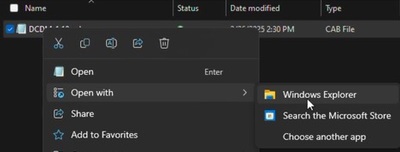 Note: For information about downloading Dell Client Device Manager, see How to Download Dell Client Device Manager.
 - Select all files, right click, and click Extract.

- Go to where you would like to extract the contents to using the Select a Destination window and click the Extract button.
 Note: The folder structure is lost, and the DCDM_Deployment.ps1 script does not work as designed when using Windows Explorer to extract the cabinet files. If you intend to deploy DCDM using the provided PowerShell script, you must create a new folder named Installers then move Dell.Core.Services.Installer_64bit.msi, DellCommandUpdateApp_Setup.exe, and TrustedDevice-64Bit.msi into it.
Using Command Line:
- Open the command prompt and set the directory focus to the folder where the cab file was downloaded.
 Note: For information about downloading Dell Client Device Manager, see How to Download Dell Client Device Manager.
 - Type the following command:
expand -F:* cabfile_path existing_destination_folder
cabfile_path is the name of the Dell Client Device Manager cab file, and existing_destination_folder is the full path to a folder where the contents are to be extracted.
Érintett termékek
Dell Client Device ManagerTermék tulajdonságai
Article Number: 000299313
Article Type: How To
Utoljára módosítva: 27 márc. 2025
Version: 1
Választ kaphat kérdéseire más Dell-felhasználóktól
Támogatási szolgáltatások
Ellenőrizze, hogy a készüléke rendelkezik-e támogatási szolgáltatással.