Dell Networking OS9 如何設定手動 DHCP 繫結或靜態 DHCP 繫結
Summary: 本文說明如何在 Dell Networking OS9 中設定手動動態主機控制通訊協定 (DHCP) 繫結或靜態 DHCP 繫結。
Ez a cikk a következő(k)re vonatkozik:
Ez a cikk nem vonatkozik a következő(k)re:
Ez a cikk nem kapcsolódik egyetlen konkrét termékhez sem.
Ez a cikk nem azonosítja az összes termékverziót.
Instructions
索引
什麼是手動 DHCP 綁定或靜態 DHCP 綁定?
DHCP 伺服器會自動為用戶端分配一個可用的IP位址,然後在綁定表中創建一個條目。但是,管理員可以為客戶機手動創建條目。當您希望保證網路設備接收特定IP位址時,手動綁定非常有用。
組態
動態集區組態
|
命令 |
說明 |
|---|---|
DELL# configure |
進入組態模式 |
DELL(conf)# ip dhcp server |
進入 DHCP 模式 |
DELL(config-dhcp)# pool <POOL NAME> |
建立 DHCP 集區 |
DELL(config-dhcp-D-POOL)# network <Network/subnet mask> |
指定 IP 位址 |
DELL(config-dhcp-D-POOL)# default-router <Default Router IP> |
指定預設路由器 |
DELL(config-dhcp-D-POOL)# dns-server <DNS server IP> |
指定 DNS 伺服器 |
靜態集區組態
|
命令 |
說明 |
|---|---|
DELL# configure |
進入組態模式 |
DELL(conf)# ip dhcp server |
進入 DHCP 模式 |
DELL(config-dhcp)# pool <POOL NAME> |
建立 DHCP 集區 |
DELL(config-dhcp-S-POOL)# host-address <IP address> |
指定 IP 位址 |
DELL(config-dhcp-S-POOL)# hardware-address <Mac address> |
指定用戶端硬體位址 |
DELLconfig-dhcp-S-POOL)# default-router <Default Router IP> |
指定預設路由器 (選用) |
DELL(config-dhcp-S-POOL)# dns-server <DNS server IP> |
指定 DNS 伺服器 (選用) |
啟用 DHCP 伺服器
|
命令 |
說明 |
|---|---|
DELL# configure |
進入組態模式 |
DELL(conf)# ip dhcp server |
進入 DHCP 模式 |
DELL(config-dhcp)# no disable |
啟用 DHCP 伺服器 |
範例組態
請考慮以下示例,其中 mac 位址為 11:22:33:44:55:66 的用戶端必須從 DHCP 伺服器接收 IP 位址 10.0.0.100。
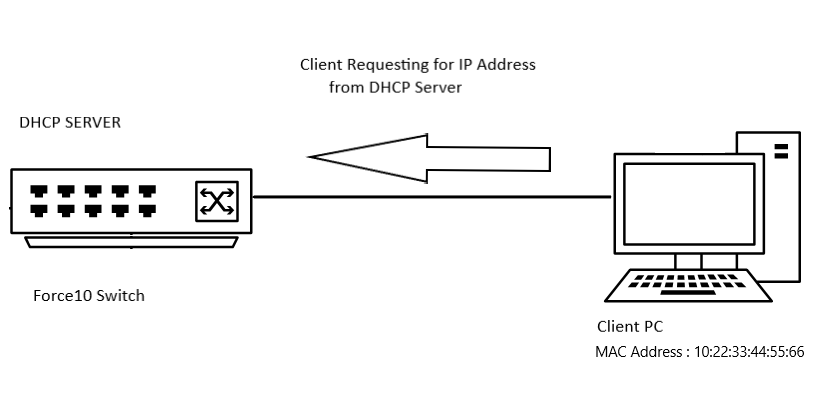
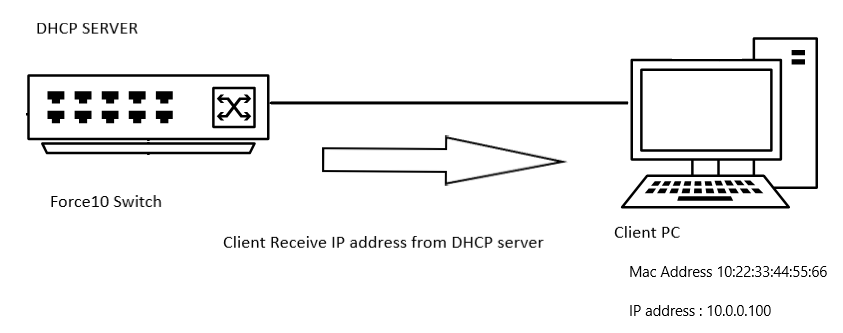
範例組態
DELL# configure
DELL(conf)# ip dhcp server
DELL(config-dhcp)# pool DYNAMICPOOL
DELL(config-dhcp-DYNAMICPOOL)# network 10.0.0.0/24
DELL(config-dhcp-DYNAMICPOOL)# default-router 10.0.0.1
DELL(config-dhcp-DYNAMICPOOL)# dns-server 8.8.8.8
DELL(config-dhcp-DYNAMICPOOL)# exit
DELL(config-dhcp)#

DELL(config-dhcp)# pool STATICPOOL
DELL(config-dhcp-STATICPOOL)# host-address 10.0.0.100
DELL(config-dhcp-STATICPOOL)# hardware-address 10:22:33:44:55:66
DELL(config-dhcp-DYNAMICPOOL)# exit
DELL(config-dhcp)#

DELL(config-dhcp)# no disable
確認
DHCP 組態
若要驗證 DHCP 伺服器組態和集區詳細資料,請使用以下命令:
DELL# show ip dhcp configuration pool
範例輸出
DELL# show ip dhcp configuration  pool

Pool Name            : DYNAMICPOOL
Pool Type            : Dynamic
Domain Name          :
Lease Time           : 1Day 0Hrs 0Mins
DNS Servers          : 8.8.8.8
Default Routers      : 10.0.0.1
Network              : 10.0.0.0 255.255.255.0

Pool Name            : STATICPOOL
Pool Type            : Manual
Domain Name          :
Lease Time           : 1Day 0Hrs 0Mins
DNS Servers          :
Default Routers      :
Hardware Address     : 10:22:33:44:55:66
Hardware Address Type: Ethernet
Host                 : 10.0.0.100 0.0.0.0
繫結
若要驗證 DHCP 伺服器提供的 IP 位址,請使用以下命令:
DELL# show ip dhcp binding

Sample output
DELLEMC#show ip dhcp binding
 IP address      Hardware address   Lease expiration     Type
10.0.0.100      10:22:33:44:55:66    infinite             Manual
Total number of entries in the table: 1
記憶要點
- 您必須在該網路中具有動態集區範圍,靜態集區才能正常工作
- 手動綁定可被視為單主機位址池。手動綁定的數量沒有限制,
- 我們只能為每個主機配置一個手動綁定。
- 請確認我們使用子網路範圍內的有效主機 IP 作為主機 IP。
Érintett termékek
OS9, PowerSwitch S3048-ON, PowerSwitch S4048-ON, PowerSwitch S4810P, PowerSwitch S4810-ON, PowerSwitch S4820T, PowerSwitch S5000, Dell Networking S3100 Series, PowerSwitch S4048T-ON, PowerSwitch S5048F-ONTermékek
PowerSwitch S6000, PowerSwitch S6000 ON, PowerSwitch S6010-ON, PowerSwitch S6100-ON, PowerSwitch Z9100-ON, PowerSwitch Z9264F-ON, PowerSwitch Z9332F-ONTermék tulajdonságai
Article Number: 000312772
Article Type: How To
Utoljára módosítva: 25 ápr. 2025
Version: 1
Választ kaphat kérdéseire más Dell-felhasználóktól
Támogatási szolgáltatások
Ellenőrizze, hogy a készüléke rendelkezik-e támogatási szolgáltatással.