NetWorker: How To Determine Server Load Using nsrwatch
Summary: Determine NetWorker server load using nsrwatch when NetWorker Management Console (NMC) Graphical User Interface (UI) or NetWorker User Interface (NWUI) UI are not available.
Ez a cikk a következő(k)re vonatkozik:
Ez a cikk nem vonatkozik a következő(k)re:
Ez a cikk nem kapcsolódik egyetlen konkrét termékhez sem.
Ez a cikk nem azonosítja az összes termékverziót.
Instructions
Determining Load on a NetWorker Server
To determine the load on a NetWorker server using nsrwatch, follow these steps:
- Log in to the NetWorker server and launch
nsrwatchfrom an Administrator Command prompt or a Terminal session.
Launch nsrwatch
- Clear the existing window panes by pressing the keys in the following order; a, m, s, d, and o.
Press a, then m, then s, then d, and lastly o
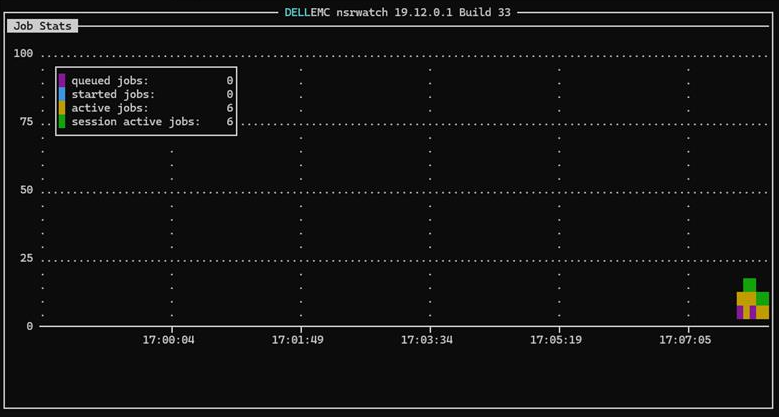
- Press the b key to launch the Job Stats window in
nsrwatch.
Press b to launch Job Stats
- Copy and paste the individual lines for the following:
- Queued jobs
- Started jobs
- Active jobs
- Session active jobs
Important Note: Do not send a screenshot or try to copy and paste the whole window.
- To get back to the cleared screen, type b.
Type b to get back to the cleared screen
- To get the default settings displayed, type o, then d, s, m, and a
Type o, then d, then s, then m, and lastly a
- To quit out of
nsrwatch, type q.
Type q to quit
For help, type h and use the down arrow to scroll down through the help screen. Type q to quit out of the help screen.
Here is an example of the Job Stats window which is tapped.
Additional Information
Érintett termékek
NetWorkerTermék tulajdonságai
Article Number: 000355575
Article Type: How To
Utoljára módosítva: 18 szept. 2025
Version: 2
Választ kaphat kérdéseire más Dell-felhasználóktól
Támogatási szolgáltatások
Ellenőrizze, hogy a készüléke rendelkezik-e támogatási szolgáltatással.