Connectrix: Cisco: CA certificate is missing Basic constraints extension
Summary: Error while authenticating the CA certificate to configure AAA service on Switch.
Ez a cikk a következő(k)re vonatkozik:
Ez a cikk nem vonatkozik a következő(k)re:
Ez a cikk nem kapcsolódik egyetlen konkrét termékhez sem.
Ez a cikk nem azonosítja az összes termékverziót.
Symptoms
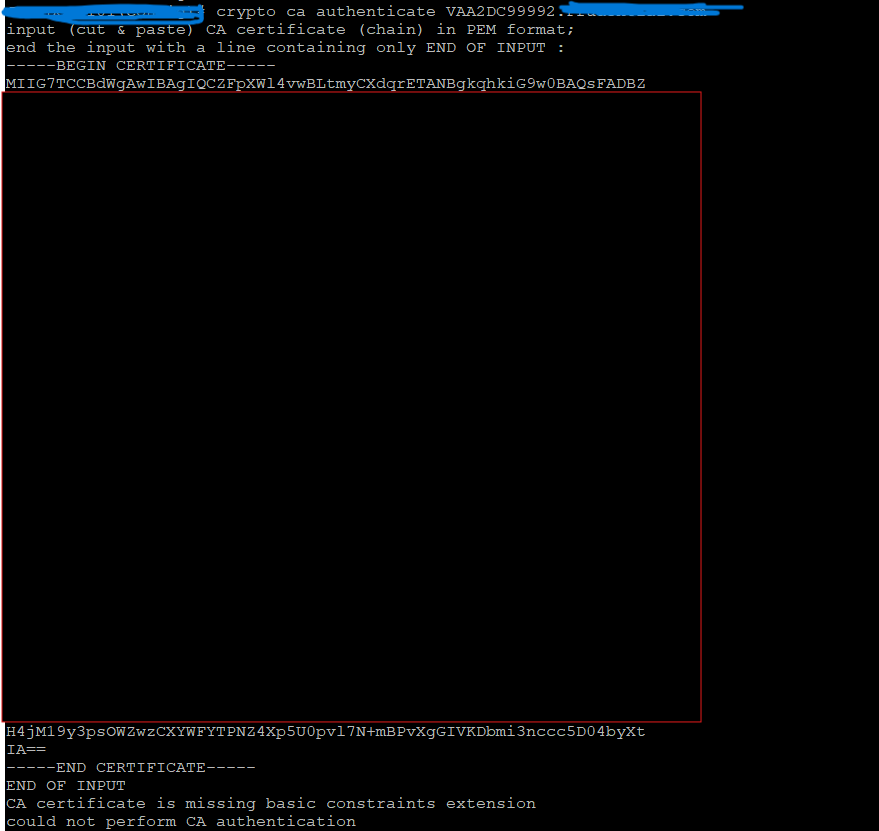
While authenticating the CA signed certificate, the below error is seen:
CA certificate is missing Basic constraints extension, could not perform CA authentication
Cause
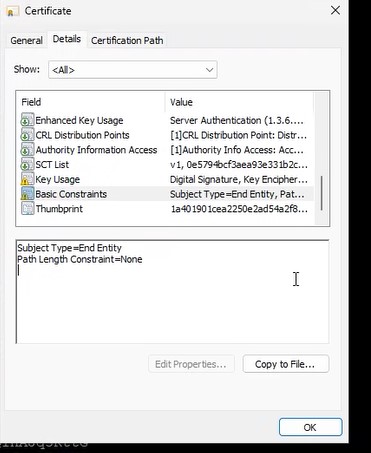
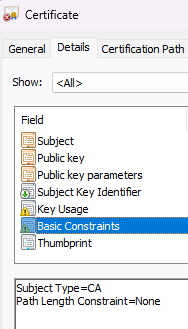
Subject Type under Basic Constraints was set to NONE instead of CA.
Problematic Certificate:
Correct CA certificate as expected:
Resolution
Action Plan:
- Review the certificate for any errors or missing attributes.
- Remove any existing related configuration from the switches.
- Re-attempt the configuration from the beginning with a corrected certificate.
Additional Information
To open basic constraints of a CA certificate, use a web browser by visiting a secure (HTTPS) website. Click the padlock icon and select the certificate. Then navigating to the "Details" or "Extensions" tab to find the "Basic Constraints" section.
Érintett termékek
Connectrix MDS-Series HardwareTermék tulajdonságai
Article Number: 000368416
Article Type: Solution
Utoljára módosítva: 15 szept. 2025
Version: 1
Választ kaphat kérdéseire más Dell-felhasználóktól
Támogatási szolgáltatások
Ellenőrizze, hogy a készüléke rendelkezik-e támogatási szolgáltatással.