VxRail Time synchronization discrepancy between VCSA and ESXi hosts
概要: This article describes instructions to resolve Time synchronization discrepancy between VCSA and ESXi hosts
この記事は次に適用されます:
この記事は次には適用されません:
この記事は、特定の製品に関連付けられていません。
すべての製品パージョンがこの記事に記載されているわけではありません。
現象
If the node is out of sync with other active nodes in the vSAN cluster or with VCSA could generate:
"vSAN Cluster Alarm "Time isn't syncronized across hosts and VC"
Example:
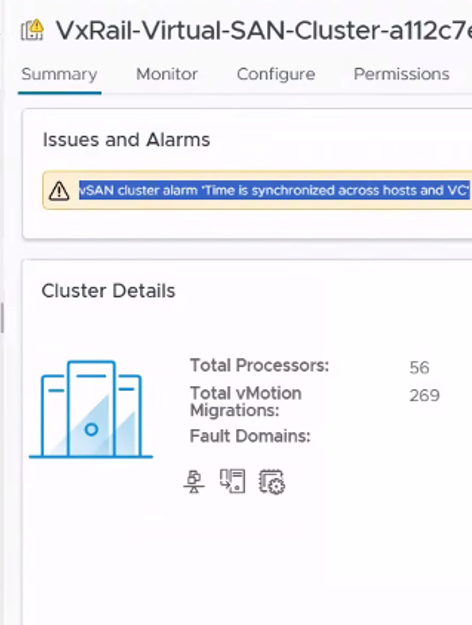
From vSAN Skyline health perspective check:"Time Synchronization Across Hosts and VC": alarm;
* This health check validates the time difference between the vCenter Server and ESXi hosts.
* vSAN Witness Appliance time sync issue.
* NTP services are not started for the Witness host.
Ref: https://knowledge.broadcom.com/external/article/326424/vsan-health-service-cluster-health-tim.html If the time exceeds more than 1 minute it can trigger Time sync health alerts on vSAN.
原因
This issue occurs when there is a time synchronization discrepancy between the vCenter Server and one or more ESXi hosts. If the time difference exceeds 60 seconds, it can trigger Time sync health alerts on vSAN.
解決方法
Configure NTP to VxRail nodes, vCenter Server and VxRail Manager
Ref:000019465 - VxRail: How to Set NTP After Deployment https://www.dell.com/support/kbdoc/en-us/000019465/set-ntp-after-deployment
If already enabled Restart the NTP Service from ESXi Hosts;
Command: /etc/init.d/ntpd restart
From VxRMgr; use to check synchronization status from VxRail Manager:
Command: ntpq -c assoc
Note: If the NTP works fine, the result should be reach=yes, condition=sys.peer.
Example:

*Workaround
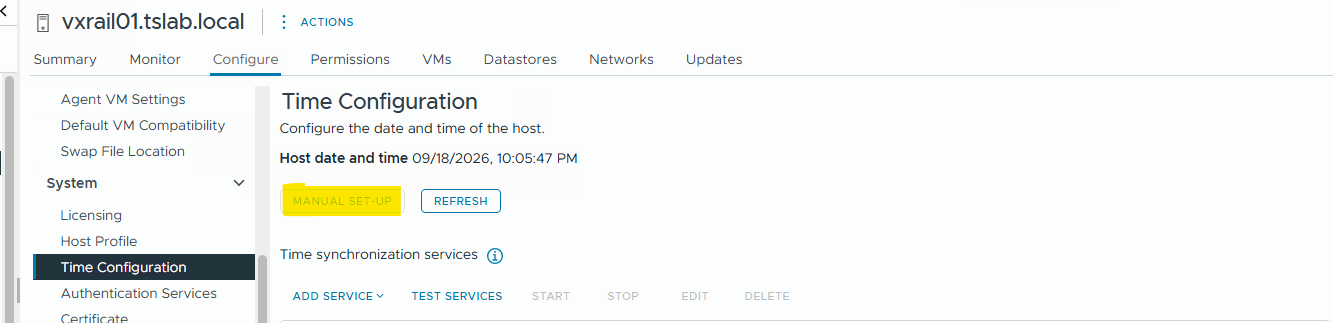
If NTP Server is not available Its necessary adjust the Date and time Manually;
- Hosts: (vCenter Web GUI)
In the
home page, navigate to
.
Home
Hosts and Clusters
Select a host.
On the
.
Configure
tab, select
System
Time Configuration
Click
Manual Set-Up
.
Ex:
The
Manual time configuration
dialog box appears.
Enter a date and time and click:
OK
.
Note: ESXi hosts use UTC (Coordinated Universal Time) and do not support changing time zones. In the vSphere Client, you see your local time as the current host time.
Hosts: ESXCLI Use the esxcli system time set command. For example, to set the date to 31 Jan 2012 18:00:00 UTC, type this command as the root user:
esxcli system time set -d 31 -M 1 -y 2012 -H 18 -m 0 -s 0
Important: Use VxTool to execute the command across all cluster nodes simultaneously use vxtool to adjust at the same time. 000009345 - VxRail: How to Use Vxtool.
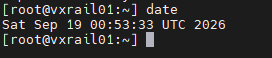
Note: Confirm if the config was applied successfully from nodes using the command "date" and compare output across all nodes.
Example (output):
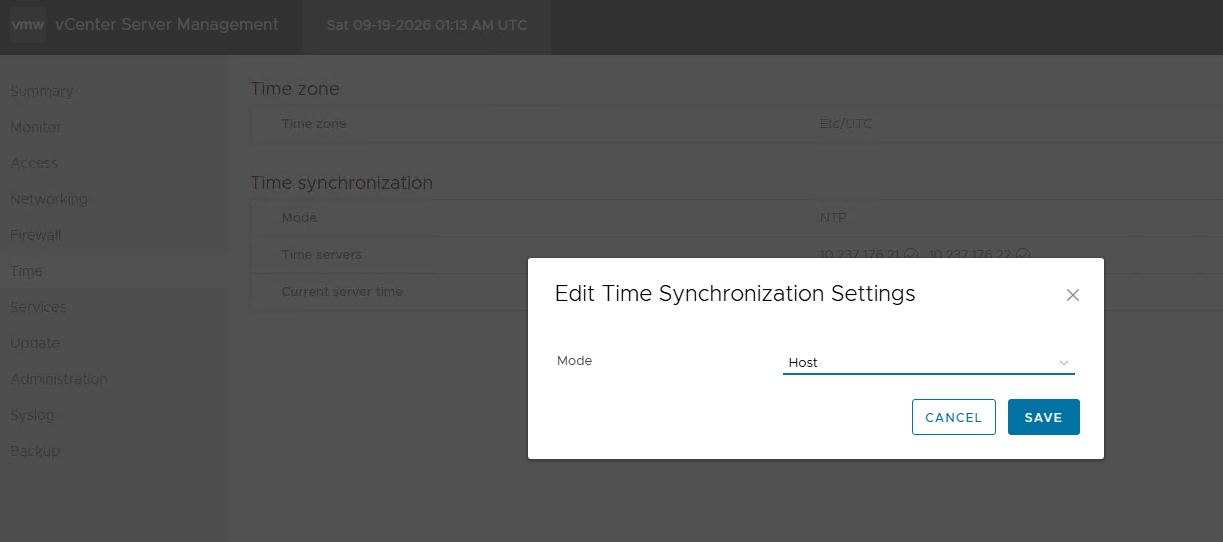
vCenter VAMI;
1- Access the Appliance management for both through port 5480 using: https://:5480
2- Navigate to time
3- Add NTP server.
Example: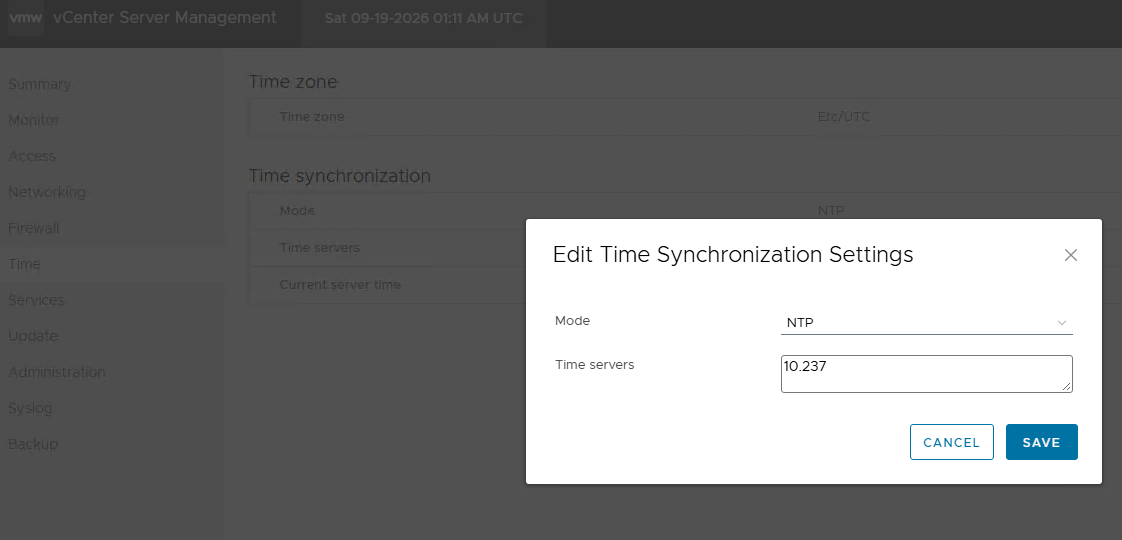
or Set Time Syncronization Settings to Mode sync with Hosts.
Example:
VxRail Manager (VxRMgr)
Set the system time using the NTP server on the VxRail Manager using the root user.
ntpdate -u <ntp sever ip>
Ref Broadcom KB/Docs;
Verifying time synchronization across an ESX/ESXi host environment
https://knowledge.broadcom.com/external/article/318888/verifying-time-synchronization-across-an.html
Configure the Date and Time on Your ESXi Host Manually
対象製品
VxRail, VMware, VMware ESXi 8.x, VMware OEM Products with ProSupport, VxRail Software文書のプロパティ
文書番号: 000510822
文書の種類: Solution
最終更新: 28 9月 2026
バージョン: 2
質問に対する他のDellユーザーからの回答を見つける
サポート サービス
お使いのデバイスがサポート サービスの対象かどうかを確認してください。