Isilon: How to find the serial number label on an Isilon A100 accelerator node
요약: Introduction The serial number label on an Isilon A100 acceleration node is in a different location than the serial number labels on other Isilon nodes. This article describes how to find the serial number label. ...
이 문서는 다음에 적용됩니다.
이 문서는 다음에 적용되지 않습니다.
이 문서는 특정 제품과 관련이 없습니다.
모든 제품 버전이 이 문서에 나와 있는 것은 아닙니다.
지침
Procedure
The serial number is printed on a blue label inside the node chassis, as indicated by the following image: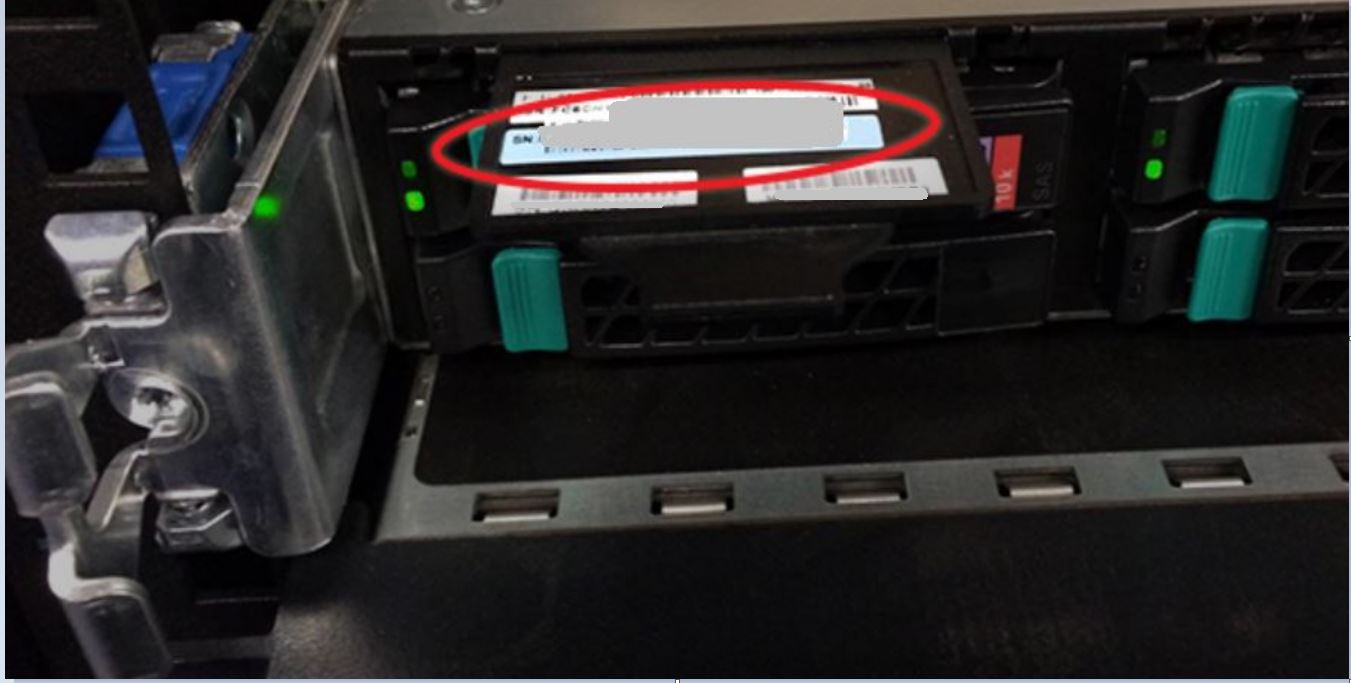
To retrieve the serial number from the chassis:
- Remove the face plate:
- Press both latches inward and to the center simultaneously.
- Pull the face plate off straight toward you while keeping the latches pushed in.
- Locate the black plastic tab sticking out of the chassis at the top-left corner, directly above the leftmost boot drive.
- Pull the tab out to expose the blue serial number label. The serial number starts with "FC6IS" and followed by nine digits.
- When you are done, push the label tab back into the chassis.
- Reinstall the face plate by carefully lining it up with the mount points and then pressing it onto the chassis until it clicks into place.
NOTE
To view the serial number using the OneFS web administration interface or the command-line interface, see PowerScale: Isilon: How to find serial numbers for PowerScale/Isilon nodes. | Dell US
To view a demonstration of this procedure, see the following video.
해당 제품
Isilon제품
Isilon, Isilon A100문서 속성
문서 번호: 000020342
문서 유형: How To
마지막 수정 시간: 14 10월 2022
버전: 3
다른 Dell 사용자에게 질문에 대한 답변 찾기
지원 서비스
디바이스에 지원 서비스가 적용되는지 확인하십시오.