VMAX3 and VMAX All Flash: How to copy SMAS DB backup files from Embedded Management for VMAX using vApp Manager
요약: Provides instructions to customers how to make a copy of the data from Embedded Management for VMAX.
이 문서는 다음에 적용됩니다.
이 문서는 다음에 적용되지 않습니다.
이 문서는 특정 제품과 관련이 없습니다.
모든 제품 버전이 이 문서에 나와 있는 것은 아닙니다.
지침
Starting from the release 8.3 it is possible to make a copy of the data from vApp Manager for eManagement.
Follow the following procedure to copy SMAS DB backup files (.dat):
-
Log in to vApp Manager using IP address of eManagement and the port 5480 with the seconfig account and password

-
On the bottom right of the screen in the Operation area, you have an option to download logs and the data

-
The Download Files Wizard is opened

You can download the followings:
- System database backups these are .dat file
- Performance data (.dat files)
- Performance Reports
Note: This Performance Backup file (.dat file) is the same as you would receive from performance/settings/database/backup over port 8443, but makes it easier for CS to download a copy of it, in case the container has to be reimaged.
These Performance backup files can be located in /opt/emc/SMAS/backup/SPA.
These Performance backup files can be located in /opt/emc/SMAS/backup/SPA.
추가 정보
It is also recommended to copy options and nethost files from eManagement. To do this, open the Download Files Wizard as described above and choose these files as shown below.
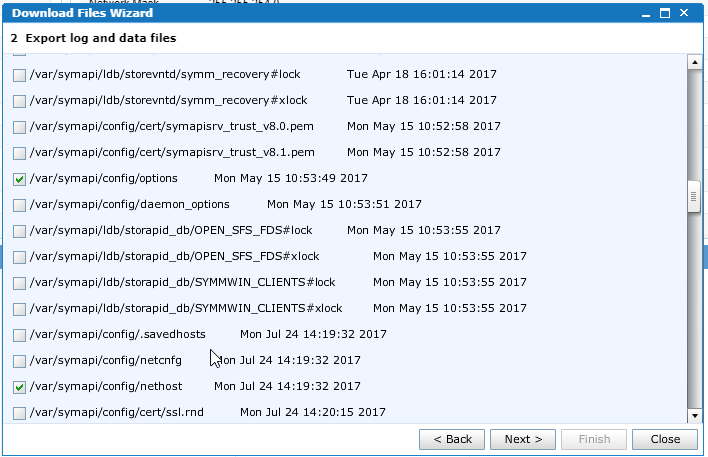
To restore these files, engage the Dell Technologies Global Support.
해당 제품
VMAX3 Series제품
Unisphere for VMAX, VMAX All Flash, VMAX3 Series문서 속성
문서 번호: 000022546
문서 유형: How To
마지막 수정 시간: 27 3월 2025
버전: 6
다른 Dell 사용자에게 질문에 대한 답변 찾기
지원 서비스
디바이스에 지원 서비스가 적용되는지 확인하십시오.