Dell Unity: 동기화와 함께 페일오버 후 복제 재개가 전체 동기화를 나타냄
요약: Dell Unity OE 5.0.x에서 동기화와 함께 페일오버 작업 후 표시되는 재개 확인 메시지에 선택한 모든 복제 세션에 대해 전체 동기화가 시작된다고 잘못 표시됩니다. 이는 사용자 인터페이스 메시징 문제일 뿐이며 실제 복제 동작에는 영향을 주지 않습니다. Dell Unity 개발 팀에서는 이 문제를 식별했으며, Dell Unity OE 5.1에 대한 수정이 예정되어 있습니다. 이 수정에서는 수행 중인 복제 작업을 재개 요약 메시지에 올바르게 반영합니다. ...
이 문서는 다음에 적용됩니다.
이 문서는 다음에 적용되지 않습니다.
이 문서는 특정 제품과 관련이 없습니다.
모든 제품 버전이 이 문서에 나와 있는 것은 아닙니다.
증상
Dell Unity OE 5.0.x에서 동기화와 함께 페일오버를 수행한 후 복제 세션에 대한 재개 옵션은 영향을 받는 모든 복제 세션에 대해 전체 동기화가 시작된다는 확인 메시지를 표시합니다.
이 메시지는 Unity OE 5.0.x에서 사용자에게 예상 동기화 동작을 알리기 위한 새로운 기능으로 도입되었습니다. 이 메시지는 전체 동기화가 발생할 것이라고 나타내지만 Dell Unity Development에서는 이 동작을 식별하여 향후 릴리스에서 수정하고 있습니다.
이 메시지는 동기화와 함께 페일오버 작업 후 복제를 재개할 때 Unity OE 5.0.x를 실행하는 모든 Dell Unity 어레이에서 표시될 수 있습니다.
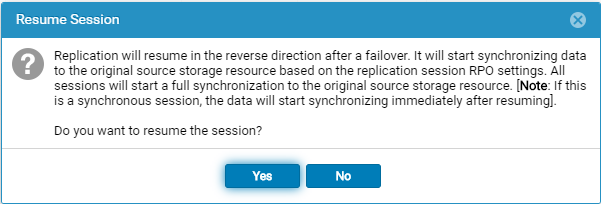
동기화와 함께 페일오버 작업 후 재개 옵션을 선택하면 다음 메시지가 표시됩니다.
Replication will resume in the reverse direction after a failover. It will start synchronizing data to the original source storage resource based on the replication session RPO settings. All sessions will start a full synchronization to the original source storage resource. [Note: If this is a synchronous session, the data will start synchronizing immediately after resuming].

Do you want to resume the session?
원인
재개 요약 메시지가 잘못되었습니다. 동기화와 함께 페일오버를 수행한 후 재개를 선택하면 표시되는 확인 메시지에 모든 복제 세션에 대해 전체 동기화가 시작된다는 메시지가 표시됩니다. 그러나 이 메시지는 실제 복제 동작을 정확하게 반영하지 않습니다.
이 문제는 사용자 인터페이스에 표시되는 메시지로 제한되며 전체 동기화가 발생한다는 의미는 아닙니다. Dell Unity 개발 팀은 Unity OE 5.0.x에서 이 문제를 확인하고 수정 작업을 진행하고 있습니다.
해결
재개 요약 메시지가 잘못되었으며 향후 Unity OE 릴리스에서 수정될 예정입니다.
현재 이 메시지는 모든 복제 세션에 대해 전체 동기화 가 시작된다는 것을 나타냅니다. 이는 표시 문제일 뿐이며 수행될 실제 복제 작업을 반영하지 않습니다.
이 문제에 대한 수정 사항은 Dell Unity OE 5.1에 포함될 예정입니다. 그때까지 사용자는 Unity OE 5.0.x에 표시되는 잘못된 전체 동기화 메시지를 무시해도 됩니다.
올바른 메시지는 다음과 같아야 합니다.
페일백 확인 메시지
Failback will perform a synchronization from the destination storage resource to the source storage resource, block access to the destination storage resource to allow it to be used for replication, and change the source storage resource access to read/write mode. Replication will then resume. The synchronization could be either delta or full synchronization depending on the replicated snapshots. This operation will be lengthy if a full synchronization is needed during failback.
When the failback operation is complete, you can then connect your hosts to the source storage resource.
Note: Before you begin, you should block writes to the destination storage resource because it will be placed in read-only mode.
페일오버 시 재개 확인
Replication will resume in the reverse direction after a failover. It will start synchronizing data to the original source storage resource based on the replication session RPO settings.
All sessions will start a synchronization to the original source storage resource. The synchronization could be either delta or full synchronization depending on the replicated snapshots.
Note: If this is a synchronous session, the data will start synchronizing immediately after resuming. Do you want to resume the session?
해당 제품
Dell Unity 300, Dell EMC Unity 300F, Dell EMC Unity 400, Dell EMC Unity 400F, Dell EMC Unity 450F, Dell EMC Unity 500, Dell EMC Unity 550F, Dell EMC Unity 600, Dell EMC Unity 600F, Dell EMC Unity 650F, Dell EMC Unity Family제품
Dell EMC Unity XT 380, Dell EMC Unity XT 380F, Dell EMC Unity XT 480, Dell EMC Unity XT 480F, Dell EMC Unity XT 680, Dell EMC Unity XT 680F, Dell EMC Unity XT 880, Dell EMC Unity XT 880F, Dell EMC Unity Family |Dell EMC Unity All Flash
, Dell EMC Unity Family, Dell EMC Unity Hybrid, Dell EMC UnityVSA Professional Edition/Unity Cloud Edition
...
문서 속성
문서 번호: 000063277
문서 유형: Solution
마지막 수정 시간: 16 7월 2026
버전: 8
다른 Dell 사용자에게 질문에 대한 답변 찾기
지원 서비스
디바이스에 지원 서비스가 적용되는지 확인하십시오.