CloudIQ: Unisphere for PowerMax: Unable to view just performance data in CloudIQ. It shows "No data to display".
요약: Unable to view just performance data in CloudIQ. It shows "No data to display".
이 문서는 다음에 적용됩니다.
이 문서는 다음에 적용되지 않습니다.
이 문서는 특정 제품과 관련이 없습니다.
모든 제품 버전이 이 문서에 나와 있는 것은 아닙니다.
증상
Unable to view performance data only in CloudIQ. It shows "No data to display".
All other data collecting in CloudIQ is ok.
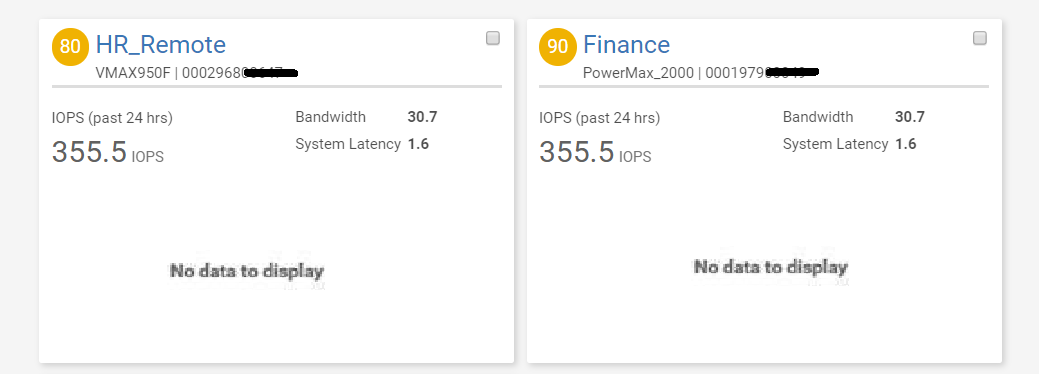
The collection.log and smas.log is streaming with status code: 400 errors but that does not indicate the actual failure.
The actual failure is found in the smas.log. See below snippet:
2020-01-17 08:28:48,676 ERROR [org.jboss.as.ejb3.invocation] (EE-ManagedThreadFactory-default-Thread-6) WFLYEJB0034: EJB Invocation failed on component MetricsDateManager for method public abstract com.emc.em.common.collector.persistence.MetricsCollectionPeriod com.emc.em.collector.impl.util.IMetricsDateManager.getMetricsCollectionPeriod(): javax.ejb.EJBException: java.lang.RuntimeException: com.emc.em.common.persistence.PersistenceException: java.io.EOFException
원인
MetricsDateManager file is corrupted. That is the file that the SPA (metrics) data is written to.
해결
Follow the steps below to address the issue:
- Stop Unisphere server
- Rename the file:
<SMAS>\ jboss\standalone\data\esrs\MetricsDateManager.pers
to
MetricsDateManager_backup.pers
MetricsDateManager_backup.pers
- Restart the Unisphere server.
해당 제품
CloudIQ제품
CloudIQ, Unisphere for PowerMax문서 속성
문서 번호: 000081995
문서 유형: Solution
마지막 수정 시간: 25 4월 2025
버전: 3
다른 Dell 사용자에게 질문에 대한 답변 찾기
지원 서비스
디바이스에 지원 서비스가 적용되는지 확인하십시오.