如何确定 Dell Encryption Enterprise 或 Dell Encryption Personal 版本
요약: 通过遵循这些说明,可以识别 Dell Encryption Enterprise 或 Dell Encryption Personal 的版本。
이 문서는 다음에 적용됩니다.
이 문서는 다음에 적용되지 않습니다.
이 문서는 특정 제품과 관련이 없습니다.
모든 제품 버전이 이 문서에 나와 있는 것은 아닙니다.
증상
了解 Dell Encryption Enterprise 的版本(以前称为 Dell Data Protection |Enterprise Edition)或 Dell Encryption Personal(以前称为 Dell Data Protection |Personal Edition)允许用户:
- 识别已知问题。
- 确定 UI 差异。
- 了解工作流更改。
- 验证系统要求。
受影响的产品:
- Dell Encryption Enterprise
- Dell Encryption Personal
- Dell Data Protection | Enterprise Edition
- Dell Data Protection | Personal Edition
受影响的操作系统:
- Windows
원인
不适用
해결
可以通过产品用户界面 (UI) 或产品安装程序确定版本。单击相应的选项卡以了解更多信息。
提醒:在通过 UI 识别版本之前,必须安装 Dell Encryption Enterprise 或 Dell Encryption Personal。
要使用 UI 确定产品版本:
- 登录 Windows 计算机。
- 在 Windows 系统托盘中,右键单击 Dell Encryption(以前称为 Dell Data Protection | Encryption)图标,然后选择 Open Dell Encryption 或 Open Dell Data Protection | Encryption。
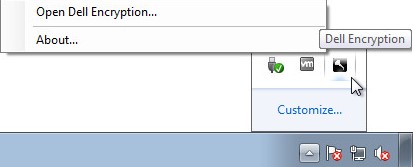
或
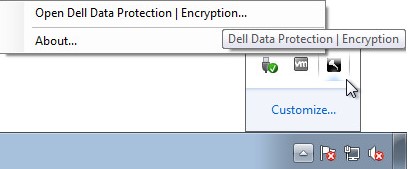
- 在产品 UI 中,单击 ?,然后记录 About Version X.X.X.XX 中的相关信息。前三个数字是要记录的最为重要的数字。在示例中,8.15.0 为前三个数字。

提醒:您的客户端的版本可能与上面的屏幕截图不同。
提醒:有关下载安装程序的信息,请参阅 如何下载 Dell Encryption Enterprise 或 Dell Encryption Personal 。
要使用安装程序识别产品版本:
- 右键单击 [INSTALLER],然后选择 Properties。
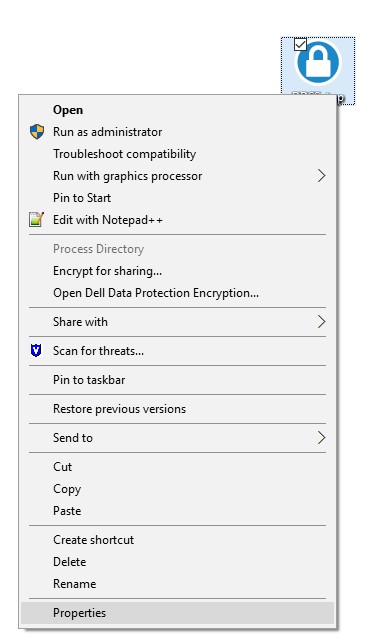
提醒:[INSTALLER] =
- Dell Encryption Enterprise = DDSSetup.exe
- Dell Encryption Personal = DDSSetup.exe
- Dell Data Protection | Enterprise Edition = DDPSetup.exe
- Dell Data Protection | Personal Edition = DDPSetup.exe
- 单击 Details 选项卡。

- 记下产品版本。前三个数字是要记录的最为重要的数字。在示例中,8.15.0 为前三个数字。
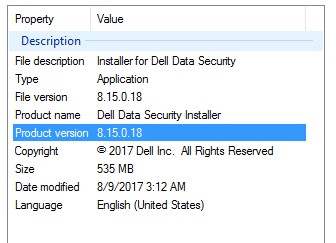
提醒:您的客户端的版本可能与上面的屏幕截图不同。
要联系支持部门,请参阅 Dell Data Security 国际支持电话号码。
转至 TechDirect,在线生成技术支持请求。
要获得更多见解和资源,请加入戴尔安全社区论坛。
추가 정보
비디오
해당 제품
Dell Encryption문서 속성
문서 번호: 000124591
문서 유형: Solution
마지막 수정 시간: 25 9월 2023
버전: 11
다른 Dell 사용자에게 질문에 대한 답변 찾기
지원 서비스
디바이스에 지원 서비스가 적용되는지 확인하십시오.