Dell Security Management Server Virtual Upgrade Fails on Interfaces.d
요약: Upgrading Dell Security Management Server Virtual appliance fails with an error referencing the interfaces.d directory.
이 문서는 다음에 적용됩니다.
이 문서는 다음에 적용되지 않습니다.
이 문서는 특정 제품과 관련이 없습니다.
모든 제품 버전이 이 문서에 나와 있는 것은 아닙니다.
증상
Affected Products:
- Dell Security Management Server Virtual
Affected Versions:
- v10.2.9 to v10.2.11
Affected Operating Systems:
- Linux
The Dell Security Management Server Virtual upgrade stops with a message Failed to restore from backup file: and this occurs after attempting the restore of the files in the etc/network/interfaces directory.
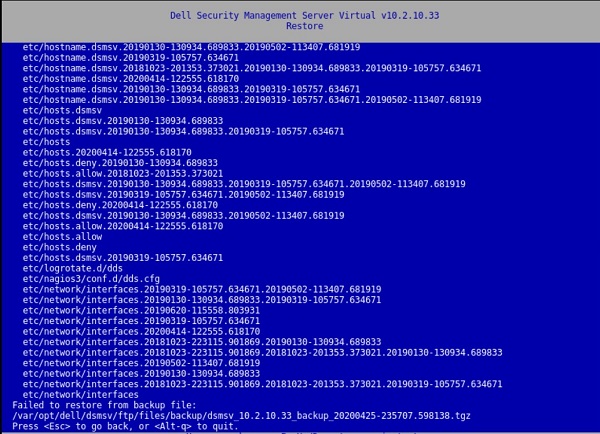
Figure 1: (English Only) Restore returns Failed to restore from backup file:
Pressing a key result in a window with:
[Errno 21] Is a directory:
‘/etc/network/interfaces.d’.
This error is also present in the /var/log/messages file:
![[Errno 21] Is a directory: ‘/etc/network/interfaces.d’](https://supportkb.dell.com/img/ka06P000000sfPFQAY/ka06P000000sfPFQAY_en_US_6.jpeg)
Figure 2: (English Only) [Errno 21] Is a directory: ‘/etc/network/interfaces.d’
원인
Not Applicable
해결
To resolve the issue, follow the instructions to rename the interfaces.d directory.
- Log in to the Dell Security Management Server Virtual Console.
- Select Launch Shell in the Dell Security Management Server Virtual Administration Console.
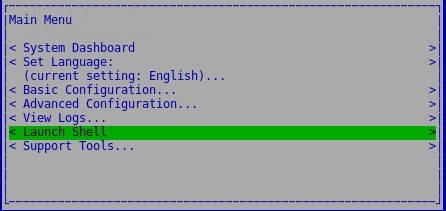
Figure 3: (English Only) Launch Shell
- Switch to the
dellsupportuser account using the commandsu dellsupport.

Figure 4: (English Only) Switch to dellsupport
- Provide the password for the
dellsupportuser. By default, the password isdellsupport.

Figure 5: (English Only) Type password
- Rename the interfaces.d directory with the following command:
sudo mv /etc/network/interfaces.d /etc/network/interfaces.old

Figure 6: (English Only) Type sudo mv /etc/network/interfaces.d /etc/network/interfaces.old
- Exit out of the shell by typing
exitor usingctrl-dtwice and run the upgrade through the user interface.
To contact support, reference Dell Data Security International Support Phone Numbers.
Go to TechDirect to generate a technical support request online.
For additional insights and resources, join the Dell Security Community Forum.
해당 제품
Dell Encryption문서 속성
문서 번호: 000131146
문서 유형: Solution
마지막 수정 시간: 06 7월 2023
버전: 10
다른 Dell 사용자에게 질문에 대한 답변 찾기
지원 서비스
디바이스에 지원 서비스가 적용되는지 확인하십시오.