Latitude 5410: Keyboard Function Key Guide
요약: The following guide lists the keyboard shortcuts available and the functions they perform on the Dell Latitude 5410 Laptop.
이 문서는 다음에 적용됩니다.
이 문서는 다음에 적용되지 않습니다.
이 문서는 특정 제품과 관련이 없습니다.
모든 제품 버전이 이 문서에 나와 있는 것은 아닙니다.
증상
Keyboard Shortcut Key Functions
The below table is a list of combination short-cut key functions available on the Latitude 5410 laptop.
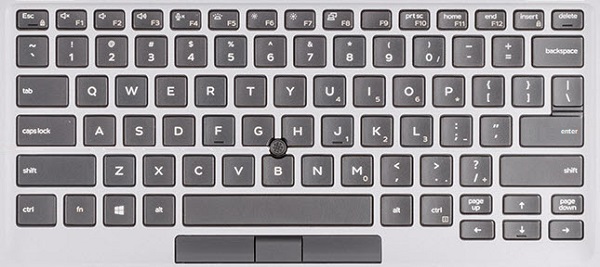
(Figure.1 Latitude 5410 US Keyboard Layout)
원인
| Keys | Primary behavior | Secondary behavior (Fn + Key) |
|---|---|---|
| Fn + Esc | Escape |
Toggle Fn-key lock |
| Fn + F1 |
Mute audio |
F1 |
| Fn + F2 |
Decrease volume |
F2 |
| Fn + F3 |
Increase volume |
F3 |
| Fn + F4 |
Mute microphone |
F4 |
| Fn + F5 |
Turn on/off keyboard backlight |
F5 |
| Fn + F6 |
Decrease brightness |
F6 |
| Fn + F7 |
Increase brightness |
F7 |
| Fn + F8 |
Switch to external display |
F8 |
| Fn + F10 |
Print screen |
F10 |
| Fn + F11 |
Home |
F11 |
| Fn + 12 |
End |
F12 |
| Fn + Ctrl |
Open application menu |
-- |
해결
 Visit our Keyboard knowledge base for additional resources and information.
 For additional articles and information visit our Touchpad support page.
 Additional articles and information can also be found on our Mouse support page.
해당 제품
Latitude 5410문서 속성
문서 번호: 000133658
문서 유형: Solution
마지막 수정 시간: 29 4월 2026
버전: 7
다른 Dell 사용자에게 질문에 대한 답변 찾기
지원 서비스
디바이스에 지원 서비스가 적용되는지 확인하십시오.