Data Protection Advisor (DPA): Error message ‘Error 401: Unauthorized Action’ appears in Gui
요약: Error message ‘Error 401: Unauthorized Action’ appears in Gui
이 문서는 다음에 적용됩니다.
이 문서는 다음에 적용되지 않습니다.
이 문서는 특정 제품과 관련이 없습니다.
모든 제품 버전이 이 문서에 나와 있는 것은 아닙니다.
증상
User sees an error message on the DPA GUI and has to log back in again:
Error 401: Unauthorized Action
원인
This error happens when a user is logged into the DPA GUI for hours at a time and the open session is being closed due to inactivity or some other environment factor closes the session.
해결
The error can be ignored as it has no impact on DPA functionality.
User can log in to DPA again and continue as normal.
The following setting can be configured on the GUI to force a clean logoff after a specific period:
Administration > User & Security > Security Settings.
The Session Expiration parameter can be set to example for 6 hours (default is off):
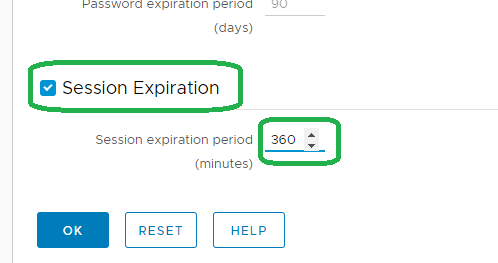
Note: The above feature was introduced on 18.2.
Please contact DELL Technical Support for further information.
User can log in to DPA again and continue as normal.
The following setting can be configured on the GUI to force a clean logoff after a specific period:
Administration > User & Security > Security Settings.
The Session Expiration parameter can be set to example for 6 hours (default is off):
Note: The above feature was introduced on 18.2.
Please contact DELL Technical Support for further information.
해당 제품
Data Protection Advisor제품
Data Protection Advisor문서 속성
문서 번호: 000173588
문서 유형: Solution
마지막 수정 시간: 05 5월 2026
버전: 4
다른 Dell 사용자에게 질문에 대한 답변 찾기
지원 서비스
디바이스에 지원 서비스가 적용되는지 확인하십시오.