Avamar - PDM(Proxy Deployment Manager) 권장 사항이 다음 내부 오류로 실패함 "java.lang.ArrayIndexOutOfBoundsException: -1"
요약: Avamar - PDM(Proxy Deployment Manager) 권장 사항이 다음 내부 오류로 실패함 "java.lang.ArrayIndexOutOfBoundsException: -1"
이 문서는 다음에 적용됩니다.
이 문서는 다음에 적용되지 않습니다.
이 문서는 특정 제품과 관련이 없습니다.
모든 제품 버전이 이 문서에 나와 있는 것은 아닙니다.
증상
Avamar 19.3 이상에서 다음 내부 오류로 인해 PDM 권장 사항이 실패함:
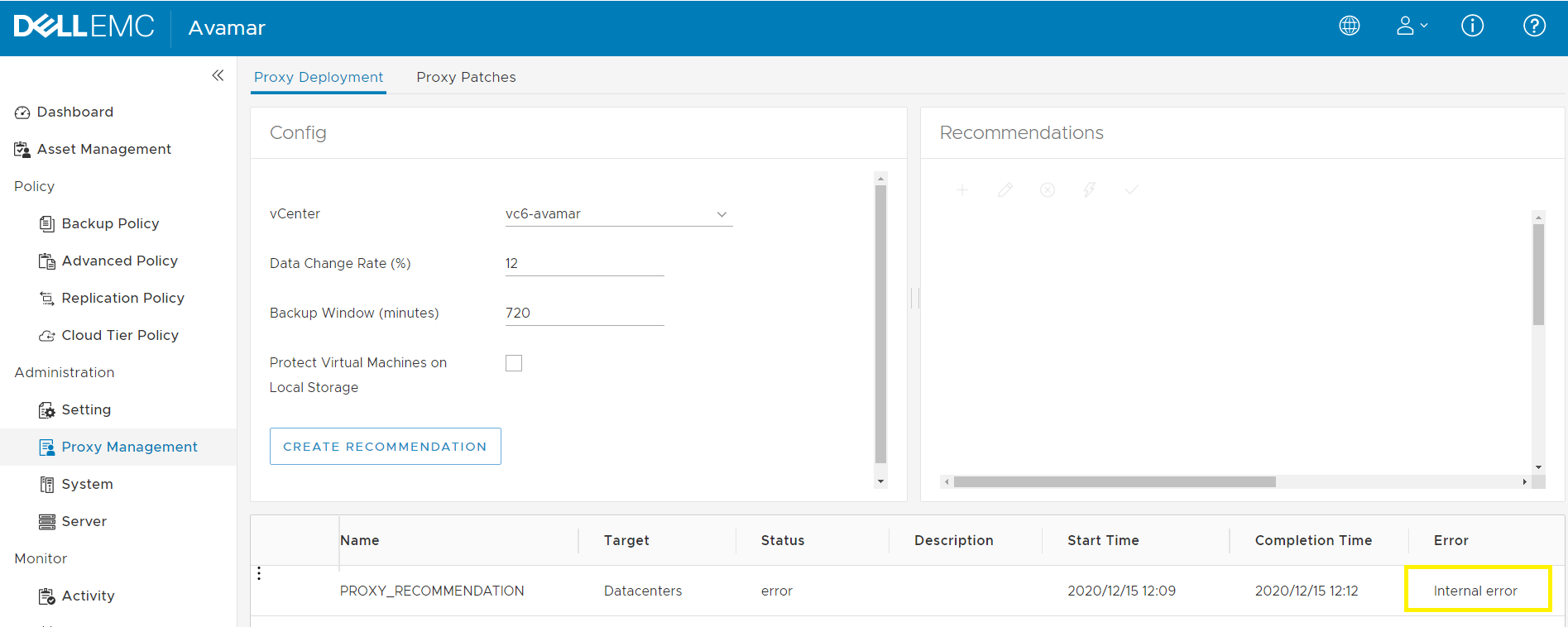
Avamar Server에서 /usr/local/avamar/var/log/vcs/deploymanager.log에서 다음과 같은 "ava.lang.ArrayIndexOutOfBoundsException: -1" 자바 예외가 표시됩니다.
Avamar Server에서 /usr/local/avamar/var/log/vcs/deploymanager.log에서 다음과 같은 "ava.lang.ArrayIndexOutOfBoundsException: -1" 자바 예외가 표시됩니다.
2020-12-10T11:21:51.378+0200 INFO [cTaskExecutor-1][ util.MCCipherUtil# getResultValue]: jarPath==/usr/local/avamar-tomcat-8.5.57/webapps/deploymanager/WEB-INF/vcs-util.jar 2020-12-10T11:21:52.572+0200 INFO [cTaskExecutor-1][ util.MCCipherUtil# getResultValue]: proc.exitValue():0 2020-12-10T11:21:52.574+0200 ERROR [cTaskExecutor-1][CredentialsMcConnectionFactory# newMcConnection]: Error connecting to mc service java.lang.ArrayIndexOutOfBoundsException: -1 at com.emc.avamar.vmware.util.MCCipherUtil.getResultValue(MCCipherUtil.java:110) at com.emc.avamar.vmware.util.MCCipherUtil.getMCRootPW(MCCipherUtil.java:35) at com.emc.avamar.vmware.deploymanager.service.impl.DefaultCredentialsMcConnectionFactory.newMcConnection(DefaultCredentialsMcConnectionFactory.java:77) at com.emc.avamar.vmware.deploymanager.service.impl.UserSessionService.login(UserSessionService.java:121)
원인
Avamar 19.3에서 새로운 RSA Lockbox가 도입되었습니다.
/usr/local/avamar/var/lockbox/avlockbox.clb
NULL에서 항목을 검색할 때 java.lang.ArrayIndexOutOfBoundsException 예외가 발생합니다.
/usr/local/avamar/var/lockbox/avlockbox.clb
NULL에서 항목을 검색할 때 java.lang.ArrayIndexOutOfBoundsException 예외가 발생합니다.
해결
Avamar 서버에서 change-password 명령을 실행하여 루트 사용자에 대한 "Avamar Server" 비밀번호를 변경합니다. 이는 Lockbox 상태를 수정합니다. 참고: 1. change-password는 gsan/mcs 서비스를 재시작합니다. 2. 동일한 비밀번호를 사용하면 문제가 해결됩니다.
root@ave193:~/#: change-passwords [change-passwords version 2.1] Identity added: /root/.ssh/rootid (/root/.ssh/rootid) Identity added: /root/.ssh/rootid (/root/.ssh/rootid) Do you wish to specify one or more additional SSH passphrase-less private keys that are authorized for root operations? Answer n(o) here unless there are known inconsistencies in ~root/.ssh/authorized_keys files among the various nodes. Note that the following key will be used automatically (i.e., there is no need to re-specify it here): /root/.ssh/rootid y(es), n(o), h(elp), q(uit/exit): y -------------------------------------------------------- Please enter a list of paths to SSH private keys, one per line. These keys should be passphrase-less. Tilde references are permitted in the paths. Example: ~/.ssh/dpnid.orig Press Enter or Return after each response. An empty response (a blank line) ends the list. [00] You entered nothing. Is that what you intended? y(es), n(o), q(uit/exit): y -------------------------------------------------------- The following is a test of OS root authorization with the currently loaded SSH key(s). If the authorization test fails, then you might be missing an appropriate private key, e.g., rootid or dpnid. -> In that event, re-run this program and, when prompted, specify as many SSH private key files as are necessary in order to complete root operations. Starting root authorization test with 600 second timeout... End of root authorization test. -------------------------------------------------------- Change OS (login) passwords? y(es), n(o), q(uit/exit): n -------------------------------------------------------- Generate new SSH keys? y(es), n(o), h(elp), q(uit/exit): n -------------------------------------------------------- Change Avamar Server passwords? y(es), n(o), q(uit/exit): y -------------------------------------------------------- Please enter the CURRENT server password for "root" (Entering an empty (blank) line twice quits/exits.) > Checking Avamar Server root password (1200 second timeout)... Avamar Server current root password accepted. -------------------------------------------------------- Change Avamar Server password for "MCUser"? y(es), n(o), q(uit/exit): n -------------------------------------------------------- Change Avamar Server password for "root"? y(es), n(o), q(uit/exit): y Please enter a new Avamar Server password for user "root". (Entering an empty (blank) line twice quits/exits.) > Enter the same Avamar Server password again. (Entering an empty (blank) line twice quits/exits.) > Accepted Avamar Server password for "root". -------------------------------------------------------- Change Avamar Server password for "repluser"? y(es), n(o), q(uit/exit): n -------------------------------------------------------- Please enter the CURRENT server password for "MCUser" (Entering an empty (blank) line twice quits/exits.) > Checking Avamar Server MCUser password (1200 second timeout)... Avamar Server current MCUser password accepted. -------------------------------------------------------- Change the viewuser password? y(es), n(o), h(elp), q(uit/exit): n -------------------------------------------------------- Do you wish to proceed with your changes on the selected node? Answering y(es) will proceed to make changes. Answering n(o) or q(uit) will not proceed. y(es), n(o), q(uit/exit): y Changing Avamar Server passwords... Suspending maintenance cron jobs Checking Administrator Server status... Stopping Administrator Server... Changing the passwords for the local Avamar Server... The passwords for the local Avamar Server have been changed. Starting process of updating Administrator and Enterprise Manager configurations... Running script to update Administrator and Enterprise Manager configurations on node 0.s... [Logging to /usr/local/avamar/var/change-passwords.log...] Done with updating Administrator configuration on node 0.s... Starting process of updating client configurations... Running script to update client configuration on all... [Logging to /usr/local/avamar/var/change-passwords.log...] Updating client configuration on node 0.0... Done updating client configuration on 0.0... Starting process of updating mccli configuration files... Running script to update mccli configuration files on node set "0.0"... [Logging to /usr/local/avamar/var/change-passwords.log...] Done with updating mccli configuration files on node 0.0... Checking Administrator Server status... Starting Administrator Server... Resuming maintenance cron jobs Stopping EMT subsystem Starting EMT subsystem -------------------------------------------------------- Done. 참고: - 원격 사용자 계정에서 mccli(관리자 명령줄 인터페이스)를 사용하는 경우 각 원격 계정의 mccli 기본 설정/구성 파일(일반적으로 ~USER/.avamardata/var/mc/cli_data/prefs/mcclimcs.xml)의 사본에서 비밀번호를 업데이트하십시오. - 관리자 GUI 또는 'dpnctl start sched'를 통해 일정을 다시 시작하십시오.
추가 정보
유사한 "PDM internal error" 문제입니다. 다음을 참조하십시오. KB 181136 -"Avamar - PDM(Proxy Deployment Manager) 권장 사항이 "org.apache.axis2.AxisFault: Socket is closed"로 인한 내부 오류 때문에 실패함
해당 제품
Avamar문서 속성
문서 번호: 000181440
문서 유형: Solution
마지막 수정 시간: 30 11월 2022
버전: 4
다른 Dell 사용자에게 질문에 대한 답변 찾기
지원 서비스
디바이스에 지원 서비스가 적용되는지 확인하십시오.