PowerVault ME5: No Base unit preference option available while creating a user through PowerVault Manager.
요약: There is no option to change the base unit preference while creating a user through PowerVault Manager on ME5 series arrays. The previous generation PowerVault Manager on ME4 series presented this option. Use PowerVault command line interface to change this value. ...
이 문서는 다음에 적용됩니다.
이 문서는 다음에 적용되지 않습니다.
이 문서는 특정 제품과 관련이 없습니다.
모든 제품 버전이 이 문서에 나와 있는 것은 아닙니다.
증상
In PowerVault ME5, creating a user in PowerVault Manager does not present the option "base preference.”
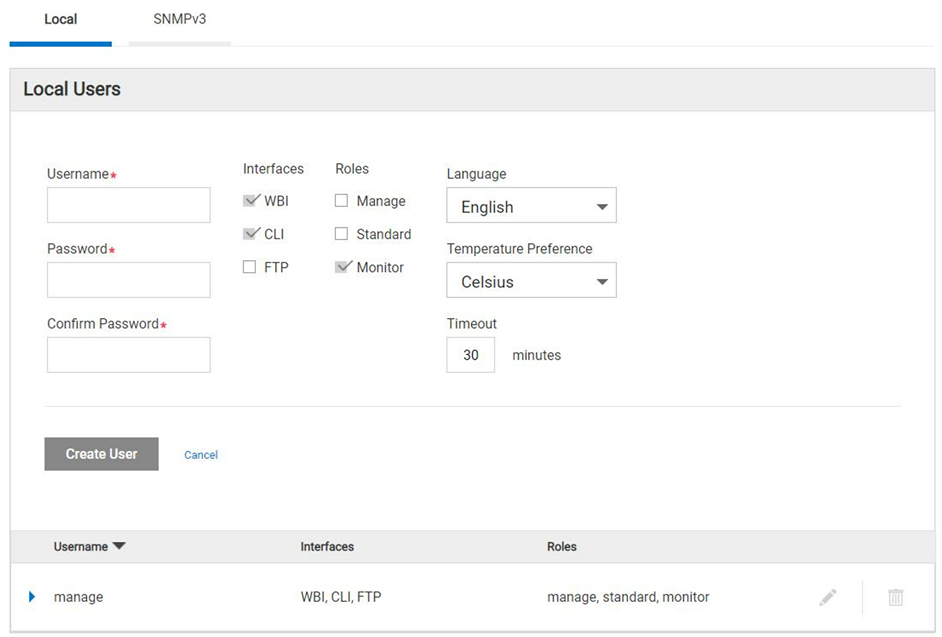
Figure 1 - PowerVault Manager create user dialog.
원인
Dell engineering identified that this feature is not part of the PowerVault Manager web-based interface (WBI) in the ME5 product family and control base preference can only be set using CLI. This is by design.
NOTE: Most host operating systems measure volume capacity using base 2.
해결
-
Using command line interface (CLI) the base preference value can be set while creating a new user.
Here is an example showing how to create a user with base 2 preferences:
# create user base 2 interfaces wbi roles monitor Michael
Enter new password: ********
Re-enter new password: ********
Success: Command completed successfully. (Michael) - The new user was created. (2022-04-05 13:16:17)

# show users
Username             Roles                    User Type    User Locale            WBI   CLI   FTP   SNMP  Authentication Type Privacy Type
  Password                         Privacy Password                 Trap Host Address Trap Host Port
-------------------------------------------------------------------------------------------------------------------------------------------
John                 monitor                  Standard     English                x
  ********                         ********
Michael              monitor                  Standard     English                x
  ********                         ********
manage               manage, standard, monitor  Standard     English                x     x     x
  ********                         ********
-------------------------------------------------------------------------------------------------------------------------------------------
Success: Command completed successfully. (2022-04-05 13:16:29)
-
To verify what is the base preference created during user creation through CLI.
Below are the CLI reference commands:
# set CLI json
{
"status":[
  {
    "object-name":"status",
    "meta":"/meta/status",
    "response-type":"Success",
    "response-type-numeric":0,
    "response":"Command completed successfully. (2022-04-05 13:16:36)",
    "return-code":0,
    "component-id":"",
    "time-stamp":"2022-04-05 13:16:36",
    "time-stamp-numeric":1649164596
  }
]
}


# show users Michael
{
"users":[
  {
    "object-name":"user",
    "meta":"/meta/users",
    "username":"Michael",
    "roles":"monitor",
    "user-type":"Standard",
    "user-type-numeric":2,
    "user-locale":"English",
    "user-locale-numeric":0,
    "interface-access-WBI":"x",
    "interface-access-CLI":"",
    "interface-access-FTP":"",
    "interface-access-SMIS":"",
    "interface-access-SNMP":"",
    "storage-size-base":2,
    "storage-size-precision":1,
    "storage-size-units":"Auto",
    "temperature-scale":"Celsius",
    "timeout":1800,
    "authentication-type":"",
    "privacy-type":"",
    "password":"********",
    "default-password-changed":"True",
    "default-password-changed-numeric":1,
    "privacy-password":"********",
    "trap-destination":"",
    "trap-port":""
  }
],
"status":[
  {
    "object-name":"status",
    "meta":"/meta/status",
    "response-type":"Success",
    "response-type-numeric":0,
    "response":"Command completed successfully. (2022-04-05 13:16:44)",
    "return-code":0,
    "component-id":"",
    "time-stamp":"2022-04-05 13:16:44",
    "time-stamp-numeric":1649164604
  }

]
}

# set cli console
Success: Command completed successfully. (2022-04-05 13:19:50)
NOTE: Revert the CLI from *Json to *console.
해당 제품
PowerVault ME5012, PowerVault ME5024, PowerVault ME5084문서 속성
문서 번호: 000198077
문서 유형: Solution
마지막 수정 시간: 31 5월 2023
버전: 4
다른 Dell 사용자에게 질문에 대한 답변 찾기
지원 서비스
디바이스에 지원 서비스가 적용되는지 확인하십시오.