NVP vProxy - Virtual Machine Image Recover failing with Error registering VM: ServerFaultCode: Permission to perform this operation was denied.
요약: Virtual Machine "Image Recover" consistently failing using recently upgraded vCenter. NetWorker vProxy Image Recover has stopped working after recent vCenter upgrade.
이 문서는 다음에 적용됩니다.
이 문서는 다음에 적용되지 않습니다.
이 문서는 특정 제품과 관련이 없습니다.
모든 제품 버전이 이 문서에 나와 있는 것은 아닙니다.
증상
The NetWorker vProxy recover session log shows:
159373:nsrvproxy_recover: vProxy Log: ####-##-#####:##:### ERROR:  [75] Error registering VM: ServerFaultCode: Permission to perform this operation was denied.
159373:nsrvproxy_recover: vProxy Log: ####-##-#####:##:### ERROR:  [75] Error in registering VM "[####l-####-SAN-Datastore] ###_1/###_1.vmx". "ServerFaultCode: Permission to perform this operation was denied."
159373:nsrvproxy_recover: vProxy Log: ####-##-#####:##:### WARN:   [75] RecoverVMSessions "####-###-###-###-113093c9524a" cleaning up running recover session due to error.
159373:nsrvproxy_recover: vProxy Log: ####-##-#####:##:### INFO:   [75] Successfully removed folder/file "[####l-####-SAN-Datastore] ###_1".
159373:nsrvproxy_recover: vProxy Log: ####-##-#####:##:### INFO:   [75] Disconnected from session on vCenter '####.###.###'.
159373:nsrvproxy_recover: vProxy Log: ####-##-#####:##:### ERROR:  [75] Failed to recover to a new VM. ServerFaultCode: Permission to perform this operation was denied.
152793:nsrvproxy_recover: vProxy Log Ends =================================================
153335:nsrvproxy_recover: Virtual machine recovery failed: vProxy recovery failed with error message: Session "####-###-###-###-113093c9524a" failed. Error: ServerFaultCode: Permission to perform this operation was denied..vProxy Recover Log locations
/opt/emc/vproxy/runtime/logs/vrecoverd
/opt/emc/vproxy/runtime/logs/recycle/vrecoverd
원인
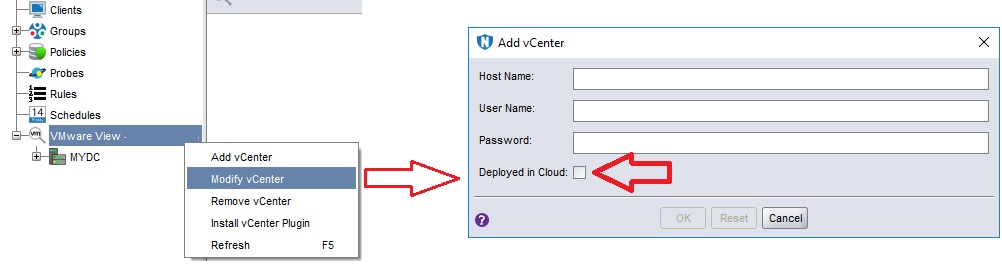
The VMware vCenter has the "Deployed in Cloud" checkbox Enabled in NetWorker; however, the vCenter server is not deployed in Cloud.
해결
- Goto NetWorker Management Console (NMC) user interface
- Launch NetWorker Administration Window.
- Right Click vCenter
- Click "Modify vCenter."
- Clear the "Deployed in Cloud" checkbox.
- Perform the VM restore again, and it completes successfully.
- Perform VM backups as well to ensure no impact to data protection.
Alternatively, this change can be performed from a nsradmin prompt on the NetWorker server:
[root@nsr ~]# nsradmin
NetWorker administration program.
Use the "help" command for help, "visual" for full-screen mode.
nsradmin> show name; cloud
nsradmin> print type: nsr hypervisor
                        name: vcsa.amer.lan;
                       cloud: Yes;
nsradmin> update cloud: No
                       cloud: No;
Update? y
updated resource id 177.0.110.157.0.0.0.0.243.35.70.103.192.168.9.150(19710)
nsradmin> print
                        name: vcsa.amer.lan;
                       cloud: No;
nsradmin> quit
추가 정보
This issue can also be related to a user permissions issue at the vCenter level: NVP vProxy: Image Restore Fails "ServerFaultCode: Permission to perform this operation was denied."
해당 제품
NetWorker Family문서 속성
문서 번호: 000205793
문서 유형: Solution
마지막 수정 시간: 12 3월 2025
버전: 4
다른 Dell 사용자에게 질문에 대한 답변 찾기
지원 서비스
디바이스에 지원 서비스가 적용되는지 확인하십시오.