Data Domain: Reboot loop at "NVRAM driver load and initialization"
요약: PowerProtect Data Domain systems have reported being stuck in a reboot loop. The NVRAM driver fails to load or initialize successfully resulting in a system reboot.
이 문서는 다음에 적용됩니다.
이 문서는 다음에 적용되지 않습니다.
이 문서는 특정 제품과 관련이 없습니다.
모든 제품 버전이 이 문서에 나와 있는 것은 아닙니다.
지침
Affected Systems:
- PowerProtect DD6400 | DD6900 | DD9400 | DD9900
- All DDOS versions
Symptoms:
- Unable to boot into DDOS
- Serial output (Virtual Console - iDRAC) shows Boot process restarts after "NVRAM driver load and initialization"
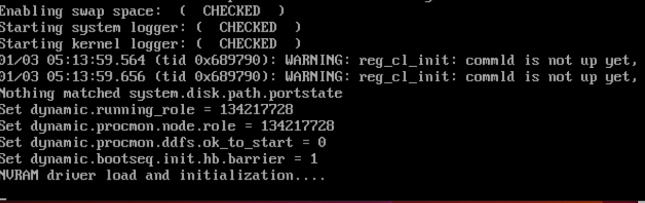
Cause:
- The DIMM located on the NVRAM card is not seated or installed correctly.
- OR
- The NVRAM card is not installed correctly or is faulty.
Required Action:
With the system powered off:
- Check and reseat the DIMM on the NVRAM card.
- Here is a image showing the NVRAM DIMM not clipped in correctly
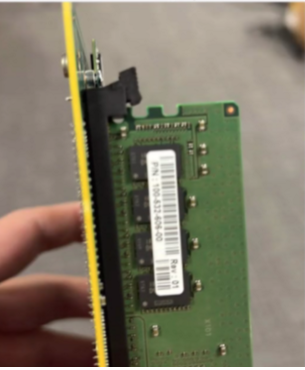
- Ensure the NVRAM card or PCI riser are seated securely.
- Power up and retry booting the system.
- If symptoms persist, replace the NVRAM (Part Number: DGK85).
해당 제품
Data Domain, DD6400 Appliance제품
Data Domain, Data Domain Deduplication Storage Systems, DD6900 Appliance, DD9400 Appliance, DD9900 Appliance문서 속성
문서 번호: 000208323
문서 유형: How To
마지막 수정 시간: 29 9월 2025
버전: 5
다른 Dell 사용자에게 질문에 대한 답변 찾기
지원 서비스
디바이스에 지원 서비스가 적용되는지 확인하십시오.