PowerProtect - SQL discovery fails with ASD0002 or ASDS0018 error
요약: PowerProtect Data Manager SQL discovery fails with ASD0002 or ASDS0018 error.
이 문서는 다음에 적용됩니다.
이 문서는 다음에 적용되지 않습니다.
이 문서는 특정 제품과 관련이 없습니다.
모든 제품 버전이 이 문서에 나와 있는 것은 아닙니다.
증상
Within PPDM, when attempting to run a discovery of a Microsoft SQL Server asset, the discovery may fail with the following errors:
In the DPSApps\AgentService\logs\OpAgentSvc* log, the following error is logged:
ADA0002: Unable to discover ASSETS on host <Server SQL Name> because of an agent issue.
Unable to perform applications discovery because agent failed to create the discovery session.
Or
ASDS0018: Discovery of Assets failed on the host <SQL Server Name> for AddOn MICROSOFT_SQL_DATABASE_SYSTEM.
In the DPSApps\AgentService\logs\OpAgentSvc* log, the following error is logged:
ErrCode: -2147467259, Error: SSL Provider: The certificate chain was issued by an authority that is not trusted.
In the System event logs on the SQL server, one or more of the following errors may be logged:
System Event Logs:
Log Name:      System
Source:        Schannel
Date:          <DATE>
Event ID:      36882
Task Category: None
Level:         Error
Keywords:
User:          SYSTEM
Computer:      <SQL Server Name>
Description:
The certificate received from the remote server was issued by an untrusted certificate authority. Because of this, none of the data contained in the certificate can be validated. The SSL connection request has failed. The attached data contains the server certificate.

Log Name:      System
Source:        Schannel
Date:          <DATE>
Event ID:      36884
Task Category: None
Level:         Error
Keywords:
User:          SYSTEM
Computer:      <SQL Server Name>
Description:
The certificate received from the remote server does not contain the expected name. It is therefore not possible to determine whether we are connecting to the correct server. The server name we were expecting is crcorpsqldev02. The TLS connection request has failed. The attached data contains the server certificate.

Log Name:      System
Source:        Schannel
Date:          <DATE>
Event ID:      36888
Task Category: None
Level:         Error
Keywords:
User:          SYSTEM
Computer:      <SQL Server Name>
Description:
A fatal alert was generated and sent to the remote endpoint. This may result in termination of the connection. The TLS protocol defined fatal error code is 48. The Windows SChannel error state is 552.
원인
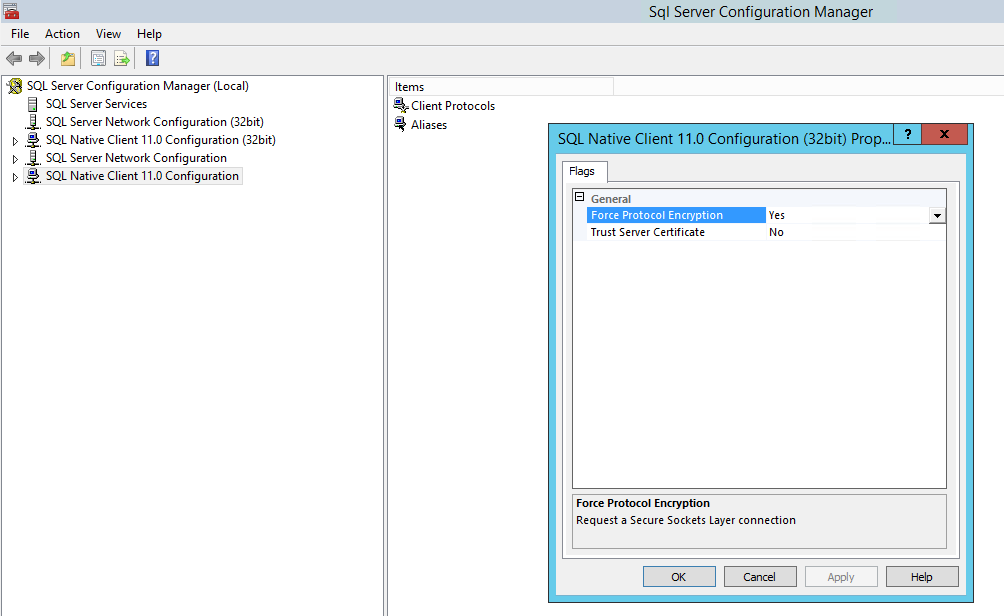
The failure is caused because "Force protocol encryption" is enabled on the SQL Native Client configuration under SQL Server Configuration Manager.
해결
To resolve the issue, follow the steps below:
- Open the SQL Server Configuration Manager
- Right click on SQL Native Client 11.0 Configuration and select properties.
- Set the Force Protocol Encryption value to No and select OK.
- Perform the same steps for the SQL Native Client 11.0 Configuration (32 bit) configuration
- Reboot the SQL Server
- Once the SQL server is up and running, run Discovery from the PPDM UI.
Sometimes, it may be necessary to unregister or uninstall the Agent and reinstall for discovery to work.
해당 제품
PowerProtect Data Manager문서 속성
문서 번호: 000214332
문서 유형: Solution
마지막 수정 시간: 22 9월 2023
버전: 2
다른 Dell 사용자에게 질문에 대한 답변 찾기
지원 서비스
디바이스에 지원 서비스가 적용되는지 확인하십시오.