Avamar: How to find and download Avamar scripts and tools from the Dell Central Avamar page
요약: This article provides instructions for locating and downloading Avamar scripts and tools to troubleshoot and manage the Avamar backup environment.
이 문서는 다음에 적용됩니다.
이 문서는 다음에 적용되지 않습니다.
이 문서는 특정 제품과 관련이 없습니다.
모든 제품 버전이 이 문서에 나와 있는 것은 아닙니다.
지침
Open the Dell Central page to access customer-accessible scripts in the Avamar-Scripts solution.
Sign in to the Dell Central site with your Dell credentials, or create an account if necessary.

The following screen appears including the entire list of scripts and tools that able to be shared with customer level:
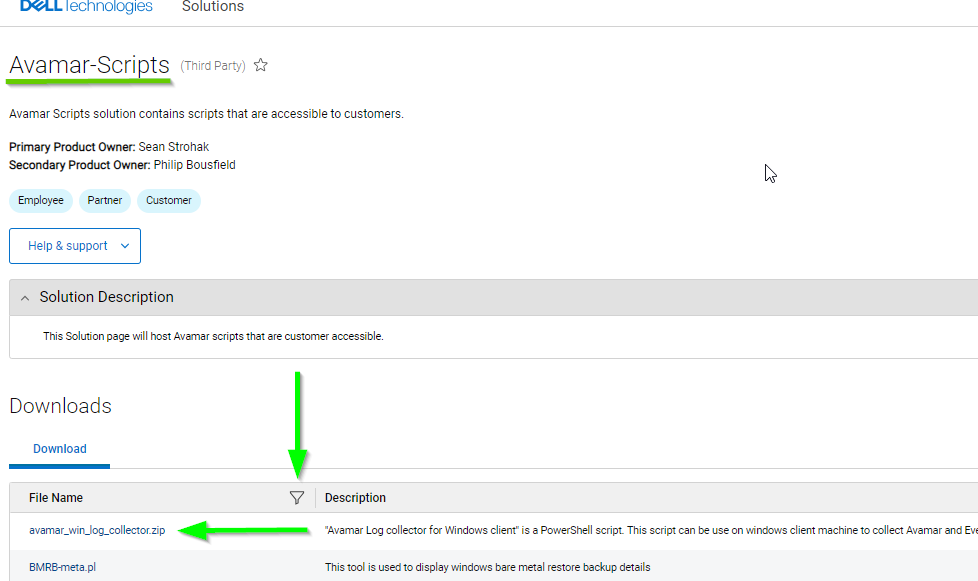
To search for an item, click the search icon and type the item name or part of it:

Another example:

To download an item click the script or tool’s name and, it downloads to the default download folder.
Notes:
Sign in to the Dell Central site with your Dell credentials, or create an account if necessary.
The following screen appears including the entire list of scripts and tools that able to be shared with customer level:
To search for an item, click the search icon and type the item name or part of it:
Another example:
To download an item click the script or tool’s name and, it downloads to the default download folder.
Notes:
- The Dell Central link requires "Sign In" with the Dell support credentials to search and download items.
- These steps are specific to the Avamar product.
- In case the item is not found, contact the Dell Avamar Support team.
해당 제품
Avamar문서 속성
문서 번호: 000225258
문서 유형: How To
마지막 수정 시간: 07 6월 2024
버전: 3
다른 Dell 사용자에게 질문에 대한 답변 찾기
지원 서비스
디바이스에 지원 서비스가 적용되는지 확인하십시오.