OptiPlex 3070: Visual Guide to your Computer
Samenvatting: This article is a visual guide to the external ports and features on the various form factors of the Dell OptiPlex 3070 desktop series.
Dit artikel is van toepassing op
Dit artikel is niet van toepassing op
Dit artikel is niet gebonden aan een specifiek product.
Niet alle productversies worden in dit artikel vermeld.
Symptomen
Note: For a more detailed description of each location, go to the computer manuals at www.dell.com/support
Table of Contents:
- Mini Tower (MT) Front View
- Mini Tower (MT) Rear View
- Small Form Factor (SFF) Front View
- Small Form Factor (SFF) Rear View
- Micro Form Factor (MFF) Front View
- Micro Form Factor (MFF) Rear View
- Additional Info:
Mini Tower (MT) Front View
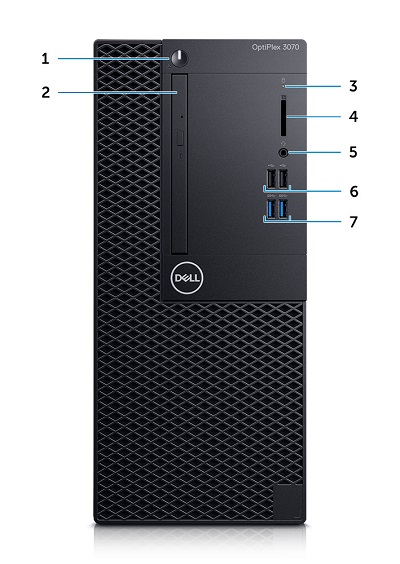
(Fig.1 MT Front View)
| 1 | Power Button and Power LED | 2 | Optical Drive (Optional) |
| 3 | Hard Drive Activity LED | 4 | Memory Card Reader (Optional) |
| 5 | Headset/Universal Audio Jack Connector | 6 | USB 2.0 Connector x2 |
| 7 | USB 3.1 Gen1 Type-A Connector x2 |
Mini Tower (MT) Rear View

(Fig.2 MT Rear View)
| 1 | Line-Out Audio Connector | 2 | Serial Connector (Optional) |
| 3 | HDMI | 4 | DP 1.2/HDMI 2.0/VGA/Serial/Serial-PS/2 (Optional) |
| 5 | DisplayPort Connector | 6 | USB 3.3 Gen1 Type-A Connector x 2 |
| 7 | Service Tag | 8 | USB 2.0 Type-A Connector x 2 (Supports SmartPower On) |
| 9 | NIC Ethernet Connector | 10 | Expansion Card Slots x 4 |
| 11 | Power Connector | 12 | External SMA Antenna Connectors (Optional) |
| 13 | Power Supply Diagnostic LED | 14 | Kensington Security Cable Slot |
| 15 | Padlock Ring |
Small Form Factor (SFF) Front View

(Fig.3 SFF Front View)
| 1 | Optical Drive (Optional) | 2 | Power Button and Power LED |
| 3 | Hard Drive Activity LED | 4 | Memory Card Reader (Optional) |
| 5 | Headset/Universal Audio Jack Connector | 6 | USB 2.0 Connector x2 |
| 7 | USB 3.1 Gen1 Type-A Connector x2 |
Small Form Factor (SFF) Rear View

(Fig.4 SFF Rear View)
| 1 | Line-Out Audio Connector | 2 | Serial Connector (Optional) |
| 3 | DP 1.2/HDMI 2.0/VGA/Serial/Serial PS/2 (Optional) | 4 | HDMI Connector |
| 5 | DisplayPort Connector | 6 | Service Tag |
| 7 | USB 3.1 Gen1 Type-A Connector x2 | 8 | USB 2.0 Connector x2 (Supports SmartPower On) |
| 9 | NIC Ethernet Connector | 10 | Expansion Card Slots x2 |
| 11 | Power Connector | 12 | Power Supply Diagnostic LED |
| 13 | External SMA Antenna Connectors (Optional) | 14 | Kensington Security Cable Slot |
| 15 | Padlock Ring |
Micro Form Factor (MFF) Front View

(Fig.5 MFF Front View)
| 1 | Power Button and Power LED | 2 | Hard Drive Activity LED |
| 3 | Headset/Universal Audio Jack Connector | 4 | Line-Out Connector |
| 5 | USB 3.1 Gen1 Type-A Connector x2 |
Micro Form Factor (MFF) Rear View
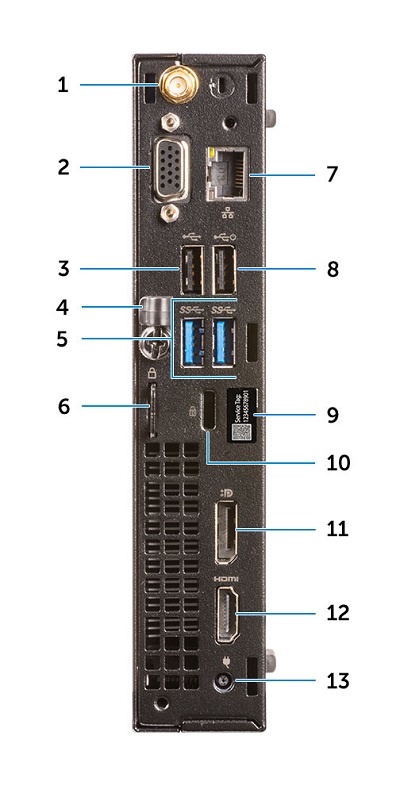
(Fig.6 MFF Rear View)
| 1 | External SMA Antenna Connectors (Optional) | 2 | DP 1.2/HDMI 2.0/VGA/Serial/Serial PS/2 (Optional) |
| 3 | USB 2.0 Connector | 4 | Cable Holder |
| 5 | USB 3.1 Gen1 Type-A Connector x2 | 6 | Padlock Ring |
| 7 | NIC Ethernet Connector | 8 | USB 2.0 Connector (Supports SmartPower On) |
| 9 | Service Tag | 10 | Kensington Security Cable Slot |
| 11 | DisplayPort Connector | 12 | HDMI Connector |
| 13 | Power Connector |
Oorzaak
Not applicable
Oplossing
Not applicable
Extra informatie
Additional Info:
- OptiPlex 3070 Online Manuals and Documents
- OptiPlex 3070 Customer replaceable unit (CRU) teardown index
Getroffen producten
OptiPlex 3070 Tower, OptiPlex 3070 Micro, OptiPlex 3070 Small Form FactorArtikeleigenschappen
Artikelnummer: 000125345
Artikeltype: Solution
Laatst aangepast: 05 jun. 2025
Versie: 9
Vind antwoorden op uw vragen via andere Dell gebruikers
Support Services
Controleer of uw apparaat wordt gedekt door Support Services.