Dell ESA 7.0 PAK Manager PAK file DellEMCEnterpriseStorageAnalytics-7.0.0-build-2260_signed.pak is not in zip format.
Samenvatting: PAK Manager PAK file DellEMCEnterpriseStorageAnalytics-7.0.0-build-2260_signed.pak is not in zip format.
Dit artikel is van toepassing op
Dit artikel is niet van toepassing op
Dit artikel is niet gebonden aan een specifiek product.
Niet alle productversies worden in dit artikel vermeld.
Symptomen
In VMware vRealize Operations (vROps), when trying to upload this PAK file DellEMCEnterpriseStorageAnalytics-7.0.0-build-2260_signed.pak, keep seeing a message appear:
PAK Manager: PAK file DellEMCEnterpriseStorageAnalytics-7.0.0-build-2260_signed.pak is not in zip format.OR
PAK Manager: PAK file reservedTemp_2696460655826554461.pak is not in zip format

Oorzaak
The downloaded pak file was corrupted.
Oplossing
Before using the downloaded file, it is always good practice to run a checksum to confirm the integrity of the file.
1. Download the ESA 7.0 file (DellEMCEnterpriseStorageAnalytics-7.0.0-build-2260_signed.pak) and get its checksum value.
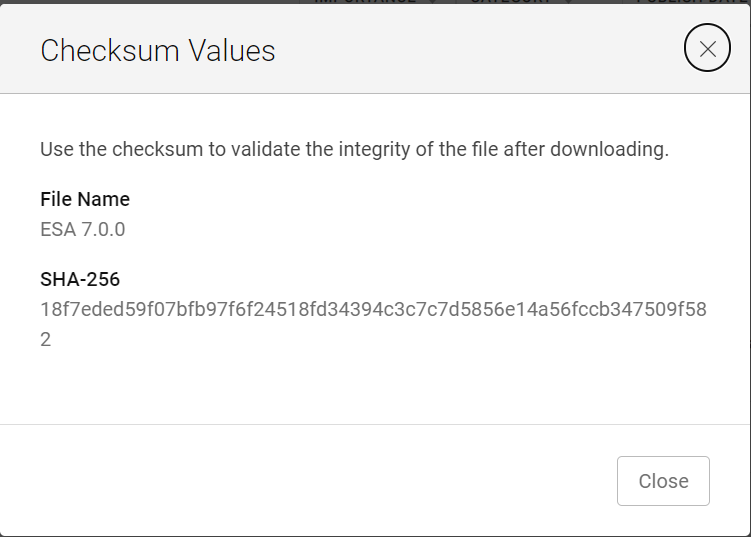
2. Invoke PowerShell
3. Run the checksum to verify that the alphanumeric checksum value of the downloaded file matches the one stated on its website.

4. Select a solution to install

5. Click "UPLOAD" and see that the validated file upload successfully.

1. Download the ESA 7.0 file (DellEMCEnterpriseStorageAnalytics-7.0.0-build-2260_signed.pak) and get its checksum value.
2. Invoke PowerShell
Input:
Press winkey+ R.
Type cmd.
The command prompt is opened.
Type PowerShell and press enter.
3. Run the checksum to verify that the alphanumeric checksum value of the downloaded file matches the one stated on its website.
4. Select a solution to install
5. Click "UPLOAD" and see that the validated file upload successfully.
Artikeleigenschappen
Artikelnummer: 000204311
Artikeltype: Solution
Laatst aangepast: 12 mrt. 2024
Versie: 2
Vind antwoorden op uw vragen via andere Dell gebruikers
Support Services
Controleer of uw apparaat wordt gedekt door Support Services.