Comment identifier la version du programme d’installation principal de Dell Data Security
Samenvatting: Découvrez comment identifier la version du programme d’installation principal de Dell Data Security (anciennement Dell Data Protection) en suivant ces instructions détaillées.
Dit artikel is van toepassing op
Dit artikel is niet van toepassing op
Dit artikel is niet gebonden aan een specifiek product.
Niet alle productversies worden in dit artikel vermeld.
Instructies
Remarque :
- depuis mai 2022, Dell Endpoint Security Suite Enterprise n’est plus couvert par les services de maintenance. Ce produit et ses articles ne sont plus mis à jour par Dell.
- Depuis janvier 2019, Dell Endpoint Security Suite Pro a atteint sa fin de maintenance. Ce produit et ses articles ne sont plus mis à jour par Dell.
- Pour plus d’informations, consultez l’article Politique relative à la fin de vie et à la fin de prise en charge de Dell Data Security. Si vous avez des questions concernant des articles, contactez votre équipe des ventes ou endpointsecurity@dell.com.
- Consultez l’article sur la sécurité des points de terminaison pour plus d’informations sur les produits actuels.
Il peut être utile de connaître la version du programme d’installation principal de Dell Data Security (anciennement Dell Data Protection) pour :
- Identifier les problèmes connus
- Comprendre les changements de flux de travail.
- Vérifier la configuration matérielle
Produits concernés :
- Dell Encryption Enterprise
- Dell Data Protection | Enterprise Edition
- Dell Encryption Personal
- Dell Data Protection | Personal Edition
- Dell Endpoint Security Suite Enterprise
- Dell Endpoint Security Suite Enterprise
Systèmes d’exploitation concernés :
- Windows
- Le [PROGRAMME D’INSTALLATION PRINCIPAL] doit être téléchargé avant d’identifier la version.
- Le nom du produit [PROGRAMME D’INSTALLATION PRINCIPAL] varie en fonction de l’application :
DDSSetup.exeDDSSetup. exe pour Dell Encryption EnterpriseDDSSetup.exeDDSSetup. exe pour Dell Encryption PersonalDDSSuite.exeDell Endpoint Security Suite EnterpriseDDSSuite.exepour Dell Endpoint Security SuiteDDPSetup.exeDDPSetup.exe pour Dell Data Protection | Enterprise EditionDDPSetup.exeDDPSetup.exe pour Dell Data Protection | Personal EditionDDPSuite.exeDDPSuite.exe pour Dell Data Protection | Endpoint Security SuiteDDPSuite.exeDDPSuite.exe pour Dell Data Protection | Endpoint Security Suite Enterprise
Pour plus d’informations sur l’obtention de DDPSetup.exe, consultez l’article Téléchargement de Dell Encryption Enterprise ou Dell Encryption Personal.
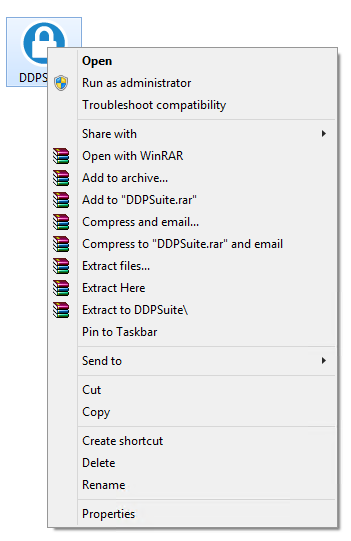
- Cliquez avec le bouton droit de la souris sur [PROGRAMME D’INSTALLATION PRINCIPAL], puis sélectionnez Properties.
- Cliquez sur l’onglet Détails.

- Documentez la version du produit.
 La version du produit de votre client peut être différente de celle affichée dans la capture d’écran ci-dessus.
Extra informatie
Video's
Getroffen producten
Dell Encryption, Dell Endpoint Security Suite Pro, Dell Endpoint Security Suite EnterpriseArtikeleigenschappen
Artikelnummer: 000124917
Artikeltype: How To
Laatst aangepast: 06 aug. 2026
Versie: 12
Vind antwoorden op uw vragen via andere Dell gebruikers
Support Services
Controleer of uw apparaat wordt gedekt door Support Services.