De versie van het Dell Data Security master-installatieprogramma identificeren
Samenvatting: Leer hoe u de versie van het hoofdinstallatieprogramma van Dell Data Security (voorheen Dell Data Protection) kunt identificeren door deze stapsgewijze instructies te volgen.
Dit artikel is van toepassing op
Dit artikel is niet van toepassing op
Dit artikel is niet gebonden aan een specifiek product.
Niet alle productversies worden in dit artikel vermeld.
Instructies
Opmerking:
- Vanaf december 2022 is Dell Endpoint Security Suite Enterprise niet meer verkrijgbaar (End of Sale). Dit product en de artikelen worden niet meer bijgewerkt door Dell.
- Vanaf december 2019 is Dell Endpoint Security Suite Enterprise niet meer verkrijgbaar (End of Sale). Dit product en de artikelen worden niet meer bijgewerkt door Dell.
- Voor meer informatie raadpleegt u Beleid voor levenscyclus (einde van support/einde levensduur) voor Dell Data Security. Als u vragen heeft over alternatieve artikelen, neem dan contact op met uw verkoopteam of neem contact op met endpointsecurity@dell.com.
- Raadpleeg Eindpuntbeveiliging voor meer informatie over huidige producten.
De versie van het Dell Data Security (voorheen Dell Data Protection) master-installatieprogramma kan worden gebruikt om:
- Bekende problemen identificeren.
- Workflow-wijzigingen begrijpen.
- Systeemvereisten te controleren.
Betreffende producten:
- Dell Encryption Enterprise
- Dell Data Protection | Enterprise Edition
- Dell Encryption Personal
- Dell Data Protection | Mobile Edition
- Dell Endpoint Security Suite Enterprise
- Dell Endpoint Security Suite Pro
Betreffende besturingssystemen:
- Windows
- Het [Master-installatieprogramma] moet worden gedownload voordat de versie wordt geïdentificeerd.
- De productnaam van het [Master-installatieprogramma] varieert per applicatie:
DDSSetup.exeDDSSetup.exe voor Dell Encryption EnterpriseDDSSetup.exeDDSSetup.exe voor Dell Encryption PersonalDDSSuite.exeDDSSuite.exe voor Dell Endpoint Security Suite EnterpriseDDSSuite.exeDDSSuite.exe voor Dell Endpoint Security SuiteDDPSetup.exeDDPSetup.exe voor Dell Data Protection | Enterprise EditionDDPSetup.exeDDPSetup.exe voor Dell Data Protection | Personal EditionDDPSuite.exeDDPSuite.exe voor Dell Data Protection | Endpoint Security SuiteDDPSuite.exeDDPSuite.exe voor Dell Data Protection | Endpoint Security Suite Enterprise
Voor informatie over het downloaden van DDSSetup of DDPSetup, kunt u Dell Encryption Enterprise of Dell Encryption Personal downloaden raadplegen.
- Klik met de rechtermuisknop op het [Master-installatieprogramma] en selecteer vervolgens Eigenschappen.
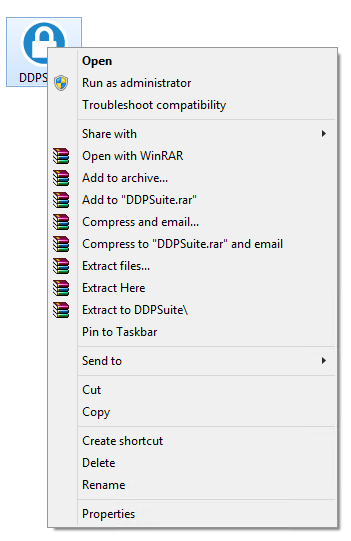
- Klik op het tabblad Details.

- Documenteer de Productversie.
 De Productversie van uw client kan afwijken van de bovenstaande schermafbeelding.
Extra informatie
Video's
Getroffen producten
Dell Encryption, Dell Endpoint Security Suite Pro, Dell Endpoint Security Suite EnterpriseArtikeleigenschappen
Artikelnummer: 000124917
Artikeltype: How To
Laatst aangepast: 06 aug. 2026
Versie: 12
Vind antwoorden op uw vragen via andere Dell gebruikers
Support Services
Controleer of uw apparaat wordt gedekt door Support Services.