Precision 5540: Keyboard function map Guide
Samenvatting: This article provides a guide to the keyboard shortcut functions on the Dell Precision 5540 Mobile Workstation
Dit artikel is van toepassing op
Dit artikel is niet van toepassing op
Dit artikel is niet gebonden aan een specifiek product.
Niet alle productversies worden in dit artikel vermeld.
Symptomen
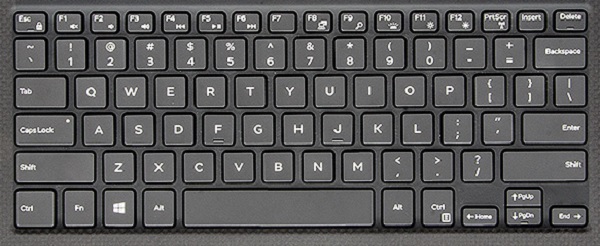
The following guide lists the keyboard shortcuts available, and the functions they perform on the Dell Precision 5540 Mobile Workstation.
Keyboard Shortcut Key Functions
The below table is a list of combination short-cut key functions available on the Dell Precision 5540 Mobile Workstation.
Oorzaak
| Function key combo | Result |
|---|---|
| Fn + Esc | Toggle the Fn-Key Lock |
| Fn + F1 | Toggle the Mute Audio |
| Fn + F2 | Decrease Volume |
| Fn + F3 | Increase Volume |
| Fn + F4 | Previous Chapter/Track |
| Fn + F5 | Play/Pause |
| Fn + F6 | Next Chapter/Track |
| Fn + F8 | Toggles Video Output |
| Fn + F9 | Search - Mimics Windows key + F |
| Fn + F10 | Keyboard Backlight Illumination
Disabled, Dim, Bright |
| Fn + F11 | Decrease Screen Brightness |
| Fn + F12 | Increase Screen Brightness |
| Fn + PrtScr | Toggle the Wireless Radio |
| Fn + Right Ctrl | Used as Context Menu Key |
| Fn + B | Used as Pause/Break Key |
| Fn + Arrow Key (Up) | Page Up |
| Fn + Arrow Key (Down) | Page Down |
| Fn + Arrow Key (Left) | Home |
| Fn + Arrow Key (Right) | End |
Oplossing
 Visit our Keyboard knowledge base for additional resources and information.
 For additional articles and information visit our Touchpad support page.
 Additional articles and information can also be found on our Mouse support page.
Getroffen producten
Precision 5540Artikeleigenschappen
Artikelnummer: 000134653
Artikeltype: Solution
Laatst aangepast: 30 apr. 2026
Versie: 5
Vind antwoorden op uw vragen via andere Dell gebruikers
Support Services
Controleer of uw apparaat wordt gedekt door Support Services.