PowerVault ML3 SKLM (Encryption Software)
Samenvatting: Running SLKM Encryption on the PowerVault ML3. How to setup encryption on Dell PowerVault Tape Libraries.
Dit artikel is van toepassing op
Dit artikel is niet van toepassing op
Dit artikel is niet gebonden aan een specifiek product.
Niet alle productversies worden in dit artikel vermeld.
Symptomen
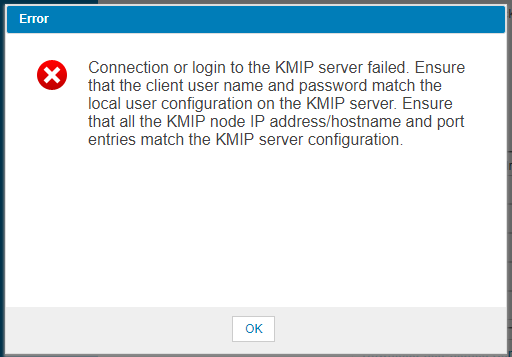
When running the Key Management Interoperability Protocol (KMIP) Wizard an error occurs when running the "Connectivity Check".
Oplossing
First we need to make sure the SKLM server can at least communicate with the ML3. Either open a browser to the ML3 from the SKLM server or run the ping command to verify.
Next verify that the port is not blocked. "netstat -a" will list all of the open TCP ports.
1. SKLM 2.6 or higher
Make the following change in the properties file on the SKLM server (SKLM 3.0 defaults to TLSv2 now):
Next verify that the port is not blocked. "netstat -a" will list all of the open TCP ports.
1. SKLM 2.6 or higher
Make the following change in the properties file on the SKLM server (SKLM 3.0 defaults to TLSv2 now):
c:\Program Files\IBM\WebSphere\AppServer\products\sklm\config\SKLMConfig.properties
TransportListener.ssl.protocols from SSL_TLS to SSL_TLSv2
After the change is made you will need to reboot the SKLM server to pick up the configuration change.
2. ML3
Next reconfigure the logical library for Library Managed Encryption (KMIP).
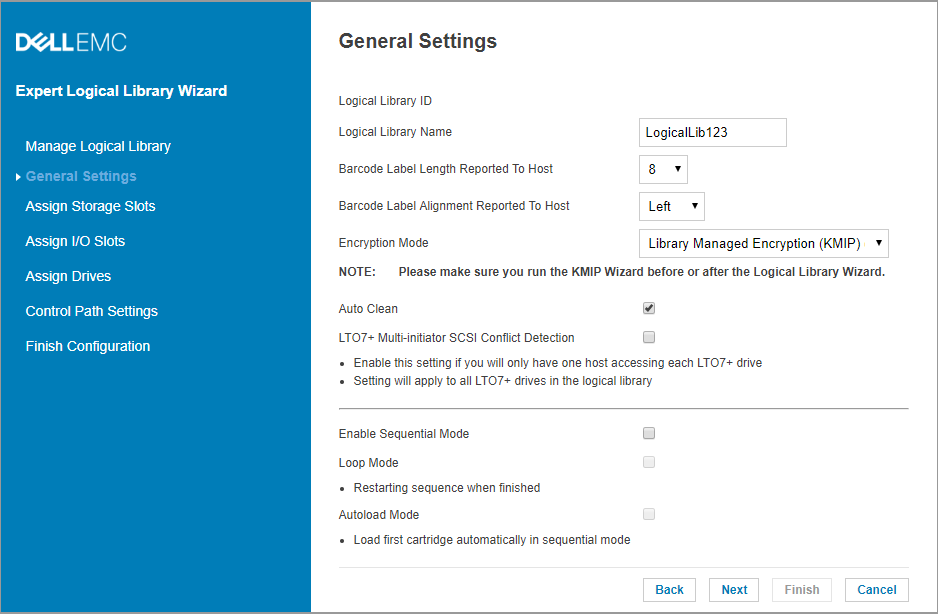
3. Login to the SKLM server and check for Pending client device connection certificate.
This will be on the "Welcome" screen under "Action Items"
Click on the request from the device and click "Accept and Trust". This may have already been done by customer if they have manually imported the certificate. If so you will not see the Pending
device list. Continue to step 4.
4. Run the Key Management Interoperability Protocol (KMIP) Wizard.
Click on the "Connectivity Check" and we should see a "Connectivity Check Successful".
Setup Summary should finish at this point.
Getroffen producten
Dell EMC ML3, Powervault LTO6, PowerVault LTO7, PowerVault LTO8, PowerVault ML6000, PowerVault TL2000, PowerVault TL4000, PowerVault TL1000Artikeleigenschappen
Artikelnummer: 000143520
Artikeltype: Solution
Laatst aangepast: 01 mei 2026
Versie: 4
Vind antwoorden op uw vragen via andere Dell gebruikers
Support Services
Controleer of uw apparaat wordt gedekt door Support Services.