Support for OpenManage Enterprise Dell AIOps Infrastructure Observability Plugin
Samenvatting: Dell OpenManage Enterprise Dell AIOps Infrastructure Observability (formerly CloudIQ) plugin enables you to configure connectivity between OpenManage Enterprise console and Dell AIOps Infrastructure Observability. AIOps Observability is Dell's cloud-based infrastructure AIOps management console and is part of a boarder solution incorporating Application Observability and Incident Management. The OpenManage Enterprise AIOps Observability plugin uses Dell Connectivity Service to securely transfer information such as inventory, health, alert, and metric information and receive instructions for selected devices. This information is periodically sent to a Dell secure portal for processing so AIOps Infrastructure can monitor, analyze, report, and action. ...
Dit artikel is van toepassing op
Dit artikel is niet van toepassing op
Dit artikel is niet gebonden aan een specifiek product.
Niet alle productversies worden in dit artikel vermeld.
Instructies
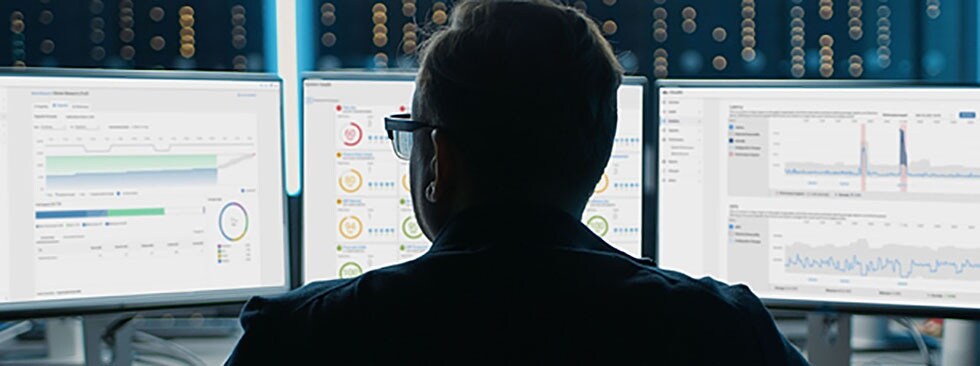
Dell AIOps Infrastructure Observability For PowerEdge Customers
Features include- The plugin provides the delivery of PowerEdge configuration, status, and telemetry data by Dell OpenManage Enterprise (OME) into Dell AIOps Infrastructure Observability
- Connection of multiple instances of OME to a single AIOps Observability instance for a global view
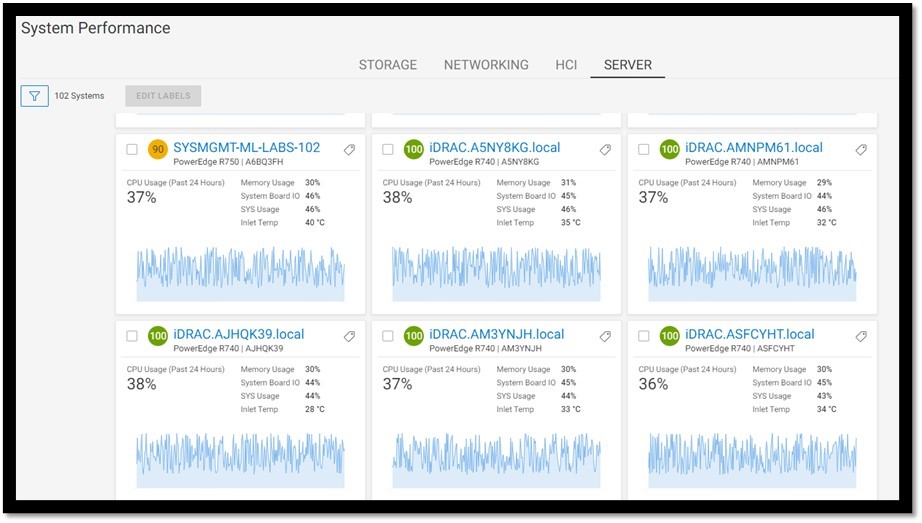
- Visualization of server telemetry including key performance, environmental, and power metrics
- Display of heath, hardware inventory, firmware inventory, alerts, performance, and warranty status
- Suggested actions to recover server health
- Creation and automatic audit of security policies based on Dell best practice
- Highlight relevant CVEs
- Detection of anomaly server behavior based on historic data
- Report existing deployed firmware versions and managed deployment of firmware updates
- Carbon emissions reporting, tending, and forecasting
- Customizable reports
Features and Benefits of OpenManage Enterprise Dell AIOps Infrastructure Observability Plugin
AIOps Observability integrates data from all your OME consoles for enterprise-wide proactive monitoring and faster time-to-resolution
Transfers data collected from each servers iDRAC by OME including
Performance metrics include CPU usage, memory usage, I/O usage, system usage, CPU temperatures, airflows, and power consumption
Periodic sync of alerts and health information from OpenManage Enterprise

Enhancements to Dell OpenManage Enterprise AIOps Observability
OpenManage Enterprise CloudIQ Plugin is required for connectivity to AIOps Observability.
New Features in OpenManage Enterprise CloudIQ Plugin 2.1
- Opt out of sending the device IP address and hostname to AIOps Observability
- Support for Dell XC appliances
New Features in OpenManage Enterprise CloudIQ Plugin 2.0
- Streamlined onboarding
- AIOps Observability Plugin is installed with OME as default
New Features in OpenManage Enterprise CloudIQ Plugin 1.2
- Backup and Restore support enabled
- Remote Management support enabled
- User roles security enhancements
- Newly release server support
New Features in OpenManage Enterprise CloudIQ Plugin 1.1
-
Cybersecurity data collection
New Features in OpenManage Enterprise CloudIQ Plugin 1.0
See the OpenManage Enterprise CloudIQ Plugin Release Notes for the complete list of enhancements and limitations, fixed issues, and known issues.
Licensing for Dell OpenManage Enterprise Dell AIOps Infrastructure Observability Plugin
Use of AIOps Observability is free. Server telemetry including system performance data, power consumption, and temperature require an iDRAC Enterprise license or OpenManage Enterprise Advanced. Use of additional telemetry such as FC port statistics or GPU statistics data requires iDRAC Data Center license is installed on the target server. The iDRAC Enterprise/data center license and OpenManage Enterprise Advanced license are perpetual licenses that are valid for the life of a server and can be bound to the Service Tag of only one server at a time. To view the list of devices and their licenses, select OpenManage Enterprise > Monitor > Reports > License Report, and then click Run.
For more telemetry licensing details, see PowerEdge Metrics : An Overview
Download and install of OpenManage Enterprise Dell AIOps Infrastructure Observability Plugin
AIOps Observability Plugin is a plugin for the Dell OpenManage Enterprise (minimum version 3.7). To download and install or upgrade this extension:
Note: Ensure use of Dell OpenManage Enterprise version 3.9 or newer.
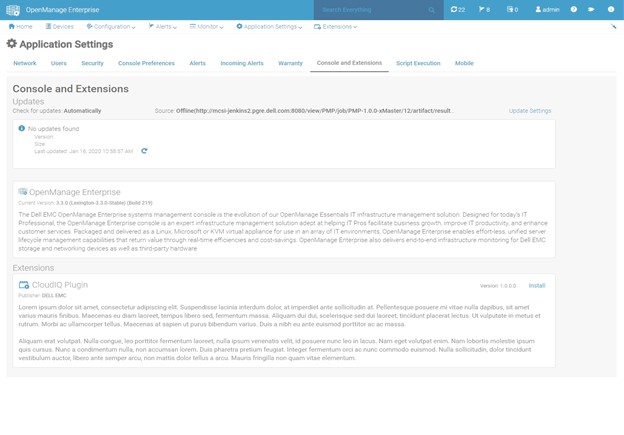
- Launch Dell OpenManage Enterprise
- In Applications Settings, click Console and Plugins. The Console and Plugin page is displayed.
- In the Plugin section, click Install. The Install plugin page is displayed.
- Select the Dell AIOps Infrastructure Observability plug-in from the menu of supported Console and Extensions for the installed version of OpenManage Enterprise. Review the list of prerequisites.
- Click Download plugin. The plugin is downloaded, and the status of the plugin is updated to Downloaded on the Console and Plugins page.
- In the Install Details page, click Install plugin.
- Review the agreement and then click the Accept option.
- The details of the number of users who are logged in to OpenManage Enterprise, tasks in progress, and scheduled jobs are displayed in the confirmation window. To confirm the installation, select the I agree that I have captured a snapshot of the OpenManage Enterprise appliance prior to performing a plugin action. option, and then click Confirm Install.
An offline process for offline or air gapped sites is also supported.
OME & Plugins can be downloaded ready for install from:
OpenManage Enterprise upgrade repository (dell.com)
November 2023
29-page white paper
This white paper describes setup of the OpenManage Enterprise CloudIQ plugin to enable periodic streaming of the inventory, health, alerts, and metrics of the monitored devices to CloudIQ, the cloud-based proactive monitoring and predictive analytics application for Dell Technologies infrastructure products. This white paper covers the basics of the data streamed from customer devices to Dell Private Cloud hosted CloudIQ and troubleshooting for common fault scenarios.
Read the white paper
July 2024
6-page white paper
This white paper covers Dell AIOps Observability enhancements for cybersecurity including enabling configuration policies based on server configuration best practices, identifying relevant CVEs, and highlighting then deploying the latest applicable firmware updates.
Read the white paper
July 2024
Four-page white paper
Dell AIOps Infrastructure Observability for PowerEdge provides a single easy-to-use portal to view the health and information of Dell servers. AIOps Observability’s powerful reporting backend enables customers to visualize and analyze server performance data. Key hardware metrics are collected, regardless of operating system, and applications installed. Beyond reporting current server performance data, AIOps Observability’s historical seasonality and anomaly detection accelerates issue detection and resolution for customers.
Read the white paper
CloudIQ: General procedures to onboard PowerEdge Systems to CloudIQ step by step.
Read the knowledge base article.
June 2022
January 2022
OME & Plugins can be downloaded ready for install from:
OpenManage Enterprise upgrade repository (dell.com)
Resources for OpenManage Enterprise Dell AIOPs Infrastructure Observability Plugin
Documentation
For the latest documentation, see APEX AIOps Observability product page on Dell.com and Dell Support
OpenManage Enterprise CloudIQ Plugin: Setup, Collection Details, and Troubleshooting
November 2023
29-page white paper
This white paper describes setup of the OpenManage Enterprise CloudIQ plugin to enable periodic streaming of the inventory, health, alerts, and metrics of the monitored devices to CloudIQ, the cloud-based proactive monitoring and predictive analytics application for Dell Technologies infrastructure products. This white paper covers the basics of the data streamed from customer devices to Dell Private Cloud hosted CloudIQ and troubleshooting for common fault scenarios.
Read the white paper
Harden Your Server Cybersecurity With Dell AIOps Infrastructure Observability Cybersecurity
July 2024
6-page white paper
This white paper covers Dell AIOps Observability enhancements for cybersecurity including enabling configuration policies based on server configuration best practices, identifying relevant CVEs, and highlighting then deploying the latest applicable firmware updates.
Read the white paper
Dell AIOps Infrastructure Observability Provides Data-Driven Server Management Decisions
July 2024
Four-page white paper
Dell AIOps Infrastructure Observability for PowerEdge provides a single easy-to-use portal to view the health and information of Dell servers. AIOps Observability’s powerful reporting backend enables customers to visualize and analyze server performance data. Key hardware metrics are collected, regardless of operating system, and applications installed. Beyond reporting current server performance data, AIOps Observability’s historical seasonality and anomaly detection accelerates issue detection and resolution for customers.
Read the white paper
CloudIQ: General procedures to onboard PowerEdge Systems to CloudIQ
CloudIQ: General procedures to onboard PowerEdge Systems to CloudIQ step by step.
Read the knowledge base article.
Take Control of Server Cybersecurity with Intelligent Cloud-Based Monitoring
June 2022
Dell Technologies Product Manager Kyle Shannan blog on the features and value proposition of CloudIQ for PowerEdge
January 2022
Videos
PowerEdge for CloudIQ Architectural Overview
Learn more about CloudIQ for PowerEdge.
May 2022Building and Tracking Dell CloudIQ Cyber Security Policies for PowerEdge Servers
Learn more about CloudIQ for PowerEdge and Cyber Security Policies.
May 2022Dell CloudIQ for PowerEdge Servers
CloudIQ for PowerEdge servers overview
December 2021Dell CloudIQ for PowerEdge Servers
CloudIQ for PowerEdge servers overview.
December 2023Getroffen producten
Dell OpenManage Enterprise, CloudIQ, CloudIQ, Dell EMC OpenManage Enterprise, OpenManage Enterprise APEX AIOps ObservabilityArtikeleigenschappen
Artikelnummer: 000196371
Artikeltype: How To
Laatst aangepast: 12 nov. 2025
Versie: 16
Vind antwoorden op uw vragen via andere Dell gebruikers
Support Services
Controleer of uw apparaat wordt gedekt door Support Services.