PowerEdge:CPU0704机器检查错误反映 iDRAC10 生命周期日志中的 CPU 索引不准确
Samenvatting: 在记录机器检查事件 (MCE) 时,Dell PowerEdge 第 17 代服务器在 iDRAC10 生命周期日志 (LCLOG) 和系统事件日志 (SEL) 中记录了不准确的 CPU 索引。
Dit artikel is van toepassing op
Dit artikel is niet van toepassing op
Dit artikel is niet gebonden aan een specifiek product.
Niet alle productversies worden in dit artikel vermeld.
Symptomen
Dell PowerEdge 第 17 代服务器采用了开放计算项目的数据中心模块化硬件系统 (DC-MHS) 体系结构。作为标准的一部分,CPU 在主机处理器模块 (HPM) 上从“0”开始编制索引。iDRAC10 利用的内部库与使用“1”启动 CPU 索引的前几代 PowerEdge 服务器共享。早于 v1.20.80.50 的 iDRAC10 固件版本无法准确反映CPU0704 MCE 事件中的 CPU 索引号。SEL 和 LCLOG 都反映错误消息字符串中的 +1 值。
iDRAC10 UI >> 系统>>概览>>组件>>处理器索引示例:
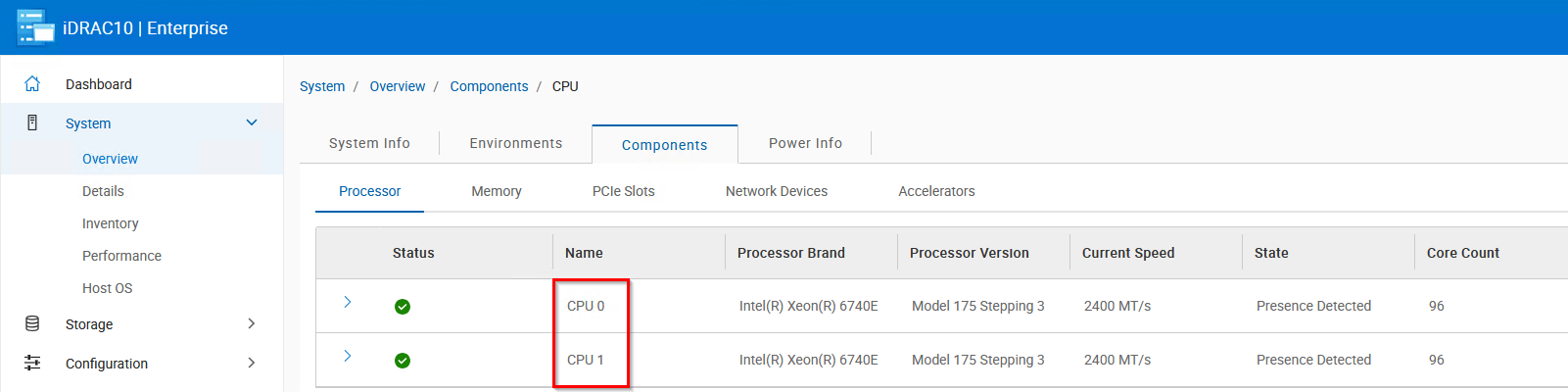
在下面的 SEL 和 LCLOG 示例中,CPU1 上发生 CPU 机器检查错误,而事件字符串指示 CPU2 上发生错误。CPU0 上的 MCE 事件将在事件字符串中记录为 CPU1。
SEL 示例:
2025-07-07 17:50:51 1004 CPU 2 machine check error detected.
LCLOG 示例:
2025-07-07 17:50:51 5617 CPU0704 CPU 2 machine check error detected.
2025-07-07 17:50:51 5615 CPU0000 Internal error has occurred check for additional logs.
2025-07-07 17:48:15 5591 CPU0704 CPU 2 machine check error detected.
2025-07-07 17:48:14 5589 CPU0000 Internal error has occurred check for additional logs.
Oorzaak
iDRAC10 利用 iDRAC9 的共享库,该库以前在处理CPU0704错误事件字符串的参数时解析从值 1 开始的 CPU 索引。
Oplossing
iDRAC10 固件 1.20.80.50 和 2025 年 12 月 17 日 PowerEdge 服务器 BIOS 版本添加了逻辑,以正确解析从服务器 BIOS 接收的 CPU 索引信息。
BIOS 版本因服务器产品型号而异。请参阅下表,了解为 iDRAC10 引入更正枚举支持的 BIOS 版本。
|
|
|
|
|
|
|
|
|
Getroffen producten
iDRAC10 - 1.10.xx Series, iDRAC10 - 1.20.xx Series, OEMR XL R470, OEMR XL R570, OEMR XL R670, OEMR XL R770, OEMR XL R6725, OEMR XL R7725, PowerEdge M7701, PowerEdge M7725, PowerEdge R470, PowerEdge R570, PowerEdge R670, PowerEdge R6725
, PowerEdge R7725, PowerEdge R7725xd, Dell vSAN R670 Ready Node, Dell vSAN R770 Ready Node
...
Artikeleigenschappen
Artikelnummer: 000382576
Artikeltype: Solution
Laatst aangepast: 14 nov. 2025
Versie: 2
Vind antwoorden op uw vragen via andere Dell gebruikers
Support Services
Controleer of uw apparaat wordt gedekt door Support Services.