VNXe: How to find the Serial Number on the VNXe array
Summary: How to find Serial Number on VNXe array (User correctable)
Acest articol se aplică pentru
Acest articol nu se aplică pentru
Acest articol nu este legat de un produs specific.
Acest articol nu acoperă toate versiunile de produs existente.
Instructions
There are three options to find the Serial Number on a VNXe array.
Option 1: EMC Unisphere
- Log in to EMC Unisphere UI.
- Go to Dashboard tab.
- The Serial Number can be found under "System Information" next to Product ID/SN:
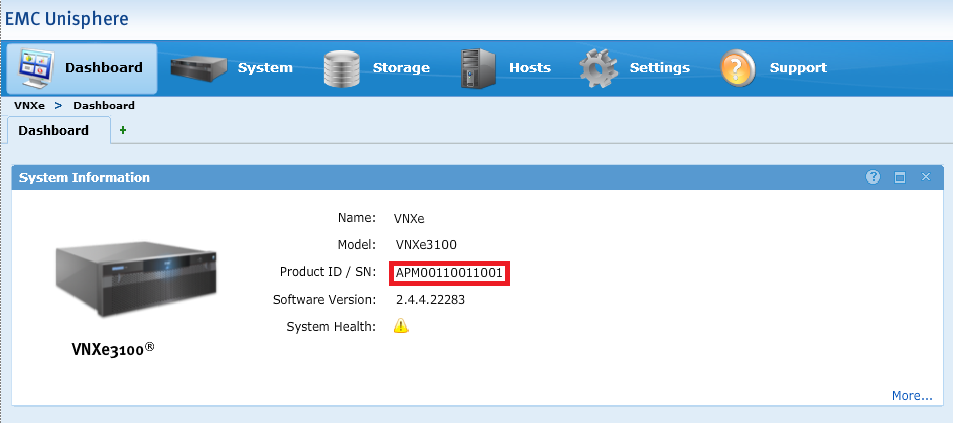
Option 2: EMC Unisphere
- Log in to EMC Unisphere UI.
- Go to the System tab and select System Health.
- The Serial Number can be found under "System Info" next to Product ID/SN:
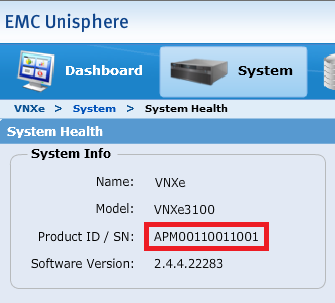
Option 3: Command Line
- Open an SSH session to VNXe.
- Log in using the service account credential.
- Run the following command:
svc_diag
Example:service@(VNXe) spb:~> svc_diag ======== Now executing basic state ======== * System Friendly Host Name is: (VNXe) * System Serial Number is: APM00110011001 * Current Software version: NeoMain-2.4.4.22283-MAGNUM-RETAIL
Produse afectate
VNX/VNXeProduse
VNXe1 Series, VNXe2 Series, VNX/VNXeProprietăți articol
Article Number: 000019667
Article Type: How To
Ultima modificare: 09 oct. 2025
Version: 5
Găsiți răspunsuri la întrebările dvs. de la alți utilizatori Dell
Servicii de asistență
Verificați dacă dispozitivul dvs. este acoperit de serviciile de asistență.