Dell EMC Unity:如何为 Unity 阵列添加 SMTP 服务器设置
Summary: Dell EMC Unity:如何为 Unity 阵列添加 SMTP 服务器设置
Acest articol se aplică pentru
Acest articol nu se aplică pentru
Acest articol nu este legat de un produs specific.
Acest articol nu acoperă toate versiunile de produs existente.
Instructions
-->从右上角的“更新系统设置”中,选择“警报”选项卡,然后选择电子邮件和SMTP选项。
--> 添加希望接收系统警报的所需邮件列表。
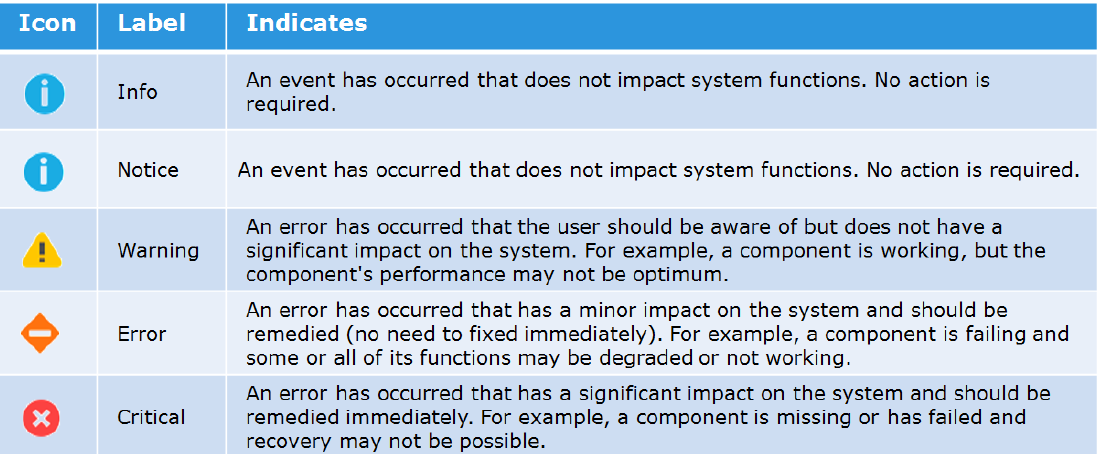
-->添加要发送的警报的严重性级别。
以下是不同严重度的图示:
-->然后键入发送电子邮件所需的简单邮件传输协议 (SMTP) 服务器的 IP 地址或主机名。
请注意,早于 Nighthawk (4.5.0) 的 Unity OE 版本不支持更改 SMTP (25) 的默认端口。
从 Nighthawk 夜鹰开始,Unity 开始支持自定义 SMTP 端口:
06:34:56 service@Peggy spa:~/user> uemcli /net/smtp -h
Storage system address:127.0.0.1
Storage system port: 443
HTTPS 连接
管理 SMTP 服务器设置。使用 SMTP 将系统警报通过电子邮件发送到指定地址。
行动:
[显示]
/net/smtp [ -id <value> ] show [ -output { nvp | csv | table [ -wrap ] } ] [ { -brief | -detail | -filter <value> } ]
[set]
/net/smtp -id <value> set -addr <value>[ -port <value> ] [ -encryptLevel { none | startTLS | ssl } ] [ -authType { none | plain | login | cram_md5 | digest_md5 } ] [ -user <value> { -passwd <value> | -passwdSecure } ] [ -bypassProxy { yes | no } ]
--> 添加希望接收系统警报的所需邮件列表。
-->添加要发送的警报的严重性级别。
以下是不同严重度的图示:
-->然后键入发送电子邮件所需的简单邮件传输协议 (SMTP) 服务器的 IP 地址或主机名。
请注意,早于 Nighthawk (4.5.0) 的 Unity OE 版本不支持更改 SMTP (25) 的默认端口。
从 Nighthawk 夜鹰开始,Unity 开始支持自定义 SMTP 端口:
06:34:56 service@Peggy spa:~/user> uemcli /net/smtp -h
Storage system address:127.0.0.1
Storage system port: 443
HTTPS 连接
管理 SMTP 服务器设置。使用 SMTP 将系统警报通过电子邮件发送到指定地址。
行动:
[显示]
/net/smtp [ -id <value> ] show [ -output { nvp | csv | table [ -wrap ] } ] [ { -brief | -detail | -filter <value> } ]
[set]
/net/smtp -id <value> set -addr <value>[ -port <value> ] [ -encryptLevel { none | startTLS | ssl } ] [ -authType { none | plain | login | cram_md5 | digest_md5 } ] [ -user <value> { -passwd <value> | -passwdSecure } ] [ -bypassProxy { yes | no } ]
Produse afectate
Dell EMC Unity FamilyProduse
Dell EMC Unity FamilyProprietăți articol
Article Number: 000022531
Article Type: How To
Ultima modificare: 22 oct. 2025
Version: 4
Găsiți răspunsuri la întrebările dvs. de la alți utilizatori Dell
Servicii de asistență
Verificați dacă dispozitivul dvs. este acoperit de serviciile de asistență.