DPSearch 19.1:如果 NBD 傳輸用於 Avamar 虛擬機器備份,搜尋會失敗
Summary: 如果在 Avamar Administrator Console 中設定了「[avvcbimage]transport=nbd:nbdssl」參數,則無法搜尋 Avamar 內的虛擬機器 (VM) 備份。
Acest articol se aplică pentru
Acest articol nu se aplică pentru
Acest articol nu este legat de un produs specific.
Acest articol nu acoperă toate versiunile de produs existente.
Symptoms
如果出現以下情況,則無法搜尋 Avamar 內的虛擬機器備份
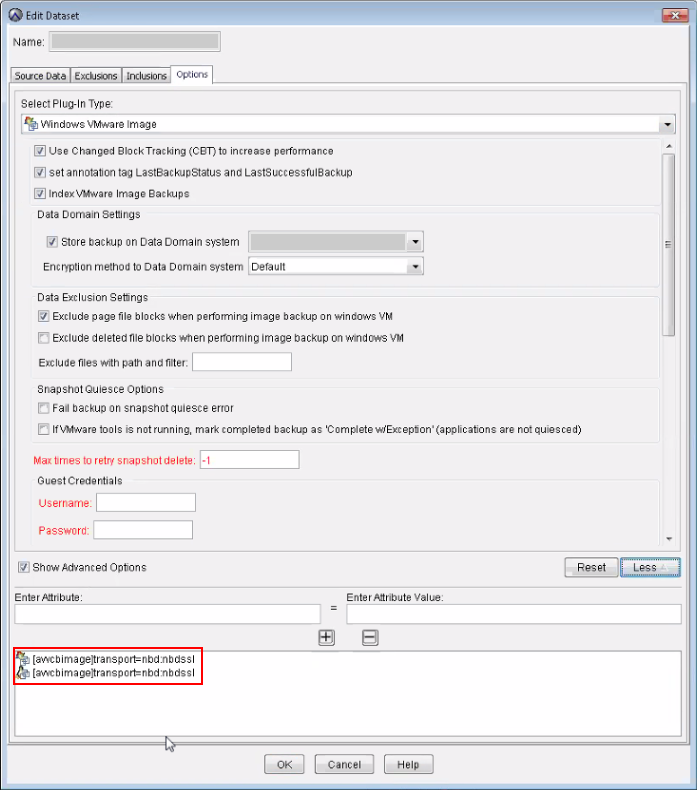
[avvcbimage]transport=nbd:nbdssl 參數已在 Avamar Administrator 主控台中設定。收集活動中未顯示任何錯誤,工作成功,且未處理任何備份項目。因此,由於沒有檔案編制索引,因此在「搜尋」頁面中找不到這些備份中存在的任何檔案。Cause
可使用 [avvcbimage]transport=nbd:nbdssl 傳輸通訊協定參數會在 Avamar Administrator Console 的「用戶端內容」中的「管理 Windows VMware 資料 集 」映像中進行設定,如下所示。
使用 NBD 傳輸通訊協定進行 Avamar VM 備份時,不會對個別檔案編製索引。
針對使用 Avamar 進行的虛擬機器備份,DPSearch 需要備份中的下列檔案才能取得中繼資料:
VMFiles/1/zMetadata.sql.
這是包含 VMDK 中繼資料 (檔案清單) 的內部 SQL 檔案。但是,使用 NBD 傳輸執行此操作時,此檔不存在,因此無法處理 VM 映像備份。
Resolution
- 移除
[avvcbimage]transport=nbd:nbdsslAvamar 管理主控台中「資料集管理員」頁面中的設定。 - 為用戶端建立新的備份。
- 在搜尋管理員中觸發 Avamar 來源的集合。等待其完成。
- 從 Search 主控台執行新搜尋。
Produse afectate
Data Protection SearchProduse
Data Protection SearchProprietăți articol
Article Number: 000044366
Article Type: Solution
Ultima modificare: 19 mar. 2026
Version: 4
Găsiți răspunsuri la întrebările dvs. de la alți utilizatori Dell
Servicii de asistență
Verificați dacă dispozitivul dvs. este acoperit de serviciile de asistență.