PowerEdge: Slik installerer du Windows Server Backup ved hjelp av PowerShell
Summary: Slik installerer du Windows Server Backup ved hjelp av PowerShell for Windows Server. Følg disse trinnene for installasjon og administrer serversikkerhetskopiene dine effektivt.
Acest articol se aplică pentru
Acest articol nu se aplică pentru
Acest articol nu este legat de un produs specific.
Acest articol nu acoperă toate versiunile de produs existente.
Instructions
- Hvis du vil starte Windows PowerShell, skriver du inn i ledetekstvinduet
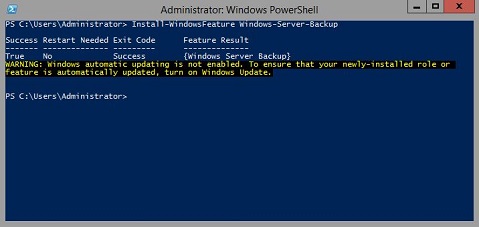
Start PowerShell - Slik installerer du Windows Server Backup Type
Install-WindowsFeature Windows-Server-Backup
Tilleggsinformasjon:
Sikkerhetskopiering av Windows Serverhttps://learn.microsoft.com/en-us/previous-versions/windows/it-pro/windows-server-2012-r2-and-2012/jj614621(v=ws.11)

Cmdleter for Windows Server Backup Windows PowerShellhttps://learn.microsoft.com/en-us/powershell/module/windowsserverbackup/?view=windowsserver2022-ps
Produse afectate
Microsoft Windows 2012 Server, Microsoft Windows 2012 Server R2Produse
C Series, HS Series, Modular Infrastructure, Rack Servers, Tower Servers, XE Servers, XR Servers, OEM Server Solutions, Microsoft Windows Server 2016, Microsoft Windows Server 2019, Microsoft Windows Server 2022, Microsoft Windows 2008 Server R2
, Microsoft Windows 2008 Server Service Pack 2, Microsoft Windows 2012 Server, Microsoft Windows 2012 Server R2
...
Proprietăți articol
Article Number: 000122393
Article Type: How To
Ultima modificare: 05 sept. 2025
Version: 9
Găsiți răspunsuri la întrebările dvs. de la alți utilizatori Dell
Servicii de asistență
Verificați dacă dispozitivul dvs. este acoperit de serviciile de asistență.