PowerEdge: Windows Server Backup installeren met PowerShell
Summary: Windows Server Backup installeren met PowerShell voor Windows Server. Volg deze stappen voor de installatie en het efficiënt beheer van uw serverback-ups.
Acest articol se aplică pentru
Acest articol nu se aplică pentru
Acest articol nu este legat de un produs specific.
Acest articol nu acoperă toate versiunile de produs existente.
Instructions
- Om Windows PowerShell te starten, typt u in het opdrachtpromptvenster
Start PowerShell - Voor het installeren van Windows Server back-uptype
Install-WindowsFeature Windows-Server-Backup
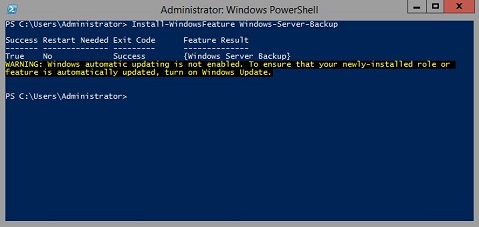
Aanvullende informatie:
Windows Server back-uphttps://learn.microsoft.com/en-us/previous-versions/windows/it-pro/windows-server-2012-r2-and-2012/jj614621(v=ws.11)

Windows Server back-up Windows PowerShell cmdletshttps://learn.microsoft.com/en-us/powershell/module/windowsserverbackup/?view=windowsserver2022-ps
Produse afectate
Microsoft Windows 2012 Server, Microsoft Windows 2012 Server R2Produse
C Series, HS Series, Modular Infrastructure, Rack Servers, Tower Servers, XE Servers, XR Servers, OEM Server Solutions, Microsoft Windows Server 2016, Microsoft Windows Server 2019, Microsoft Windows Server 2022, Microsoft Windows 2008 Server R2
, Microsoft Windows 2008 Server Service Pack 2, Microsoft Windows 2012 Server, Microsoft Windows 2012 Server R2
...
Proprietăți articol
Article Number: 000122393
Article Type: How To
Ultima modificare: 05 sept. 2025
Version: 9
Găsiți răspunsuri la întrebările dvs. de la alți utilizatori Dell
Servicii de asistență
Verificați dacă dispozitivul dvs. este acoperit de serviciile de asistență.