Dell Precision 5550-tastaturfunktionsvejledning
Summary: Følgende vejledning viser de tilgængelige tastaturgenveje og de funktioner, de udfører på Dell Precision Mobile Workstation 5550.
Acest articol se aplică pentru
Acest articol nu se aplică pentru
Acest articol nu este legat de un produs specific.
Acest articol nu acoperă toate versiunile de produs existente.
Instructions
Nedenstående tabel indeholder en liste over kombinationsgenvejstastfunktioner til Dell Precision Mobile Workstation 5550.
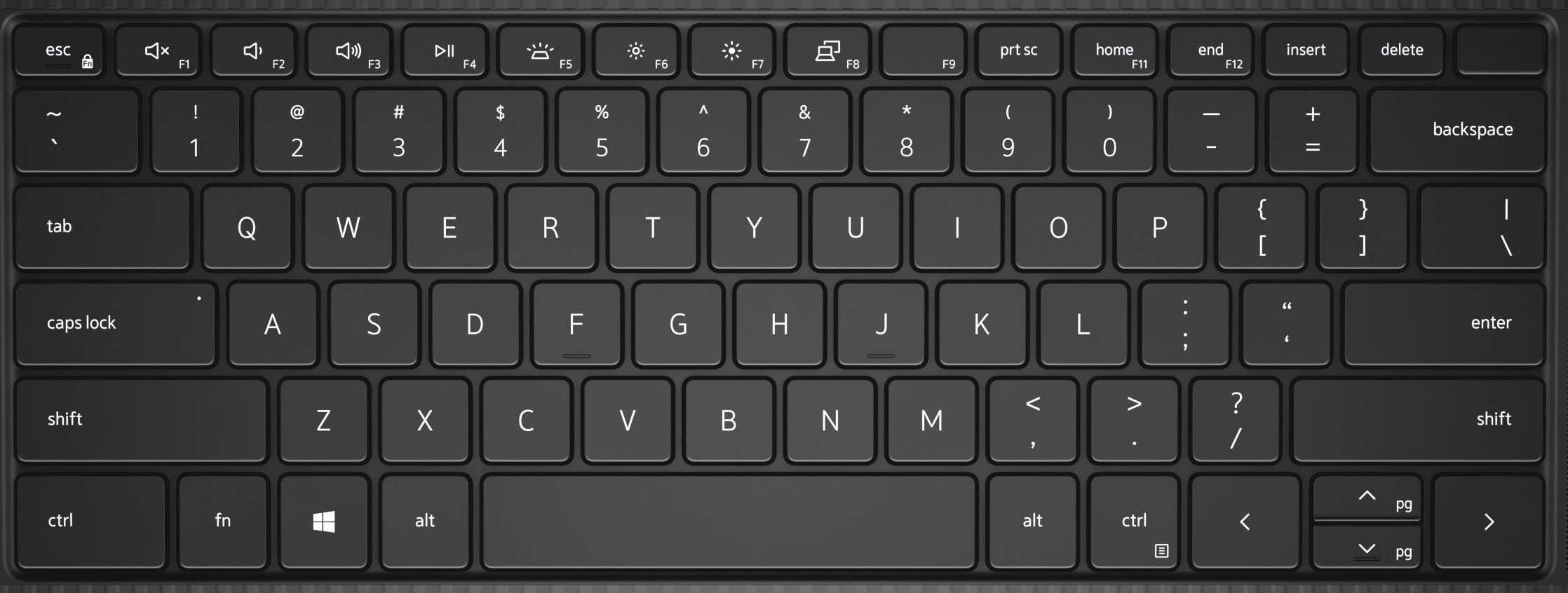
| Taster | Primær funktion |
|---|---|
| Fn + F1 | Slå lyd fra |
| Fn + F2 | Lydstyrke ned |
| Fn + F3 | Lydstyrke op |
| Fn + F4 | Afspil/pause |
| Fn + F5 | Tastaturets baggrundslys |
| Fn + F6 | Sænk skærmens lysstyrke |
| Fn + F7 | Øg skærmens lysstyrke |
| Fn + F8 | Skift skærm (Win + P) |
| Fn + F10 | Print Screen |
| Fn + F11 | Start |
| Fn + F12 | End |
| Fn + Esc | Slå Fn-nøglelås til og fra |
| Fn + CTRL | Efterlign højreklikmenu |
| Fn + B | Pause/Linjeskift |
| Fn + S | Slår Scroll Lock til/fra |
| Fn + R | Systemanmodning |
Additional Information
 Besøg vores vidensbase for tastatur for at få flere ressourcer og oplysninger.
 Du kan finde yderligere artikler og oplysninger på vores side med support til berøringsplader.
 Du kan også finde yderligere artikler og oplysninger på vores supportside for mus.
Produse afectate
Precision 5550Proprietăți articol
Article Number: 000123348
Article Type: How To
Ultima modificare: 19 apr. 2026
Version: 7
Găsiți răspunsuri la întrebările dvs. de la alți utilizatori Dell
Servicii de asistență
Verificați dacă dispozitivul dvs. este acoperit de serviciile de asistență.