如何导出 Windows 事件日志
Summary: 了解如何在 Windows 11 或 Windows 10 中导出事件查看器日志。本指南介绍如何使用事件查看器保存日志。
Acest articol se aplică pentru
Acest articol nu se aplică pentru
Acest articol nu este legat de un produs specific.
Acest articol nu acoperă toate versiunile de produs existente.
Instructions
- 按 Windows 键。
- 在命令之前键入
Event Viewer,然后从列表中选择 事件查看器 。 - 从左侧窗格中,选择要导出的日志类型。
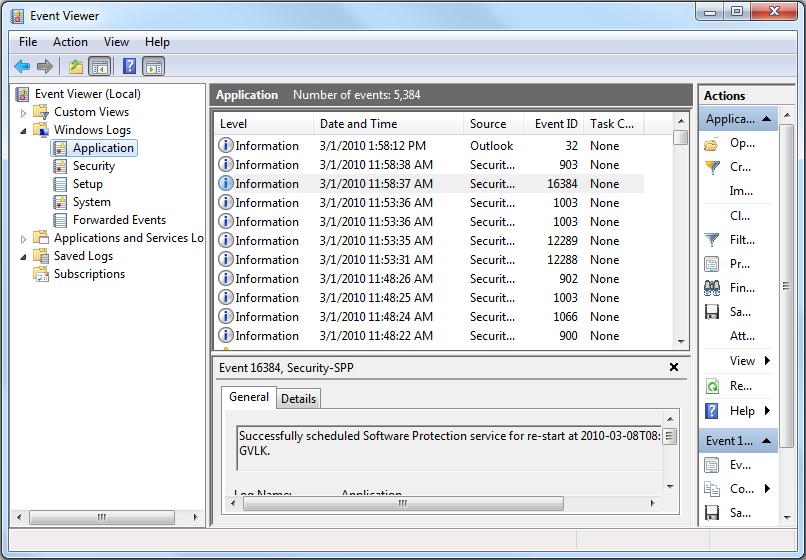
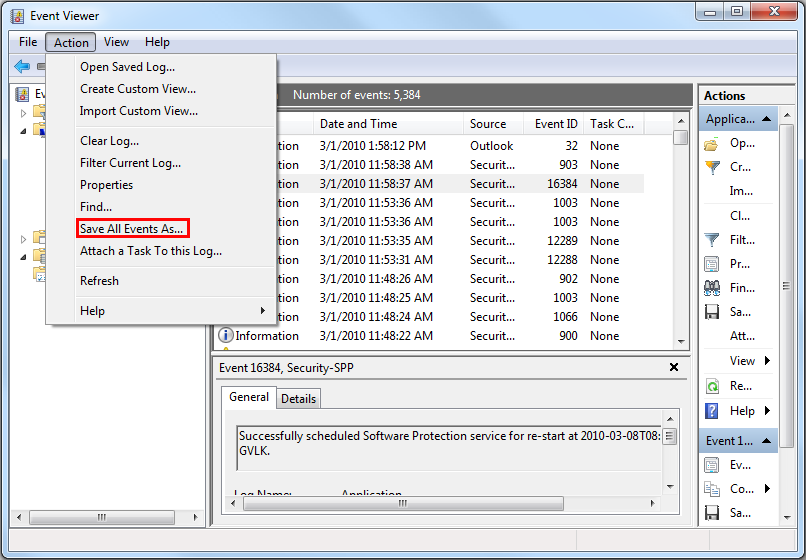
- 通过单击 作 ,然后单击将 所有事件另存为,保存日志。
有关详细信息 ,请参阅如何保存事件日志
有关戴尔笔记本电脑的 BIOS 事件日志的信息,请参阅 BIOS 事件日志和戴尔笔记本电脑上的诊断日志记录。
Additional Information
Produse afectate
Alienware, Dell All-in-One, Dell Pro All-in-One, Dell Pro Max Micro, Dell Pro Max Slim, Dell Pro Max Tower, Dell Pro Micro, Dell Pro Slim, Dell Pro Tower, Dell Slim, Dell Tower, Inspiron, Legacy Desktop Models, OptiPlex, Vostro, XPS, G Series
, G Series, Alienware, Dell Plus, Dell Pro, Dell Pro Max, Dell Pro Plus, Dell Pro Premium, Inspiron, Latitude, Dell Pro Rugged, Vostro, XPS, Legacy Laptop Models, Fixed Workstations, Mobile Workstations, Dell Pro Max Micro XE FCM2250, Dell Pro Max Slim XE FCS1250, Dell Pro Max Tower T2 XE FCT2250, Dell Pro Max 16 XE MC16250, Dell Pro Micro Plus XE QBM1250, Dell Pro Slim Plus XE5 QBS1250, Dell Pro Tower Plus XE5 QBT1250
...
Proprietăți articol
Article Number: 000124382
Article Type: How To
Ultima modificare: 12 ian. 2026
Version: 8
Găsiți răspunsuri la întrebările dvs. de la alți utilizatori Dell
Servicii de asistență
Verificați dacă dispozitivul dvs. este acoperit de serviciile de asistență.