如何安裝 Linux 版 Dell Endpoint Security Suite Enterprise
Summary: 瞭解如何依照以下指示,透過終端機命令行介面 (CLI) 安裝 Linux 版 Dell Data Security Endpoint Security Suite Enterprise。
Acest articol se aplică pentru
Acest articol nu se aplică pentru
Acest articol nu este legat de un produs specific.
Acest articol nu acoperă toate versiunile de produs existente.
Instructions
Linux 版 Dell Data Security Endpoint Security Suite Enterprise 的安裝程序會使用命令列處理。
如需產品系統需求的詳細資訊,包括支援的 Linux 版本,請參閱 Dell Endpoint Security Suite Enterprise 系統需求。
- 開啟終端機。

- 在 「終端機」中,鍵入以下命令,然後按 Enter 鍵。
sudo tar –xvf '/FilePathA/DellESSE.tar.gz' –C /FilePathB 註:
註:- 在上述範例中:
FilePathA是 TAR 檔所在的路徑。FilePathA範例:/home/admin/Desktop/Downloads/
FilePathB是 TAR 檔案解壓縮到的路徑。FilePathB範例:/home/admin/Desktop/ESSE
- 命令區分大小寫。
- 範例路徑可能與您環境中的有所不同。
- 在上述範例中:
- 類型
sudo 'filepath/install.sh'從解壓縮的安裝程式套件輸入 至終端機中,然後按 Enter 鍵。

- 填入所用帳戶的密碼,然後按下 Enter 鍵。

- 填入 Dell Security Management Server 的 IP 或 DNS,然後按 Enter 鍵。

- 填入 Dell Security Management Server 核心伺服器服務的連接埠,然後按 Enter 鍵。
 依預設,核心伺服器服務會在 8888 上執行。
 - 當系統提示您安裝 DellESSE 套件及其相依項目時,請按下是,然後按下 Enter 鍵。
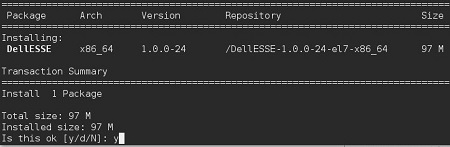
- 如果系統提示您核准指紋,請按下是。否則,請前往步驟 9。

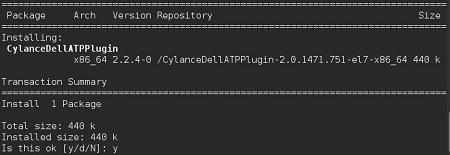
- 按下是以安裝 CylanceDellATPPlugin 套件,然後按下 Enter 鍵。
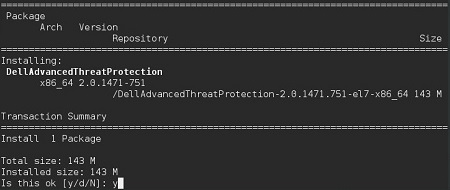
- 按下是以安裝 DellAdvancedThreatProtection 套件,然後按下 Enter 鍵。
- 安裝完成後,請輸入下列命令,然後按下 Enter 鍵。
exit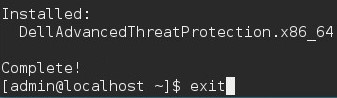
Additional Information
Videos
Produse afectate
Dell Endpoint Security Suite EnterpriseProprietăți articol
Article Number: 000124563
Article Type: How To
Ultima modificare: 05 aug. 2026
Version: 17
Găsiți răspunsuri la întrebările dvs. de la alți utilizatori Dell
Servicii de asistență
Verificați dacă dispozitivul dvs. este acoperit de serviciile de asistență.