如何确定 Dell Full Disk Encryption 版本
Summary: 按照这些分步说明了解如何识别 Dell Full Disk Encryption 的版本。
Acest articol se aplică pentru
Acest articol nu se aplică pentru
Acest articol nu este legat de un produs specific.
Acest articol nu acoperă toate versiunile de produs existente.
Instructions
了解 Dell Full Disk Encryption 的版本使管理员能够:
- 识别已知问题
- 确定UI差异
- 了解工作流程更改
- 验证系统要求
受影响的产品:
- Dell Full Disk Encryption
受影响的操作系统:
- Windows
可以通过产品用户界面 (UI) 或产品安装程序确定版本。单击相应方法以了解更多信息。
UI
必须先安装 Dell Full Disk Encryption,然后才能通过 UI 确定版本。
- 在 Windows 桌面上,双击 Dell Data Security 控制台。
 或者,可以使用 Windows 资源管理器访问 Dell Data Security Console,网址:。
%SYSTEMDRIVE%\Program Files\Dell\Dell Data Protection\Security Tools\Dell.SecurityFramework.Console.exe。 - 在 Dell Data Security 控制台的右上角,单击齿轮图标,然后选择 About。

- 记录显示的版本。
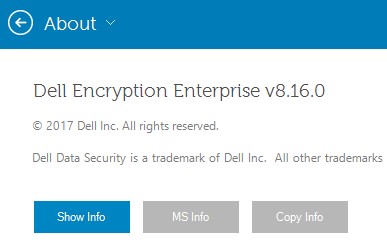 版本可能与上面的示例不同。
安装程序
有关下载安装程序的信息,请参阅如何下载 Dell Encryption Enterprise 或 Dell Encryption Personal。
- 从 Dell Data Security 主安装程序中解压子安装程序。
有关更多信息,请参阅如何从 Dell Data Security 主安装程序中解压子安装程序(英文版)。
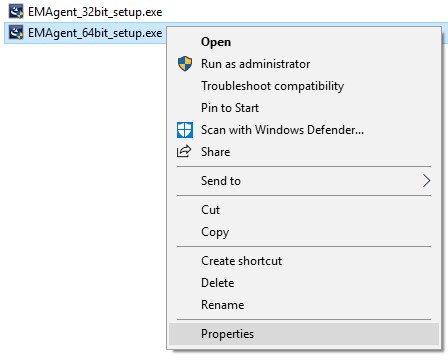
- 在解压的主安装程序路径中,右键单击 [解压的路径]
\Encryption Management Agent\EMAgent_[位深度]_setup.exe然后选择 属性。
- 单击详细信息选项卡。

- 记录产品版本的前三个数字。在此示例中,8.16.0 即为前三个数字。
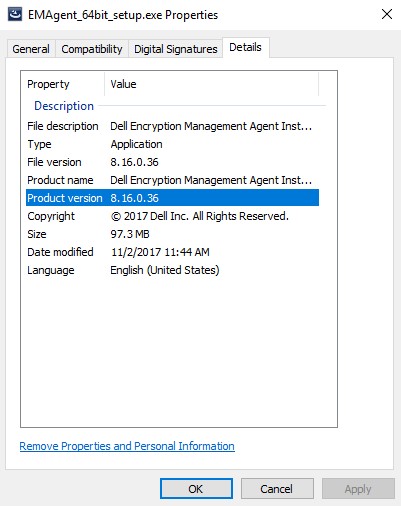 版本可能与上面的示例不同。
Additional Information
Videos
Produse afectate
Dell EncryptionProprietăți articol
Article Number: 000124907
Article Type: How To
Ultima modificare: 10 aug. 2026
Version: 13
Găsiți răspunsuri la întrebările dvs. de la alți utilizatori Dell
Servicii de asistență
Verificați dacă dispozitivul dvs. este acoperit de serviciile de asistență.