如何使用先前的金鑰重新安裝 Dell Encryption
Summary: 本文提供如何重新安裝 Dell Encryption (先前稱為 Dell Data Protection |加密),使用以前的金鑰。
Acest articol se aplică pentru
Acest articol nu se aplică pentru
Acest articol nu este legat de un produs specific.
Acest articol nu acoperă toate versiunile de produs existente.
Instructions
受影響的產品:
- Dell Encryption
- Dell Data Protection | Encryption
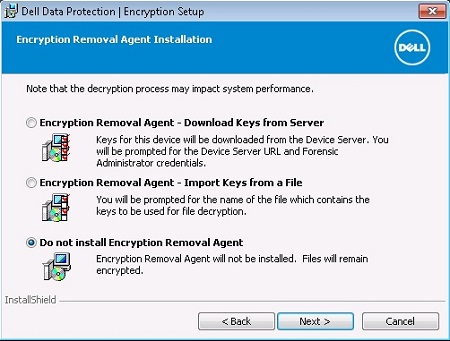
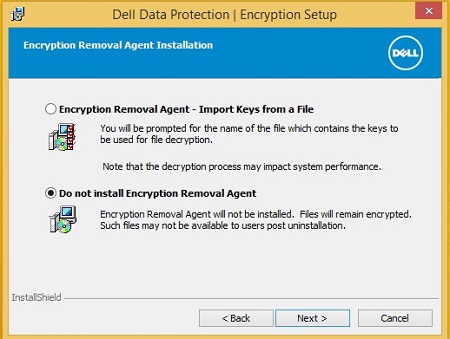
Dell Encryption 會針對每個裝置和使用者使用特定的金鑰集。在解除安裝 Dell Encryption 期間,無論是 遠端 或 本機 管理,我們都可以在不使用解密代理程式的情況下解除安裝。這可以防止資料被解密,並使 Dell Encryption 驅動程式保留在原地並處於作用中狀態。
遠端管理:
本機管理:
若要重新安裝並利用先前使用的金鑰,我們必須再次執行安裝。這是遠端和本機管理的不同程序。
遠端管理:
Dell Encryption 端點使用稱為 DCID 的識別碼。這存儲在註冊表中。如果我們在沒有解密的情況下卸載,則此金鑰應該已就位。
此金鑰的位置:
HKLM\Software\Microsoft\Windows NT\CurrentVersion\Winlogon\CMGshield
REG_SZ: DCID
Value: <8 character DCID>
此值會在重新安裝期間傳送至伺服器,並傳送至此裝置專屬的金鑰資料,並從伺服器下載使用者組合。
本機管理:
本機管理的 Dell Encryption 端點也使用 DCID。在啟用精靈期間,會修改此設定。
若要保留先前的金鑰,並取得對使用此金鑰集加密的檔案的存取權限,我們必須尋找並執行該檔案。
重新執行安裝程式後,Dell Encryption Personal (之前稱為 Dell Data Protection |個人版),我們要執行 LSARecovery 檔,然後選擇第二個選項。
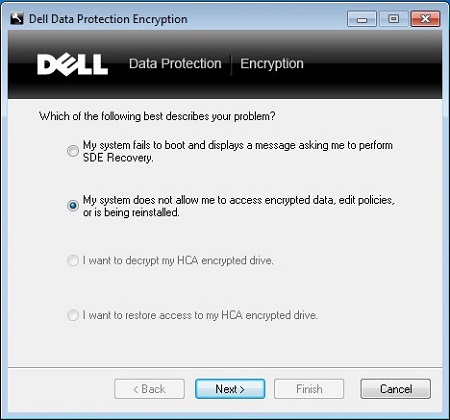
這會提示我們重新開機。
電腦重新開機後,將略過組態精靈,並從先前設定的設定中提取原則。
如要聯絡支援部門,請參閱 Dell Data Security 國際支援電話號碼。
請前往 TechDirect,以線上產生技術支援要求。
如需更多深入見解與資源,請加入 Dell 安全性社群論壇。
Produse afectate
Dell EncryptionProprietăți articol
Article Number: 000125049
Article Type: How To
Ultima modificare: 19 apr. 2026
Version: 12
Găsiți răspunsuri la întrebările dvs. de la alți utilizatori Dell
Servicii de asistență
Verificați dacă dispozitivul dvs. este acoperit de serviciile de asistență.