Wyse 3040 瘦客户端电源 LED 指示灯琥珀色错误代码故障处理
Summary: 解决机箱上的外部压力导致的 Wyse 3040 瘦客户端电源 LED 琥珀色错误代码。了解此情况如何触发 CMOS 重置以及恢复设备的步骤。
Acest articol se aplică pentru
Acest articol nu se aplică pentru
Acest articol nu este legat de un produs specific.
Acest articol nu acoperă toate versiunile de produs existente.
Symptoms
受影响的产品:
- Wyse 3040
设备的电源 LED 指示灯显示错误代码闪烁周期(琥珀色 LED 指示灯闪烁三次),接着琥珀色 LED 指示灯亮起较长时间。LED 指示灯错误闪烁周期重复三次,接着琥珀色 LED 指示灯亮起较长时间,然后继续开机自检(开启自检)。
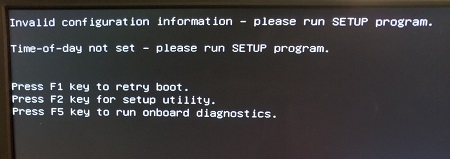
瘦客户端在开机自检过程中显示以下错误消息:
Invalid configuration information - please run SETUP program.

Time-of-day not set - please run SETUP program.

Press F1 key to retry boot.
Press F2 key for setup utility.
Press F5 key to run onboard diagnostics.
Cause
导致此问题的原因是制造设计,其中 WIFI 天线线缆布线在主板上的 CLEAR CMOS 按钮顶部。
Resolution
要恢复,按 F1 重试启动,错误消息将消失。
Produse afectate
Wyse 3040 Thin ClientProprietăți articol
Article Number: 000126115
Article Type: Solution
Ultima modificare: 26 iul. 2024
Version: 9
Găsiți răspunsuri la întrebările dvs. de la alți utilizatori Dell
Servicii de asistență
Verificați dacă dispozitivul dvs. este acoperit de serviciile de asistență.